戴尔台式机上的自动开机时间 BIOS 设置问题
Summary: 本文提供有关 Inspiron 灵越、Vostro 成就、成铭、Precision、OptiPlex 台式机和一体机 (AIO) 上的自动开机时间问题的信息。
This article applies to
This article does not apply to
This article is not tied to any specific product.
Not all product versions are identified in this article.
Symptoms
受影响的平台:
- Inspiron 灵越 3891
- Inspiron 灵越 3910
- Inspiron 灵越 5410
- Inspiron 灵越 7710
- OptiPlex 3000 微型机
- OptiPlex 3000 瘦客户端
- OptiPlex 3090 Ultra
- OptiPlex 5000 微型机
- OptiPlex 5090 塔式机
- OptiPlex 5400
- OptiPlex 5490 一体机
- OptiPlex 7000 微型机
- OptiPlex 7000 OEM MT+
- OptiPlex 7090 塔式机
- OptiPlex 7090 Ultra
- OptiPlex 7400
- OptiPlex 7490 一体机
- Precision 3450
- Precision 3460 小型
- Precision 3650
- Precision 3660
- Precision 7865塔式台式机
- Vostro 成就 3690
- Vostro 成就 3710
- Vostro 成就 3890
- Vostro 成就 3910
- Vostro 成就 5890
- 成铭 3900
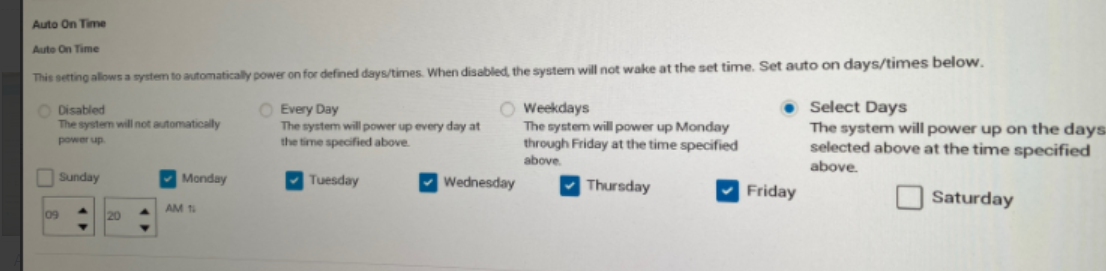
启用 Select Days并在 BIOS Auto On Time 设置中设置任意一天时,用户可能会遇到计算机每天自动开机的情况。
按工作日设置日期时,计算机运行良好。
故障模式:
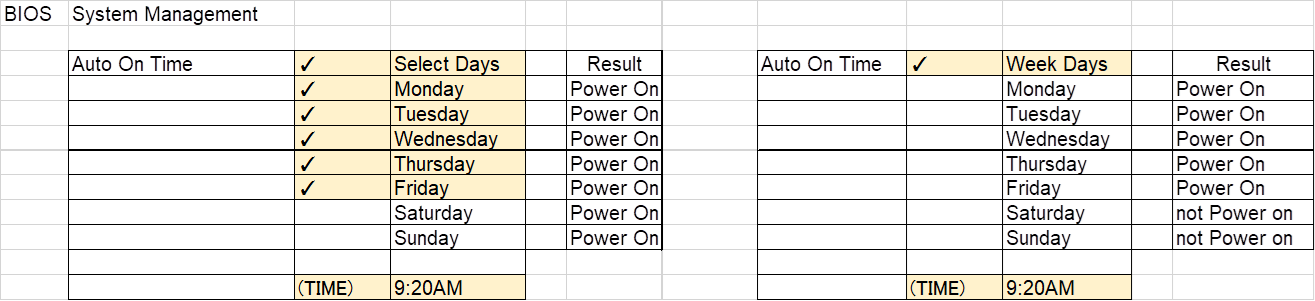
示例:
计算机设置为周一至周五自动开机,但计算机也将在周六和周日自动开机。
Cause
BIOS 编码问题
Resolution
戴尔工程团队已意识到此行为。将计算机上的 BIOS 版本更新到最新版本可有助于解决此问题。
要下载并安装最新的 BIOS:
提醒:Web 发布日期和 BIOS 版本可能会因验证结果而异。
| 营销型号名称 | 目标 Web 发布日期 | 目标 BIOS 版本 |
|---|---|---|
| 成铭 3900 | 02-21-2023 | 1.9.0 |
| Inspiron 灵越 3891 | 02-21-2023 | 1.9.0 |
| Inspiron 灵越 3910 | 02-21-2023 | 1.9.0 |
| Inspiron 灵越 5410 | 01-17-2023 | 1.9.0 |
| Inspiron 灵越 7710 | 01-17-2023 | 1.9.0 |
| OptiPlex 3000 MFF | 02-21-2023 | 1.9.0 |
| OptiPlex 3000 TC | 01-17-2023 | 1.9.0 |
| OptiPlex 3090 UFF | 01-17-2023 | 1.9.0 |
| OptiPlex 5000 MFF | 02-21-2023 | 1.9.0 |
| OptiPlex 5090 塔式机 | 02-21-2023 | 1.9.0 |
| OptiPlex 5400 | 01-17-2023 | 1.9.0 |
| OptiPlex 5490 AIO | 01-17-2023 | 1.9.0 |
| OptiPlex 7000 MFF | 02-21-2023 | 1.9.0 |
| OptiPlex 7000 OEM MT+ | 02-21-2023 | 1.9.0 |
| OptiPlex 7090 塔式机 | 02-21-2023 | 1.9.0 |
| OptiPlex 7090 UFF | 01-17-2023 | 1.9.0 |
| OptiPlex 7400 | 01-17-2023 | 1.9.0 |
| OptiPlex 7490 AIO | 01-17-2023 | 1.9.0 |
| Precision 3450 | 02-21-2023 | 1.9.0 |
| Precision 3460 SFF | 01-17-2023 | 1.9.0 |
| Precision 3650 MT | 01-17-2023 | 1.9.0 |
| Precision 3660 | 01-17-2023 | 1.9.0 |
| Precision 7865塔式台式机 | 01-17-2023 | 1.9.0 |
| Vostro 成就 3690 | 01-17-2023 | 1.9.0 |
| Vostro 成就 3710 | 02-21-2023 | 1.9.0 |
| Vostro 成就 3890 | 01-17-2023 | 1.9.0 |
| Vostro 成就 3910 | 02-21-2023 | 1.9.0 |
| Vostro 成就 5890 | 02-21-2023 | 1.9.0 |
警告:Dell Technologies 推荐在更新 BIOS 之前断开外部硬盘、打印机、扫描仪等设备的连接。
提醒:
- 要了解在戴尔计算机上更新 BIOS 的更多信息,请参阅戴尔知识库文章戴尔 BIOS 更新。
- 要安装 BIOS,您的用户帐户必须具有管理员权限。
Affected Products
Inspiron 24 5410 All-in-One, Inspiron 27 7710 All-in-One, Inspiron 3891, Inspiron 3910, OptiPlex 3000 Tower, OptiPlex 3000 Micro, OptiPlex 3000 Small Form Factor, OptiPlex 3000 Thin Client, OptiPlex 3090 Tower, OptiPlex 3090 Micro
, OptiPlex 3090 Small Form Factor, OptiPlex 3090 Ultra, Optiplex 5000 Tower, OptiPlex 5000 Micro, OptiPlex 5000 Small Form Factor, OptiPlex 5090 Tower, OptiPlex 5090 Micro, OptiPlex 5090 Small Form Factor, OptiPlex 5400 All-In-One, OptiPlex 5490 All-In-One, OptiPlex 7000 Tower, OptiPlex 7000 Micro, OptiPlex 7000 Small Form Factor, OptiPlex 7090 Tower, OptiPlex 7090 Micro, OptiPlex 7090 Small Form Factor, OptiPlex 7090 Ultra, OptiPlex 7400 All-In-One, OptiPlex 7490 All-In-One, OptiPlex 7000 XE Micro, Precision 3450 Small Form Factor, Precision 3460 Small Form Factor, Precision 3650 Tower, Precision 3660 Tower, Precision 7865 Tower, Vostro 3690, Vostro 3710, Vostro 3890, Vostro 3900, Vostro 3910, Vostro 5890
...
Article Properties
Article Number: 000206660
Article Type: Solution
Last Modified: 18 Apr 2025
Version: 6
Find answers to your questions from other Dell users
Support Services
Check if your device is covered by Support Services.