PowerFlex: Failure to import v3.6 PowerFlex to PowerFlex Manager Platform (PFMP) with Trusted IP enabled
Summary: When importing a v3.6 PowerFlex cluster to PowerFlex Manager Platform (PFMP) , when Trusted IPs are configured in LIA, the import fails with the errors "CERT_VERIFY_FAILURE" and "Not in whitelist" ...
This article applies to
This article does not apply to
This article is not tied to any specific product.
Not all product versions are identified in this article.
Symptoms
When running the "Initial Configuration Wizard" and choosing the "I have PowerFlex instance to import" option, importing the system completes successfully.
Once trying to "Update Resources" under the "PowerFlex Gateway," the process fails due to "An error occurred during the PowerFlex upgrade," as seen in the screenshot below.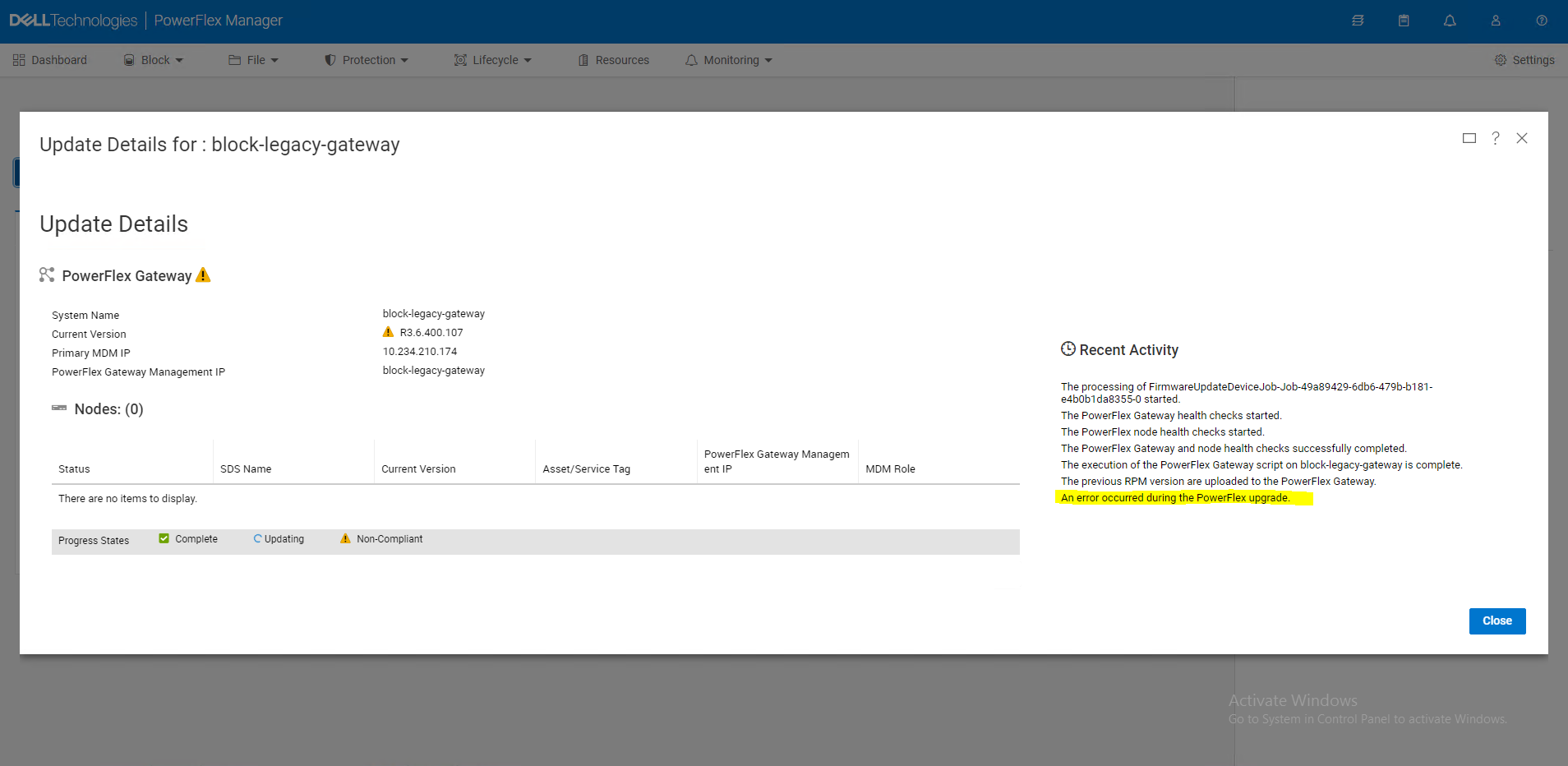
Kubernetes (K8s) kubectl logs command output:
$ kubectl logs block-legacy-gateway-f4f5d966f-gm7cv -n powerflex
06:50:05.709 [|executor-5] INFO  c.e.s.s.i.s.i.c.LIANodeConnection - Closing connection to UnknownSystemNode[nodeName=,nodeIPs=[10.234.210.174],credentials=]
06:50:05.755 [|scheduler-1] INFO  c.e.s.s.d.i.activemq.ActiveMqService - publishing event Event{code=2021830d, name=COMMAND_FAILED_ON_OPERATION_UPGRADE_AND_PHASE_QUERY, description=Could not validate node on node 10.234.210.175 due to: Command failed: Could not connect to 10.234.210.175. Ensure that the relevant service (LIA) is running and that the server can communicate with the node, severity=MINOR, category=MAINTENANCE, details={message=Could not validate node on node 10.234.210.175 due to: Command failed: Could not connect to 10.234.210.175. Ensure that the relevant service (LIA) is running and that the server can communicate with the node}, isInternal=false, domain=BLOCK, id=7b6f7465e219b0bb, timestamp=Mon Aug 22 06:50:05 UTC 2022, resourceType=BLOCK_LCM_S12Y, resourceName=Block Lifecycle Management and Serviceability, resourceId=0x0, serviceName=block-legacy-gw, serviceVersion=null, serviceInstanceId=null, originatingApplicationName=null, requestId=null, relatedEvents=null, jobId=null}
06:50:05.755 [|scheduler-1] INFO  c.e.s.s.d.i.activemq.ActiveMqService - event builder com.dell.powerflex.management.events.AutoValue_Event$Builder@2fdf7785
06:50:05.812 [|LiaConnectionListener1] WARN  c.e.e.c.service.CommandService - Connection error Connection reset
06:50:05.812 [|executor-5] INFO  c.e.s.s.i.s.i.c.LIANodeConnection - Closing connection to UnknownSystemNode[nodeName=,nodeIPs=[10.234.210.174],credentials=]
06:50:05.888 [|Thread-3] INFO  c.e.s.s.i.s.i.OperationTrackerService - OperationAndPhaseEndEvents - sendEventIfNeeded - phase: query, phase status running, operation upgrade
06:50:05.913 [|executor-5] ERROR c.e.s.s.i.s.i.c.LIANodeConnection - Failed to connect to node UnknownSystemNode[nodeName=,nodeIPs=[10.234.210.174],credentials=] - closing connection
06:50:05.913 [|executor-5] ERROR c.e.s.s.d.i.c.ValidateNodeCommand - Error Could not connect to 10.234.210.174. Ensure that the relevant service (LIA) is running and that the server can communicate with the node executing command .ValidateNodeCommand (abort) : com.emc.s3g.scaleio.im.services.installation.connectors.LIANodeConnection.connect(LIANodeConnection.java:382)
com.emc.s3g.scaleio.im.services.installation.connectors.LIANodeConnection.connect(LIANodeConnection.java:331)
com.emc.s3g.scaleio.im.services.installation.NodeConnectionFactoryImpl.getNodeConnection(NodeConnectionFactoryImpl.java:205)
com.emc.s3g.scaleio.domain.installation.commands.ValidateNodeCommand.getNodeConnection(ValidateNodeCommand.java:168)
com.emc.s3g.scaleio.domain.installation.commands.NodeCommand.executeCommand(NodeCommand.java:99)
com.emc.s3g.scaleio.domain.installation.commands.BaseCommand.call(BaseCommand.java:646)
java.base/java.util.concurrent.FutureTask.run(FutureTask.java:264)
java.base/java.util.concurrent.ThreadPoolExecutor.runWorker(ThreadPoolExecutor.java:1128)
java.base/java.util.concurrent.ThreadPoolExecutor$Worker.run(ThreadPoolExecutor.java:628)
java.base/java.lang.Thread.run(Thread.java:829)
LIA trace log:
2022/08/21 11:46:11.273180 7f83001a1db0:mosSsl_HandleError:00429: ERROR: Handshake: error:140800FF:SSL routines:ssl3_accept:unknown state, SSL error: 1
2022/08/21 11:46:11.273193 7f83001a1db0:netSec_SslHandshake_CK:00487: ERROR: Handshake failed (CERT_VERIFY_FAILURE)
2022/08/21 11:46:11.273198 7f83001a1db0:netPath_StartAsServer_CK:00551: ERROR:  :: Disconnected Live SERVER path 0x7f83001e0480 of portal (nil) net 0xa68300 socket 11 inflights 0 HS:1 secure accept failure (CERT_VERIFY_FAILURE) <<<
2022/08/21 14:00:24.225169 7f83001a1db0:netPath_StartAsServer_CK:00524:  :: Disconnected Live SERVER path 0x7f8300269990 of portal (nil) net 0xa68300 socket 11 inflights 0 HS:0 Rejected connection from 10.207.105.97 (Not in whitelist) <<<
Cause
The Trusted IPs' feature limits the IPs that can communicate with the LIA it is configured on.
As the IP addresses of the K8s nodes and load balancer are not recognized by each LIA, the import process fails.
As the IP addresses of the K8s nodes and load balancer are not recognized by each LIA, the import process fails.
Resolution
To avoid the issue, a patch script must be run on each LIA to update the lia_trusted_ips values with the IP addresses of the K8s nodes and load balancer.
To automate this task, the "Run Script On Host" feature on the 3.6 Gateway must be used.
Follow the instructions below:
1. Download the patch script ("patch_script_csp.txt") attached to this KB.
2. Change the file name to "patch_script."
Note that the filename is hard coded and cannot be changed to anything else!
3. Edit the patch script to contain the K8s nodes' and M&O's load balancer IPs instead of the placeholders, "1.1.1.1,2.2.2.2."
4. Save and copy the patch script into the /opt/emc/scaleio/lia/bin directory on each of the 3.6 PowerFlex nodes.
5. Run the "Run Script On Host" feature on the 3.6 Gateway - follow the instructions on PowerFlex: Run Script on Host (aka OS Patching) Feature Explained.
6. Continue to run the import process on the PFMP.
To automate this task, the "Run Script On Host" feature on the 3.6 Gateway must be used.
Follow the instructions below:
1. Download the patch script ("patch_script_csp.txt") attached to this KB.
2. Change the file name to "patch_script."
Note that the filename is hard coded and cannot be changed to anything else!
3. Edit the patch script to contain the K8s nodes' and M&O's load balancer IPs instead of the placeholders, "1.1.1.1,2.2.2.2."
4. Save and copy the patch script into the /opt/emc/scaleio/lia/bin directory on each of the 3.6 PowerFlex nodes.
5. Run the "Run Script On Host" feature on the 3.6 Gateway - follow the instructions on PowerFlex: Run Script on Host (aka OS Patching) Feature Explained.
6. Continue to run the import process on the PFMP.
Additional Information
The Trusted IPs' feature was introduced in PowerFlex version 2.0 (previously known as ScaleIO 2.0).
The feature limits the Gateways that can communicate with this LIA, by entering all the IPs allowed to do so.
The feature is enabled by changing the LIA configuration file.
Configuration file location
Linux: /opt/emc/scaleio/lia/cfg/conf.txt
Windows: C:\Program Files\emc\scaleio\LIA\cfg\conf.txt
Method to enable the feature in an existing system.
Add the following string to the configuration file:
lia_trusted_ips=<IP_ADDRESS_1>,<IP_ADDRESS_2>
For example:
lia_trusted_ips=1.2.3.4,5.6.7.8
Method to enable the feature during LIA installation:
Set the TRUSTED_IPS environment variable.
For example:
TRUSTED_IPS=1.2.3.4,5.6.7.8 rpm -i <lia.rpm>
The feature limits the Gateways that can communicate with this LIA, by entering all the IPs allowed to do so.
The feature is enabled by changing the LIA configuration file.
Configuration file location
Linux: /opt/emc/scaleio/lia/cfg/conf.txt
Windows: C:\Program Files\emc\scaleio\LIA\cfg\conf.txt
Method to enable the feature in an existing system.
Add the following string to the configuration file:
lia_trusted_ips=<IP_ADDRESS_1>,<IP_ADDRESS_2>
For example:
lia_trusted_ips=1.2.3.4,5.6.7.8
Method to enable the feature during LIA installation:
Set the TRUSTED_IPS environment variable.
For example:
TRUSTED_IPS=1.2.3.4,5.6.7.8 rpm -i <lia.rpm>
Article Properties
Article Number: 000206828
Article Type: Solution
Last Modified: 17 Feb 2025
Version: 4
Find answers to your questions from other Dell users
Support Services
Check if your device is covered by Support Services.