OS10 Ağ Komutları Sorunlarını Giderme
Summary: OS10 Ağ Komutları Sorunlarını Giderme.
This article applies to
This article does not apply to
This article is not tied to any specific product.
Not all product versions are identified in this article.
Instructions
Varsayılan Oturum Açma kimlik bilgileri.
Oturum Açma: admin
Parola: admin
Tüm komutları görüntülemek için şunu kullanın: Show komutunu çalıştırın ve ardından enter tuşuna basın.
s1# show version
s1# show boot
s1# show spanning-tree active
s1# show interface status | no-more

Filtre seçenekleri: bul, hariç, grep.
s1# show ip route
Gösteri teknik desteği toplamak için
PuTTY oturumunu bir metin dosyasına kaydedin.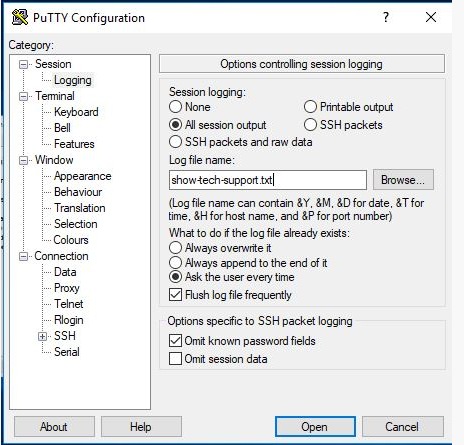
Bu komut ekrandaki tüm bilgileri listeler:
s1# show tech-support
SOSreport Paketi nasıl oluşturulur?
Anahtarda flash a kaydedilen çekirdek düzeyi destek paketi:
s1# generate support-bundle
Bu komut en son oluşturulan paketleri gösterir:
s1# dir supportbundle
s1# copy supportbundle://sosreport-OS10-dateandtime.tar.xz
(Ardından, kopyalayabileceğiniz seçenekleri görmek için sekme tuşuna basın)
Ayrıca (Dell Sunucularla birlikte destek yardımı kullanmak üzere yapılandırılmışsa) bir destek-yardım aktarımı da çalıştırabilir).
Bu, tüm günlükleri bir anahtardan bir destek yardım sunucusuna aktarır:
s1# support-assist activity full-transfer start-now
Destek yardımı yapılandırmasını kontrol etmek için:
s1# configure
s1(config) # support-assist
s1(conf-support-assist)# show

s1(conf-support-assist)# exit
s1(config)
Sorun giderme sırasında hata mesajlarının ekrana yazdırılmasını durdurmak için:
s1(config)# logging console enable
s1(config)# logging console disable
s1(config)# end
Konsola bildirilen hataların önem derecesini değiştirmek için:
s1(config)# logging console severity log-crit
s1(config)#logging console enable
Günlüğe kaydetme işlemini varsayılana sıfırlamak için:
s1(config)# no logging console severity
Affected Products
StorageArticle Properties
Article Number: 000207120
Article Type: How To
Last Modified: 30 Sep 2025
Version: 4
Find answers to your questions from other Dell users
Support Services
Check if your device is covered by Support Services.