OS10 網路命令故障診斷
Summary: 故障診斷 OS10 網路命令。
This article applies to
This article does not apply to
This article is not tied to any specific product.
Not all product versions are identified in this article.
Instructions
預設登入認證。
登入:admin
密碼:admin
若要檢視所有命令,請使用 Show 命令後跟 ENTER。
s1# show version
s1# show boot
s1# show spanning-tree active
s1# show interface status | no-more

過濾器選項:查找,除了,grep。
s1# show ip route
收集展會技術支援
將 PuTTY 工作階段記錄至文字檔。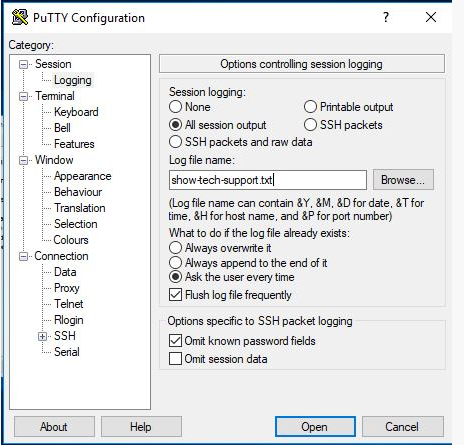
此命令將所有資訊列出到螢幕上:
s1# show tech-support
如何產生 SOS 報告套裝
在交換器上儲存至快閃式記憶體的核心層級支援套裝:
s1# generate support-bundle
此命令顯示最新建立的套裝:
s1# dir supportbundle
s1# copy supportbundle://sosreport-OS10-dateandtime.tar.xz
(然後按選項卡查看可以複製到的位置的選項)
也可以 (如果設定為使用 Support Assist 搭配 Dell 伺服器) 執行 support-assist 轉移)。
這會將所有記錄從交換器傳輸到 Support Assist 伺服器:
s1# support-assist activity full-transfer start-now
若要檢查 Support Assist 的組態:
s1# configure
s1(config) # support-assist
s1(conf-support-assist)# show

s1(conf-support-assist)# exit
s1(config)
若要在故障診斷時停止在畫面上列印錯誤訊息:
s1(config)# logging console enable
s1(config)# logging console disable
s1(config)# end
要更改向主控台報告的錯誤嚴重性,請執行以下操作:
s1(config)# logging console severity log-crit
s1(config)#logging console enable
若要將記錄重設為預設值:
s1(config)# no logging console severity
Affected Products
StorageArticle Properties
Article Number: 000207120
Article Type: How To
Last Modified: 30 Sep 2025
Version: 4
Find answers to your questions from other Dell users
Support Services
Check if your device is covered by Support Services.