Alienware Aurora R15の電源モード設定
Summary: Alienware Aurora R15の[設定]にある電源モード(最適な電力効率、バランス、最適なパフォーマンス)について説明します。
This article applies to
This article does not apply to
This article is not tied to any specific product.
Not all product versions are identified in this article.
Symptoms
従来の電源プランを参照すると、電源プランが 1 つしか表示されない場合があります。従来の電源プランは、コントロール パネルの [電源オプション] とも呼ばれます。これは、[ コントロール パネル]、[ すべてのコントロール パネル項目]、[ 電源オプション]の順に移動すると見つかります。使用可能な従来の電源プランは バランス型です。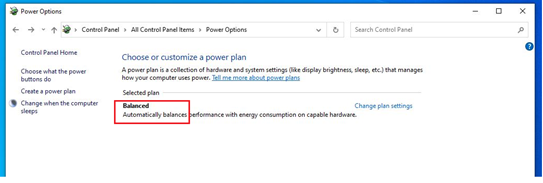
影響を受けるプラットフォーム:
- Alienware Aurora R15
- Alienware Aurora R15 AMD
対象オペレーティング システム:
- Windows 11
Cause
2021年6月、Dellは、1つのレガシー電源プランを搭載したコンピューターのみを出荷するように変更しました。
Resolution
対処方法:
電源モードには、3つの電源モード(最高の電力効率、バランス、最高のパフォーマンス)があります。電源モード は、[ 設定]、[ システム]、[ 電源]の順に移動すると表示されます。このパスに従うと、オプションを見つけることができます。![[設定]の電源モード](https://supportkb.dell.com/img/ka0Do000000E5eUIAS/ka0Do000000E5eUIAS_ja_1.jpeg)
Affected Products
Alienware Aurora R15 AMD, Alienware Aurora R15Article Properties
Article Number: 000207381
Article Type: Solution
Last Modified: 24 Apr 2025
Version: 3
Find answers to your questions from other Dell users
Support Services
Check if your device is covered by Support Services.