Alienware Aurora R15 전원 모드 설정
Summary: Alienware Aurora R15의 설정에서 찾을 수 있는 전원 모드(최고 전력 효율성, 균형 및 최고 성능)에 대해 알아봅니다.
This article applies to
This article does not apply to
This article is not tied to any specific product.
Not all product versions are identified in this article.
Symptoms
레거시 전원 관리 옵션을 검색할 때 전원 관리 옵션을 하나만 찾을 수 있습니다. 레거시 전원 관리 옵션은 제어판의 전원 옵션이라고도 합니다. 이것은 제어판, 모든 제어판 항목, 전원 옵션으로 차례로 이동하여 찾을 수 있습니다. 사용 가능한 레거시 전원 관리 옵션은 균형입니다.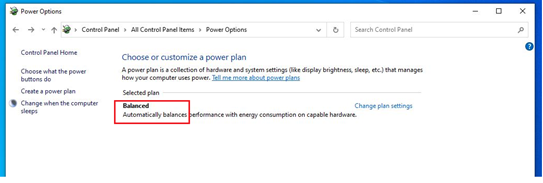
해당되는 플랫폼:
- Alienware Aurora R15
- Alienware Aurora R15 AMD
영향을 받는 운영 체제:
- Windows 11
Cause
2021년 6월, Dell은 하나의 레거시 전원 관리 옵션이 있는 컴퓨터만 배송하도록 변경했습니다.
Resolution
해결 방법:
전원 모드에는 세 가지 전원 모드(최고 전력 효율성, 균형 및최고 성능)가 있습니다. 전원 모드는Settings, System, Power로 차례로 이동하여 찾을 수 있습니다. 이 경로에 따라 옵션을 찾을 수 있습니다.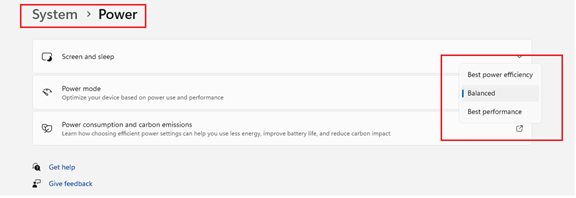
Affected Products
Alienware Aurora R15 AMD, Alienware Aurora R15Article Properties
Article Number: 000207381
Article Type: Solution
Last Modified: 24 Apr 2025
Version: 3
Find answers to your questions from other Dell users
Support Services
Check if your device is covered by Support Services.