RecoverPoint for VM: 기존 클러스터에 vRPA를 더 추가하지 못함. 오류 "구축 후 구성 VRPA를 실행할 수 없습니다.
Summary: 기존 클러스터에 vRPA를 더 추가할 때 작업이 실패하고 "구축 후 구성 VRPA를 실행할 수 없습니다" 오류가 표시됩니다.
This article applies to
This article does not apply to
This article is not tied to any specific product.
Not all product versions are identified in this article.
Symptoms
기존 클러스터에 vRPA를 추가하는 동안 다음 오류와 함께 실패합니다.
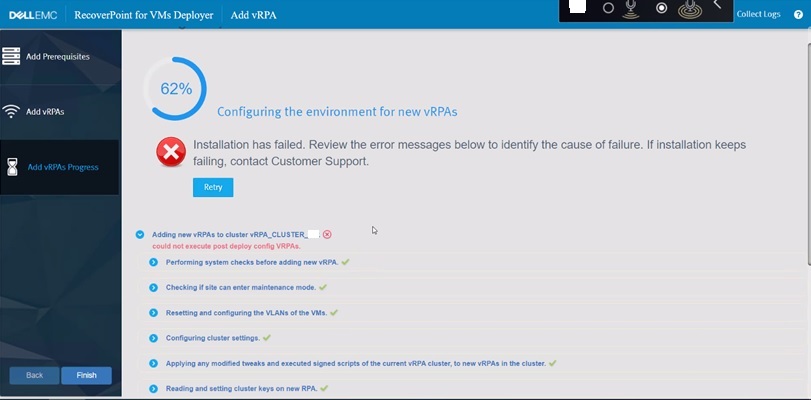
그림 1: vRPA 추가 시 RecoverPoint 실패
RecoverPoint 로그:
추가되는 새 vRPA의 설치 로그:
could not execute post deploy config VRPAs.
그림 1: vRPA 추가 시 RecoverPoint 실패
RecoverPoint 로그:
2022-12-07 06:31:10,455 [pool-7-thread-1] (BaseAction.java:42) ERROR - CreateAndAttachIOFilterDeviceAction Failed.
com.emc.recoverpoint.connectors.actions.infra.ActionFailedException: Failed to find JAM PBM profile
추가되는 새 vRPA의 설치 로그:
2022-09-13 04:29:11,312 [pool-7-thread-1] (GetJirafPolicyAction.java:40) WARN  - Failed to find JIRAF PBM profile for cluster ClusterUID(id=xxxxxxxxxxxxxxx)
2022-09-13 04:29:11,314 [pool-7-thread-1] (ExecutePostDeployConfigVRPAsCommand.java:85) ERROR - Failed to create RP device for vm: VmUuid(super=Uuid(uuid=aaaaaaaa-bbbb-ffff-eeee-ddddddddd), vcUuid=VcUuid(super=Uuid(uuid=eeeeee-cccc-rrrr-ssss-ffffffffff)))
2022-09-13 04:29:11,314 [CommandWorker-2] (Command.java:88) ERROR - Command#run() ServerException errorType[EXCEPTION] errorMessage[Exception. Failed executing CreateAndAttachRPDeviceAction.] failure UID: aaaaaaaa-bbbb-cccc-dddd-eeeeeeeeeee
:
2022-09-08 05:03:07,734 [pool-7-thread-1] (BasePBMCommand.java:33) DEBUG - Executing PBM Command: PbmRetrieveContentCommand BasePBMCommand(super=com.emc.recoverpoint.connectors.vi.infra.pbm.PbmRetrieveContentCommand@a50a0887, pbmProxy=com.emc.recoverpoint.connectors.vi.infra.PBMProxy@db413f60)
2022-09-08 05:03:07,774 [pool-7-thread-1] (BasePBMCommand.java:39) DEBUG - Finished executing PBM Command: PbmRetrieveContentCommand with return value: [com.vmware.pbm.PbmCapabilityProfile@ed9ba2b4,
:
2022-09-08 05:03:07,774 [pool-7-thread-1] (GetJirafPolicyAction.java:40) WARN  - Failed to find JIRAF PBM profile for cluster ClusterUID(id=xxxxxxxxxxxxxxxxxxxx)
2022-09-08 05:03:07,774 [pool-7-thread-1] (BaseAction.java:74) DEBUG - Action finished: GetJirafPolicyAction result: null
2022-09-08 05:03:07,776 [pool-7-thread-1] (BaseAction.java:42) ERROR - CreateAndAttachIOFilterDeviceAction Failed.
ClusterLogic 사이트 제어 vRPA에서 로그:
2022/09/13 04:29:11.498 [pool-13-thread-783] (GeneralUtils.java:75) ERROR - could not execute post deploy config VRPAs.
com.emc.recoverpoint.cluster_logic.inner_model.exception.RpaAdapterException: Exception. Failed executing CreateAndAttachRPDeviceAction.
        at com.emc.recoverpoint.cluster_logic.cl_rpa_adapter_core.calls.BaseRpaCall.logAndThrow(BaseRpaCall.java:53)
        at com.emc.recoverpoint.cluster_logic.cl_rpa_adapter_core.calls.BaseRpaCall.call(BaseRpaCall.java:39)
        at com.emc.recoverpoint.cluster_logic.cl_rpa_adapter_core.RpaAdapterImpl.executePostDeployConfigVRPAs(RpaAdapterImpl.java:182)
        at com.emc.recoverpoint.deployment.task.ExposeVirtualRepositoryAndConfigVirtualRPATask.perform(ExposeVirtualRepositoryAndConfigVirtualRPATask.java:87)
        at com.emc.recoverpoint.deployment.task.ExposeVirtualRepositoryAndConfigVirtualRPATask.perform(ExposeVirtualRepositoryAndConfigVirtualRPATask.java:28)
        at com.emc.recoverpoint.utils.javainfra.status.tasks.Task.executeSync(Task.java:91)
        at com.emc.recoverpoint.utils.javainfra.status.tasks.Task.call(Task.java:142)
        at java.util.concurrent.FutureTask.run(FutureTask.java:266)
        at java.util.concurrent.ThreadPoolExecutor.runWorker(ThreadPoolExecutor.java:1149)
        at java.util.concurrent.ThreadPoolExecutor$Worker.run(ThreadPoolExecutor.java:624)
        at java.lang.Thread.run(Thread.java:823)
Caused by: java.lang.RuntimeException: Exception. Failed executing CreateAndAttachRPDeviceAction.
        at com.emc.recoverpoint.cluster_logic.proxy.BaseInstallationServerAdapter.getResultFromTransaction(BaseInstallationServerAdapter.java:318)
        at com.emc.recoverpoint.cluster_logic.proxy.BaseInstallationServerAdapter.getTransactionResult(BaseInstallationServerAdapter.java:244)
        at com.emc.recoverpoint.cluster_logic.proxy.BaseInstallationServerAdapter.getTransactionResult(BaseInstallationServerAdapter.java:185)
        at com.emc.recoverpoint.cluster_logic.proxy.BaseInstallationServerAdapter.getTransactionResult(BaseInstallationServerAdapter.java:181)
        at com.emc.recoverpoint.cluster_logic.proxy.InstallationServerClientImpl.executePostDeployConfigVRPAs(InstallationServerClientImpl.java:405)
        at com.emc.recoverpoint.cluster_logic.cl_rpa_adapter_core.calls.ExecutePostDeployConfigVRPAsCall.innerCall(ExecutePostDeployConfigVRPAsCall.java:24)
        at com.emc.recoverpoint.cluster_logic.cl_rpa_adapter_core.calls.ExecutePostDeployConfigVRPAsCall.innerCall(ExecutePostDeployConfigVRPAsCall.java:12)
        at com.emc.recoverpoint.cluster_logic.cl_rpa_adapter_core.calls.BaseRpaCall.call(BaseRpaCall.java:37)
        ... 9 more
2022/09/13 04:29:11.498 [pool-13-thread-783] (Task.java:116) DEBUG - ExposeVirtualRepositoryAndConfigVirtualRPATask: task: Exposing repository volume to vRPA 3.old status is: RUNNING, setting status to ERROR.
2022/09/13 04:29:11.498 [pool-13-thread-783] (Task.java:98) ERROR - ExposeVirtualRepositoryAndConfigVirtualRPATask :Task failed: Exposing repository volume to vRPA 3.
Cause
의 RecoverPoint 클러스터 ID
RecoverPoint_JCD 스토리지 정책이 삭제되었거나 잘못된 값으로 변경되었습니다. 이 값을 임의로 변경해서는 안 됩니다.Resolution
해결 방법:
에서 올바른 RecoverPoint 클러스터 ID 값을 업데이트합니다. RecoverPoint_JCD 스토리지 정책
단계:
- vSphere Client에서 정책 및 프로파일로 이동합니다
- 왼쪽의 목록에서 VM Storage Policies 를 선택합니다.
- 오른쪽 창에서 RecoverPoint_JCD_xxxxxxxxxxx 선택합니다.
- EDIT를 클릭하여 Edit VM Storage Policy 화면을 표시합니다.
- 3-호스트 기반 서비스 옆의 클릭
- 오른쪽의 'Replication' 탭을 클릭합니다.
- RecoverPoint 클러스터 옆에 있는 필드에 올바른 값을 입력합니다
- 다음을 클릭하여 완료합니다.
참고: 원래 RecoverPoint 클러스터 ID 값을 더 이상 사용할 수 없는 경우 DellDell 지원 센터 또는 서비스 담당자에게 지원을 요청하십시오. 이 Dell 문서 ID를 참조하십시오.
Affected Products
RecoverPoint for Virtual MachinesProducts
VxRail, RecoverPointArticle Properties
Article Number: 000207399
Article Type: Solution
Last Modified: 15 Oct 2025
Version: 5
Find answers to your questions from other Dell users
Support Services
Check if your device is covered by Support Services.