RecoverPoint for Virtual Machines: Det gick inte att lägga till fler vRPA:er i befintliga kluster, felet "Det gick inte att köra VRPA:er efter driftsättning
Summary: När du lägger till ytterligare en vRPA i ett befintligt kluster misslyckas det med felmeddelandet "det gick inte att köra VRPA-konfigurationer efter driftsättning".
This article applies to
This article does not apply to
This article is not tied to any specific product.
Not all product versions are identified in this article.
Symptoms
När ytterligare en vRPA läggs till i ett befintligt kluster misslyckas det med felet:
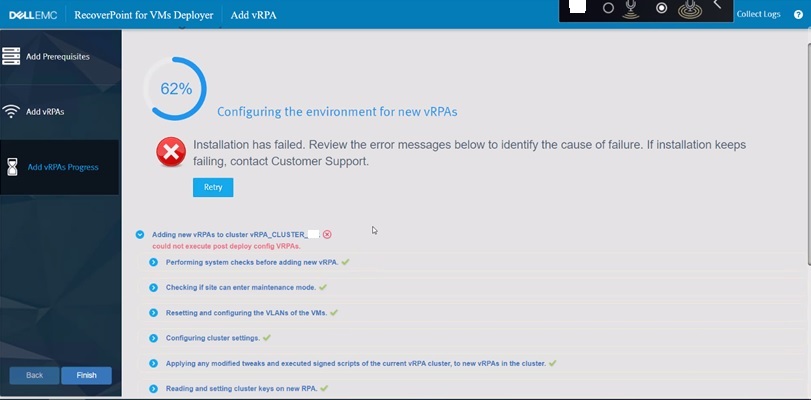
Bild 1: RecoverPoint-fel vid tillägg av ytterligare vRPA
RecoverPoint-loggar:
Installationsloggar från nya vRPA läggs till:
could not execute post deploy config VRPAs.
Bild 1: RecoverPoint-fel vid tillägg av ytterligare vRPA
RecoverPoint-loggar:
2022-12-07 06:31:10,455 [pool-7-thread-1] (BaseAction.java:42) ERROR - CreateAndAttachIOFilterDeviceAction Failed.
com.emc.recoverpoint.connectors.actions.infra.ActionFailedException: Failed to find JAM PBM profile
Installationsloggar från nya vRPA läggs till:
2022-09-13 04:29:11,312 [pool-7-thread-1] (GetJirafPolicyAction.java:40) WARN  - Failed to find JIRAF PBM profile for cluster ClusterUID(id=xxxxxxxxxxxxxxx)
2022-09-13 04:29:11,314 [pool-7-thread-1] (ExecutePostDeployConfigVRPAsCommand.java:85) ERROR - Failed to create RP device for vm: VmUuid(super=Uuid(uuid=aaaaaaaa-bbbb-ffff-eeee-ddddddddd), vcUuid=VcUuid(super=Uuid(uuid=eeeeee-cccc-rrrr-ssss-ffffffffff)))
2022-09-13 04:29:11,314 [CommandWorker-2] (Command.java:88) ERROR - Command#run() ServerException errorType[EXCEPTION] errorMessage[Exception. Failed executing CreateAndAttachRPDeviceAction.] failure UID: aaaaaaaa-bbbb-cccc-dddd-eeeeeeeeeee
:
2022-09-08 05:03:07,734 [pool-7-thread-1] (BasePBMCommand.java:33) DEBUG - Executing PBM Command: PbmRetrieveContentCommand BasePBMCommand(super=com.emc.recoverpoint.connectors.vi.infra.pbm.PbmRetrieveContentCommand@a50a0887, pbmProxy=com.emc.recoverpoint.connectors.vi.infra.PBMProxy@db413f60)
2022-09-08 05:03:07,774 [pool-7-thread-1] (BasePBMCommand.java:39) DEBUG - Finished executing PBM Command: PbmRetrieveContentCommand with return value: [com.vmware.pbm.PbmCapabilityProfile@ed9ba2b4,
:
2022-09-08 05:03:07,774 [pool-7-thread-1] (GetJirafPolicyAction.java:40) WARN  - Failed to find JIRAF PBM profile for cluster ClusterUID(id=xxxxxxxxxxxxxxxxxxxx)
2022-09-08 05:03:07,774 [pool-7-thread-1] (BaseAction.java:74) DEBUG - Action finished: GetJirafPolicyAction result: null
2022-09-08 05:03:07,776 [pool-7-thread-1] (BaseAction.java:42) ERROR - CreateAndAttachIOFilterDeviceAction Failed.
ClusterLogic logg från Site Control vRPA:
2022/09/13 04:29:11.498 [pool-13-thread-783] (GeneralUtils.java:75) ERROR - could not execute post deploy config VRPAs.
com.emc.recoverpoint.cluster_logic.inner_model.exception.RpaAdapterException: Exception. Failed executing CreateAndAttachRPDeviceAction.
        at com.emc.recoverpoint.cluster_logic.cl_rpa_adapter_core.calls.BaseRpaCall.logAndThrow(BaseRpaCall.java:53)
        at com.emc.recoverpoint.cluster_logic.cl_rpa_adapter_core.calls.BaseRpaCall.call(BaseRpaCall.java:39)
        at com.emc.recoverpoint.cluster_logic.cl_rpa_adapter_core.RpaAdapterImpl.executePostDeployConfigVRPAs(RpaAdapterImpl.java:182)
        at com.emc.recoverpoint.deployment.task.ExposeVirtualRepositoryAndConfigVirtualRPATask.perform(ExposeVirtualRepositoryAndConfigVirtualRPATask.java:87)
        at com.emc.recoverpoint.deployment.task.ExposeVirtualRepositoryAndConfigVirtualRPATask.perform(ExposeVirtualRepositoryAndConfigVirtualRPATask.java:28)
        at com.emc.recoverpoint.utils.javainfra.status.tasks.Task.executeSync(Task.java:91)
        at com.emc.recoverpoint.utils.javainfra.status.tasks.Task.call(Task.java:142)
        at java.util.concurrent.FutureTask.run(FutureTask.java:266)
        at java.util.concurrent.ThreadPoolExecutor.runWorker(ThreadPoolExecutor.java:1149)
        at java.util.concurrent.ThreadPoolExecutor$Worker.run(ThreadPoolExecutor.java:624)
        at java.lang.Thread.run(Thread.java:823)
Caused by: java.lang.RuntimeException: Exception. Failed executing CreateAndAttachRPDeviceAction.
        at com.emc.recoverpoint.cluster_logic.proxy.BaseInstallationServerAdapter.getResultFromTransaction(BaseInstallationServerAdapter.java:318)
        at com.emc.recoverpoint.cluster_logic.proxy.BaseInstallationServerAdapter.getTransactionResult(BaseInstallationServerAdapter.java:244)
        at com.emc.recoverpoint.cluster_logic.proxy.BaseInstallationServerAdapter.getTransactionResult(BaseInstallationServerAdapter.java:185)
        at com.emc.recoverpoint.cluster_logic.proxy.BaseInstallationServerAdapter.getTransactionResult(BaseInstallationServerAdapter.java:181)
        at com.emc.recoverpoint.cluster_logic.proxy.InstallationServerClientImpl.executePostDeployConfigVRPAs(InstallationServerClientImpl.java:405)
        at com.emc.recoverpoint.cluster_logic.cl_rpa_adapter_core.calls.ExecutePostDeployConfigVRPAsCall.innerCall(ExecutePostDeployConfigVRPAsCall.java:24)
        at com.emc.recoverpoint.cluster_logic.cl_rpa_adapter_core.calls.ExecutePostDeployConfigVRPAsCall.innerCall(ExecutePostDeployConfigVRPAsCall.java:12)
        at com.emc.recoverpoint.cluster_logic.cl_rpa_adapter_core.calls.BaseRpaCall.call(BaseRpaCall.java:37)
        ... 9 more
2022/09/13 04:29:11.498 [pool-13-thread-783] (Task.java:116) DEBUG - ExposeVirtualRepositoryAndConfigVirtualRPATask: task: Exposing repository volume to vRPA 3.old status is: RUNNING, setting status to ERROR.
2022/09/13 04:29:11.498 [pool-13-thread-783] (Task.java:98) ERROR - ExposeVirtualRepositoryAndConfigVirtualRPATask :Task failed: Exposing repository volume to vRPA 3.
Cause
RecoverPoint-kluster-id:t i
RecoverPoint_JCD Lagringspolicyn har tagits bort eller ändrats till ett felaktigt värde. Det här värdet bör inte ändras godtyckligt.Resolution
Alternativ lösning:
Uppdatera rätt värde för RecoverPoint Cluster-ID i RecoverPoint_JCD lagringspolicy.
Trappsteg:
- I vSphere-klienten går du till Policyer och profiler
- Välj Principer för VM-lagring i listan till vänster
- I den högra rutan markerar du RecoverPoint_JCD_xxxxxxxxxxx
- Klicka på REDIGERA för att öppna skärmen Edit VM Storage Policy
- Klicka bredvid 3-värdbaserade tjänster
- Klicka på fliken "Replication" till höger
- Ange rätt värde i fältet bredvid RecoverPoint-klustret
- Klicka på Nästa för att avsluta
Obs! Om det ursprungliga värdet för RecoverPoint Cluster ID inte längre är tillgängligt kontaktar du Dells supportcenter eller din servicerepresentant för att få hjälp. Mer information finns i detta Dell-artikel-ID.
Affected Products
RecoverPoint for Virtual MachinesProducts
VxRail, RecoverPointArticle Properties
Article Number: 000207399
Article Type: Solution
Last Modified: 15 Oct 2025
Version: 5
Find answers to your questions from other Dell users
Support Services
Check if your device is covered by Support Services.