L’application Intel Rapid Storage Technology ne parvient pas à se lancer et le pilote IRST ne parvient pas à s’installer lorsque le système d’exploitation est installé en mode AHCI
Summary: Cet article fournit des informations sur le lancement réussi d’une application Intel Rapid Storage Technology (IRST) et l’installation du pilote IRST.
This article applies to
This article does not apply to
This article is not tied to any specific product.
Not all product versions are identified in this article.
Symptoms
Un message d’échec peut s’afficher lors du lancement de l’application IRST en mode SATA en mode AHCI. L’installation du pilote IRST peut également échouer.
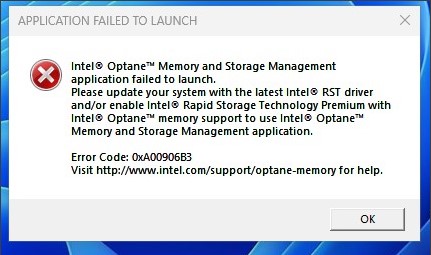
Plates-formes concernées :
- Petit ordinateur de bureau Vostro 3020
- Ordinateur de bureau Vostro 3020 au format tour
- PC de bureau Inspiron 3020
- Precision 3260
- Precision 3460
- Precision 3660
Cause
À partir du processeur Intel Alder Lake (ADL), le pilote IRST utilise la structure du périphérique de gestion des volumes (VMD) avec le mode RAID On. Pour le mode AHCI, il utilise le pilote natif Microsoft.
Resolution
N’installez pas le pilote IRST en mode AHCI. Il utilise le pilote natif du système d’exploitation Windows pour prendre en charge le mode de fonctionnement SATA AHCI.
Affected Products
Inspiron 3020 Desktop, Precision 3260 Compact, Precision 3460 Small Form Factor, Precision 3660 Tower, Vostro 3020 Tower Desktop, Vostro 3020 Small DesktopArticle Properties
Article Number: 000207553
Article Type: Solution
Last Modified: 22 Apr 2025
Version: 5
Find answers to your questions from other Dell users
Support Services
Check if your device is covered by Support Services.