L'applicazione Intel Rapid Storage Technology non si avvia e il driver IRST non si installa quando il sistema operativo è installato in modalità AHCI
Summary: Questo articolo fornisce informazioni su come avviare correttamente un'applicazione Intel Rapid Storage Technology (IRST) e installare il driver IRST.
This article applies to
This article does not apply to
This article is not tied to any specific product.
Not all product versions are identified in this article.
Symptoms
Quando si avvia l'applicazione IRST con funzionamento SATA in modalità AHCI, potrebbe essere visualizzato un messaggio di errore. Anche l'installazione del driver IRST potrebbe non riuscire.
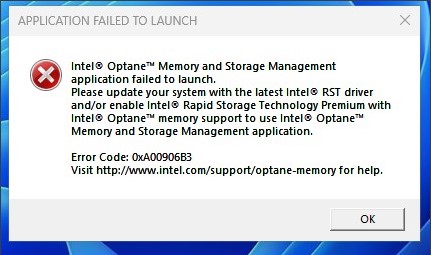
Piattaforme interessate:
- Desktop compatto Vostro 3020
- Vostro 3020 Tower Desktop
- Inspiron 3020 Desktop
- Precision 3260
- Precision 3460
- Dell Precision 3660
Cause
Dal processore Intel Alder Lake (ADL), il driver IRST utilizza la struttura VMD (Volume Management Device) con modalità RAID On. Per la modalità AHCI, utilizza il driver nativo Microsoft.
Resolution
Non installare il driver IRST in modalità AHCI. Utilizza il driver nativo del sistema operativo Windows per supportare se la modalità di funzionamento SATA è AHCI.
Affected Products
Inspiron 3020 Desktop, Precision 3260 Compact, Precision 3460 Small Form Factor, Precision 3660 Tower, Vostro 3020 Tower Desktop, Vostro 3020 Small DesktopArticle Properties
Article Number: 000207553
Article Type: Solution
Last Modified: 22 Apr 2025
Version: 5
Find answers to your questions from other Dell users
Support Services
Check if your device is covered by Support Services.