운영 체제가 AHCI 모드에서 설치된 경우 인텔 빠른 스토리지 기술 애플리케이션이 실행되지 않고 IRST 드라이버가 설치되지 않음
Summary: 이 문서에서는 IRST(Intel Rapid Storage Technology) 애플리케이션을 성공적으로 시작하고 IRST 드라이버를 설치하는 방법에 대한 정보를 제공합니다.
This article applies to
This article does not apply to
This article is not tied to any specific product.
Not all product versions are identified in this article.
Symptoms
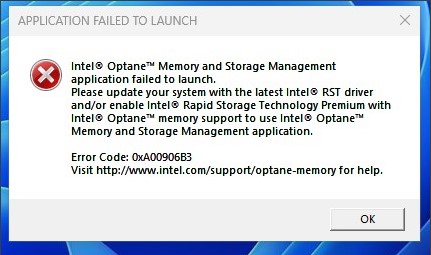
AHCI 모드에서 SATA 작동 시 IRST 애플리케이션을 실행하면 오류 메시지가 표시될 수 있습니다. IRST 드라이버 설치도 실패할 수 있습니다.
해당되는 플랫폼:
- Vostro 3020 소형 데스크탑
- Vostro 3020 타워 데스크탑
- Inspiron 3020 데스크탑
- Precision 3260
- Precision 3460
- Precision 3660
Cause
ADL(Intel Alder Lake) 프로세서에서 IRST 드라이버는 RAID On 모드로 VMD(Volume Management Device) 구조를 사용합니다. AHCI 모드의 경우 Microsoft 기본 드라이버를 사용합니다.
Resolution
AHCI 모드에서 IRST 드라이버를 설치하지 마십시오. SATA 작동 모드가 AHCI인지 지원하는 데 Windows 운영 체제 기본 드라이버를 사용합니다.
Affected Products
Inspiron 3020 Desktop, Precision 3260 Compact, Precision 3460 Small Form Factor, Precision 3660 Tower, Vostro 3020 Tower Desktop, Vostro 3020 Small DesktopArticle Properties
Article Number: 000207553
Article Type: Solution
Last Modified: 22 Apr 2025
Version: 5
Find answers to your questions from other Dell users
Support Services
Check if your device is covered by Support Services.