Programmet Intel Rapid Storage Technology startar inte och IRST-drivrutinen installeras inte när operativsystemet installeras i AHCI-läge
Summary: Den här artikeln innehåller information om hur du startar ett IRST-program (Intel Rapid Storage Technology) och installerar IRST-drivrutinen.
This article applies to
This article does not apply to
This article is not tied to any specific product.
Not all product versions are identified in this article.
Symptoms
Ett felmeddelande kan visas när du startar IRST-programmet under SATA-drift i AHCI-läge. Installationen av IRST-drivrutinen kan också misslyckas.
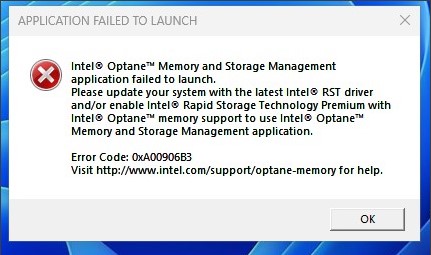
Berörda plattformar:
- Vostro 3020 liten stationär dator
- Vostro 3020 stationär dator
- Inspiron 3020 stationär dator
- Precision 3260
- Precision 3460
- Dell Precision 3660
Cause
Från ADL-processorn (Intel Alder Lake) använder IRST-drivrutinen VMD-strukturen (Volume Management Device) med RAID On-läge. För AHCI-läge används Microsoft Native Driver.
Resolution
Installera inte IRST-drivrutinen i AHCI-läge. Den använder Windows operativsystemets inbyggda drivrutin för att stödja om SATA-driftläget är AHCI.
Affected Products
Inspiron 3020 Desktop, Precision 3260 Compact, Precision 3460 Small Form Factor, Precision 3660 Tower, Vostro 3020 Tower Desktop, Vostro 3020 Small DesktopArticle Properties
Article Number: 000207553
Article Type: Solution
Last Modified: 22 Apr 2025
Version: 5
Find answers to your questions from other Dell users
Support Services
Check if your device is covered by Support Services.