İşletim Sistemi AHCI Modunda Yüklendiğinde Intel Rapid Storage Technology Uygulaması Başlatılamıyor ve IRST Sürücüsü Yüklenemiyor
Summary: Bu makalede, bir Intel Rapid Storage Technology (IRST) uygulamasının nasıl başarıyla başlatılacağı ve IRST sürücüsünün nasıl yükleneceği hakkında bilgiler yer almaktadır.
This article applies to
This article does not apply to
This article is not tied to any specific product.
Not all product versions are identified in this article.
Symptoms
IRST uygulaması AHCI modunda SATA işlemi altında başlatılırken bir hata mesajı gösterilebilir. IRST sürücü yüklemesi de başarısız olabilir.
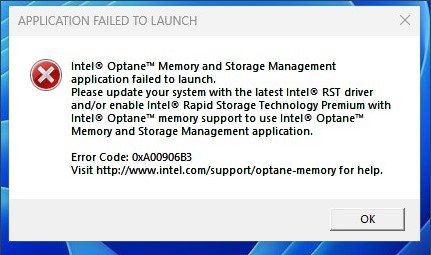
Etkilenen Platformlar:
- Vostro 3020 Küçük Masaüstü Bilgisayar
- Vostro 3020 Tower Masaüstü
- Inspiron 3020 Masaüstü Bilgisayar
- Precision 3260
- Precision 3460
- Precision 3660
Cause
Intel Alder Lake (ADL) işlemcisinden IRST sürücüsü, RAID Açık modu ile birim yönetim aygıtı (VMD) yapısını kullanır. AHCI modu için Microsoft Yerel Sürücüsünü kullanır.
Resolution
IRST sürücüsünü AHCI modunda yüklemeyin. SATA çalışma modunun AHCI olup olmadığını desteklemek için Windows İşletim Sistemi yerel sürücüsünü kullanır.
Affected Products
Inspiron 3020 Desktop, Precision 3260 Compact, Precision 3460 Small Form Factor, Precision 3660 Tower, Vostro 3020 Tower Desktop, Vostro 3020 Small DesktopArticle Properties
Article Number: 000207553
Article Type: Solution
Last Modified: 22 Apr 2025
Version: 5
Find answers to your questions from other Dell users
Support Services
Check if your device is covered by Support Services.