在 AHCI 模式下安裝作業系統時,Intel 快速儲存技術應用程式無法啟動,且 IRST 驅動程式無法安裝
Summary: 本文提供如何成功啟動 Intel 快速儲存技術 (IRST) 應用程式和安裝 IRST 驅動程式的相關資訊。
This article applies to
This article does not apply to
This article is not tied to any specific product.
Not all product versions are identified in this article.
Symptoms
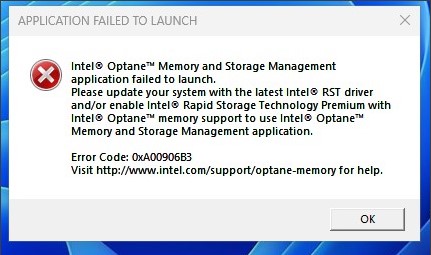
在 AHCI 模式下,在 SATA 作業下啟動 IRST 應用程式時,可能會顯示失敗訊息。IRST 驅動程式安裝也可能失敗。
受影響的平台:
- Vostro 3020 小型桌上型電腦
- Vostro 3020 Tower 桌上型電腦
- Inspiron 3020 桌上型電腦
- Precision 3260
- Precision 3460
- Precision 3660
Cause
IRST 驅動程式在 Intel Alder Lake (ADL) 處理器上,使用磁碟區管理裝置 (VMD) 結構並採用 RAID On 模式。針對 AHCI 模式,它會使用 Microsoft 原生驅動程式。
Resolution
請勿在 AHCI 模式上安裝 IRST 驅動程式。如果 SATA 作業模式為 AHCI,它會使用 Windows 作業系統原生驅動程式來支援。
Affected Products
Inspiron 3020 Desktop, Precision 3260 Compact, Precision 3460 Small Form Factor, Precision 3660 Tower, Vostro 3020 Tower Desktop, Vostro 3020 Small DesktopArticle Properties
Article Number: 000207553
Article Type: Solution
Last Modified: 22 Apr 2025
Version: 5
Find answers to your questions from other Dell users
Support Services
Check if your device is covered by Support Services.