在 AHCI 模式下安装操作系统时,英特尔快速存储技术应用程序无法启动,IRST 驱动程序无法安装
Summary: 本文提供有关如何成功启动英特尔快速存储技术 (IRST) 应用程序和安装 IRST 驱动程序的信息。
This article applies to
This article does not apply to
This article is not tied to any specific product.
Not all product versions are identified in this article.
Symptoms
在 AHCI 模式下,在 SATA 操作下启动 IRST 应用程序时,可能会显示失败消息。IRST 驱动程序安装也可能失败。
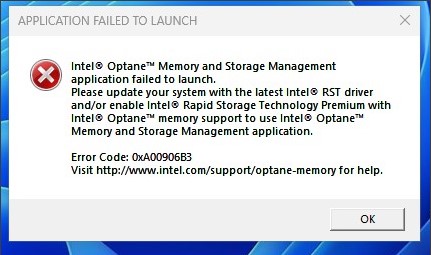
受影响的平台:
- Vostro 成就 3020 小型台式机
- Vostro 成就 3020 塔式台式机
- Inspiron 灵越 3020 台式机
- Precision 3260
- Precision 3460
- Precision 3660
Cause
在 Intel Alder Lake (ADL) 处理器中,IRST 驱动程序使用卷管理设备 (VMD) 结构和 RAID 开启模式。对于 AHCI 模式,它使用 Microsoft 本机驱动程序。
Resolution
请勿在 AHCI 模式下安装 IRST 驱动程序。它使用 Windows 操作系统本机驱动程序来支持 SATA 操作模式是否为 AHCI。
Affected Products
Inspiron 3020 Desktop, Precision 3260 Compact, Precision 3460 Small Form Factor, Precision 3660 Tower, Vostro 3020 Tower Desktop, Vostro 3020 Small DesktopArticle Properties
Article Number: 000207553
Article Type: Solution
Last Modified: 22 Apr 2025
Version: 5
Find answers to your questions from other Dell users
Support Services
Check if your device is covered by Support Services.