Dell Unity: How to connect to Unity XT platforms over serial connection
Summary: Unity XT arrays (excluding XT 380/380F) have a micro serial port in the back that can be used for a direct connection into each SP.
This article applies to
This article does not apply to
This article is not tied to any specific product.
Not all product versions are identified in this article.
Instructions
Unity XT arrays (excluding XT 380/380F) have a micro serial port in the back that can be used for a direct connection into the SP. This type of connection can be used instead of IPMI. However both cannot be used simultaneously.
A Micro DB-9 serial cable can be used to connect a computer directly to an SP.
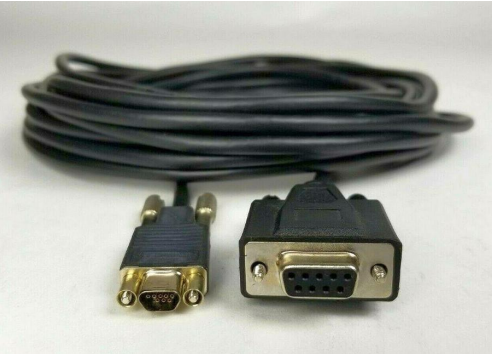
For computers that do not have a serial port a USB to DB-9 serial adapter cable can be used alongside the Micro DB-9 serial cable.

Location of serial port on each SP

Once the serial port is connected on the array open a terminal, select serial connection. Before connecting adjust the speed to 115200.
Note: Verify what COM represents the physical serial connection. Sometimes a different COM port is selected by default.

In the event strange output in the terminal is seen, turn the flow control off.

Once the putty session is opened, a login screen should be seen.

A Micro DB-9 serial cable can be used to connect a computer directly to an SP.
For computers that do not have a serial port a USB to DB-9 serial adapter cable can be used alongside the Micro DB-9 serial cable.
Location of serial port on each SP
Once the serial port is connected on the array open a terminal, select serial connection. Before connecting adjust the speed to 115200.
Note: Verify what COM represents the physical serial connection. Sometimes a different COM port is selected by default.
In the event strange output in the terminal is seen, turn the flow control off.
Once the putty session is opened, a login screen should be seen.
Affected Products
Dell EMC Unity XT 480, Dell EMC Unity XT 480F, Dell EMC Unity XT 680, Dell EMC Unity XT 680F, Dell EMC Unity XT 880, Dell EMC Unity XT 880FArticle Properties
Article Number: 000208170
Article Type: How To
Last Modified: 28 Aug 2023
Version: 1
Find answers to your questions from other Dell users
Support Services
Check if your device is covered by Support Services.