Data Domain - Introduction to NFSv4
Summary: Because NFS clients are increasingly using NFSv4.x as the default NFS protocol level, protection systems can now employ NFSv4 instead of requiring the client to work in a backwards-compatibility mode. Clients can work in mixed environments in which NFSv4 and NFSv3 must be able to access the same NFS exports. The DDOS NFS server can be configured to support NFSv4 and NFSv3, depending on-site requirements. You can make each NFS export available to only NFSv4 clients, only NFSv3 clients, or both. ...
This article applies to
This article does not apply to
This article is not tied to any specific product.
Not all product versions are identified in this article.
Instructions
Several factors might affect whether you choose NFSv4 or NFSv3:
● NFS client support
Some NFS clients may support only NFSv3 or NFSv4, or may operate better with one version.
● Operational requirements
An enterprise might be strictly standardized to use either NFSv4 or NFSv3.
● Security
If you require greater security, NFSv4 provides a greater security level than NFSv3, including ACL and extended owner and group configuration.
● Feature requirements
If you need byte-range locking or UTF-8 files, you should choose NFSv4.
● NFSv3 submounts
If your existing configuration uses NFSv3 submounts, NFSv3 might be the appropriate choice.
NFSv4 compared to NFSv3
NFSv4 provides enhanced functionality and features compared to NFSv3.
The following table compares NFSv3 features to those for NFSv4.
Table NFSv4 compared to NFSv3
| Feature | NFSv3 | NFSv4 |
| Standards-based Network file system | Yes | Yes |
| Kerberos support | Yes | Yes |
| Kerberos with LDAP | Yes | Yes |
| Quota reporting | Yes | Yes |
| Multiple exports with client-based access lists | Yes | Yes |
| ID mapping | Yes | Yes |
| UTF-8 character support | No | Yes |
| File/directory-based Access Control Lists (ACL) | No | Yes |
| Extended owner/group (OWNER@) | No | Yes |
| File share locking | No | Yes |
| Byte range locking | No | Yes |
| DD-CIFS integration (locking, ACL, AD) | No | Yes |
| Stateful file opens and recovery. | No | Yes |
| Global namespace and pseudoFS | No | Yes |
| Multisystem namespace using referrals | No | Yes |
NFSv4 ports
You can enable or disable NFSv4 and NFSv3 independently. In addition, you can move NFS versions to different ports; both versions do not need to occupy the same port.
With NFSv4, you do not need to restart the file system if you change ports. Only an NFS restart is required in such instances.
Like NFSv3, NFSv4 runs on Port 2049 as the default if it is enabled.
NFSv4 does not use portmapper (Port 111) or mountd (Port 2052).
ID-Mapping Overview
NFSv4 identifies owners and groups by a common external format, such as joe@example.com. These common formats are known as identifiers, or IDs.
Identifiers are stored within an NFS server and use internal representations such as ID 12345 or ID S-123-33-667-2. The conversion between internal and external identifiers is known as ID mapping.
Identifiers are associated with the following:
● Owners of files and directories
● Owner groups of files and directories
● Entries in Access Control Lists (ACLs)
Protection systems use a common internal format for NFS and CIFS/SMB protocols, which allows files and directories to be shared between NFS and CIFS/SMB.
Each protocol converts the internal format to its own external format with its own ID mapping.
External formats
The external format for NFSv4 identifiers follows NFSv4 standards (for example, RFC-7530 for NFSv4.0). In addition,
supplemental formats are supported for interoperability.
Standard identifier formats
Standard external identifiers for NFSv4 have the format identifier@domain. This identifier is used for NFSv4 owners,
owner-groups, and access control entries (ACEs). The domain must match the configured NFSv4 domain that was set using the
nfs option command.
The following CLI example sets the NFSv4 domain to mycorp.com for the NFS server:
nfs option set nfs4-domain mycorp.com
See client-specific documentation you have for setting the client NFS domain. Depending on the operating system, you might
need to update a configuration file (for example, /etc/idmapd.conf) or use a client administrative tool.
Note: If you do not set the default value, it will follow the DNS name for the protection system.
Note: The file system must be restarted after changing the DNS domain for the nfs4-domain to automatically update.
ACE extended identifiers
For ACL ACE entries, protection system NFS servers also support the following standard NFSv4 ACE extended identifiers
defined by the NFSv4 RFC:
● OWNER@, The current owner of the file or directory
● GROUP@, the current owner group of the file or directory.
● The special identifiers INTERACTIVE@, NETWORK@, DIALUP@, BATCH@, ANONYMOUS@, AUTHENTICATED@,
SERVICE@.
Alternative formats
To allow interoperability, NFSv4 servers on protection systems support some alternative identifier formats for input and output.
● Numeric identifiers; for example, "12345.”
● Windows compatible Security identifiers (SIDs) expressed as "S-NNN-NNN-…"
See the sections on input mapping and output mapping for more information about restrictions to these formats.
Internal Identifier Formats
The DD file system stores identifiers with each object (file or directory) in the file system. All objects have a numeric user ID (UID) and group ID (GID).
These, along with mode bits, allow for traditional UNIX/Linux identification and access controls.
Objects created by the CIFS/SMB protocol, or by the NFSv4 protocol when NFSv4 ACLs are enabled, also have an extended security descriptor (SD). Each SD contains the following:
● An owner security identifier (SID)
● An owner group SID
● A discretionary ACL (DACL)
● (Optional) A system ACL (SACL)
Each SID contains a relative ID (RID) and a distinct domain in a similar manner to Windows SIDs. See the section on NFSv4 and
CIFS interoperability for more information about SIDs and the mapping of SIDs.
When ID mapping occurs
The protection system NFSv4 server performs mapping in the following circumstances:
● Input mapping
The NFS server receives an identifier from an NFSv4 client.
● Output mapping:
An identifier is sent from the NFS server to the NFSv4 client.
● Credential mapping
The RPC client credentials are mapped to an internal identity for access control and other operations.
Input mapping
Input mapping occurs when an NFSv4 client sends an identifier to the protection system NFSv4 server—setting up the owner or owner-group of a file, for example. Input mapping is distinct from credential mapping.
Standard format identifiers such as joe@mycorp.com are converted into an internal UID/GID based on the configured conversion rules. If NFSv4 ACLs are enabled, a SID will also be generated, based on the configured conversion rules.
Numeric identifiers (for example, "12345") are directly converted into corresponding UID/GIDs if the client is not using Kerberos authentication. If Kerberos is being used, an error is generated as recommended by the NFSv4 standard. If NFSv4 ACLs are
enabled, a SID will be generated based on the conversion rules.
Windows SIDs (for example, "S-NNN-NNN-…") are validated and directly converted into the corresponding SIDs. A UID/GID will
be generated based on the conversion rules.
Output mapping
Output mapping occurs when the NFSv4 server sends an identifier to the NFSv4 client; for example, if the server returns the
owner or owner-group of a file.
1. If configured, the output might be the numeric ID.
This can be useful for NFSv4 clients that are not configured for ID mapping (for example, some Linux clients).
2. Mapping is attempted using the configured mapping services, (for example, NIS or Active Directory).
3. The output is a numeric ID or SID string if mapping fails and the configuration is allowed.
4. Otherwise, nobody is returned.
The nfs option nfs4-idmap-out-numeric configures the mapping on output:
● If nfs option nfs4-idmap-out-numeric is set to map-first, mapping will be attempted. On error, a numeric string
is output if allowed. This is the default.
● If nfs option nfs4-idmap-out-numeric is set to always, output will always be a numeric string if allowed.
● If nfs option nfs4-idmap-out-numeric is set to never, mapping will be attempted. On error, nobody@nfs4-
domain is the output.
If the RPC connection uses GSS/Kerberos, a numeric string is never allowed and nobody@nfs4-domain is the output.
The following example configures the protection system NFS server to always attempt to output a numeric string on output. For
Kerberos the name nobody is returned:
nfs option set nfs4-idmap-out-numeric always
Credential mapping
The NFSv4 server provides credentials for the NFSv4 client.
These credentials perform the following functions:
● Determine the access policy for the operation; for example, the ability to read a file.
● Determine the default owner and owner-group for new files and directories.
Credentials sent from the client may be john_doe@mycorp.com, or system credentials such as UID=1000, GID=2000.
System credentials specify a UID/GID along with auxiliary group IDs.
If NFSv4 ACLs are disabled, then the UID/GID and auxiliary group IDs are used for the credentials.
If NFSv4 ACLs are enabled, then the configured mapping services are used to build an extended security descriptor for the
credentials:
● SIDs for the owner, owner-group, and auxiliary group mapped and added to the Security Descriptor (SD).
● Credential privileges, if any, are added to the SD.
NFSv4 and CIFS/SMB Interoperability
The security descriptors used by NFSv4 and CIFS are similar from an ID mapping perspective, although there are differences.
You should be aware of the following to ensure for optimal interoperability:
● Active Directory should be configured for both CIFS and NFSv4, and the NFS ID mapper should be configured to use Active
Directory for ID mapping.
● If you are using CIFS ACLs extensively, you can usually improve compatibility by also enabling NFSv4 ACLs.
○ Enabling NFSv4 ACLs allows NFSv4 credentials to be mapped to the appropriate SID when evaluating DACL access.
● The CIFS server receives credentials from the CIFS client, including default ACL and user privileges.
○ In contrast, the NFSv4 server receives a more limited set of credentials, and constructs credentials at runtime using its
ID mapper. Because of this, the file system might see different credentials.
CIFS/SMB Active Directory Integration
The protection system NFSv4 server can be configured to use the Windows Active Directory configuration that is set with the
protection system CIFS server.
The system is mapped to use Active Directory if possible. This functionality is disabled by default, but you can enable it using the
following command:
nfs option set nfs4-idmap-active-directory enabled
Default DACL for NFSv4
NFSv4 sets a different default DACL (discretionary access control list) than the default DACL supplied by CIFS.
Only OWNER@, GROUP@ and EVERYONE@ are defined in the default NFSv4 DACL. You can use ACL inheritance to
automatically add CIFS-significant ACEs by default if appropriate.
System Default SIDs
Files and directories created by NFSv3, and NFSv4 without ACLs, use the default system domain, sometimes referred to as the
default UNIX domain:
● User SIDs in the system domain have the format S-1-22-1-N, where N is the UID.
● Group SIDs in the system domain have the format S-1-22-2-N, when N is the GID.
For example, a user with UID 1234 would have an owner SID of S-1-22-1-1234.
Common identifiers in NFSv4 ACLs and SIDs
The EVERYONE@ identifier and other special identifiers (such as BATCH@, for example) in NFSv4 ACLs use the equivalent
CIFS SIDS and are compatible.
The OWNER@ and GROUP@ identifiers have no direct correspondence in CIFS; they appear as the current owner and current owner-group of the file or directory.
NFS Referrals
The referral feature allows an NFSv4 client to access an export (or file system) in one or multiple locations. Locations can be on
the same NFS server or on different NFS servers, and use either the same or different path to reach the export.
Because referrals are an NFSv4 feature, they apply only to NFSv4 mounts.
Referrals can be made to any server that uses NFSv4 or later, including the following:
● A protection system running NFS with NFSv4 enabled
● Other servers that support NFSv4 including Linux servers, NAS appliances, and VNX systems.
A referral can use an NFS export point with or without a current underlying path in the DD file system.
NFS exports with referrals can be mounted through NFSv3, but NFSv3 clients will not be redirected since referrals are a NFSv4 feature.
This characteristic is useful in scaleout systems to allow exports to be redirected at a file-management level.
Referral Locations
NFSv4 referrals always have one or more locations.
These locations consist of the following:
● A path on a remote NFS server to the referred file system.
● One or more server network addresses that allow the client to reach the remote NFS server.
Typically when multiple server addresses are associated with the same location, those addresses are found on the same NFS
server.
Referral location names
You can name each referral location within an NFS export. You can use the name to access the referral as well as to modify or
delete it.
A referral name can contain a maximum of 80 characters from the following character sets:
● a-z
● A-Z
● 0-9
● "."
● ","
● "_"
● "-"
Note: You can include spaces as long as those spaces are embedded within the name. If you use embedded spaces, you must enclose the entire name in double quotes.
Names that begin with "." are reserved for automatic creation by the protection system. You can delete these names but you cannot create or modify them using the command line interface (CLI) or system management services (SMS).
Referrals and Scaleout Systems
NFSv4 referrals and locations can better enable access if you are scaling out your protection systems.
Because your system might or might not already contain a global namespace, the following two scenarios describe how you might use NFSv4 referrals:
● Your system does not contain a global namespace.
○ You can use NFSv4 referrals to build that global namespace. System administrators can build these global namespaces, or
you can use smart system manager (SM) element building referrals as necessary.
● Your system already has a global namespace.
○ If your system has a global namespace with MTrees placed in specific nodes, NFS referrals can be created to redirect access to those MTrees to the nodes added to the scaled-out system.
You can create these referrals or have them performed automatically within NFS if the necessary SM or file manager (FM) information is available.
NFSv4 and High Availability
With NFSv4, protocol exports (for example, /data/col1/<mtree> are mirrored in a High Availability (HA) setup. However, configuration exports such as /ddvar are not mirrored.
The /ddvar file system is unique to each node of an HA pair. As a result, /ddvar exports and their associated client access
lists are not mirrored to the standby node in an HA environment.
The information in /ddvar becomes stale when the active node fails over to the standby node. Any client permissions granted to /ddvar on the original active node must be re-created on the newly active node after a failover occurs.
You must also add any additional /ddvar exports and their clients (for example, /ddvar/core) that were created on the original active node to the newly active node after a failover occurs.
Finally, any desired /ddvar exports must be unmounted from the client and then remounted after a failover occurs.
NFSv4 Global Namespaces
The NFSv4 server provides a virtual directory tree known as a PseudoFS to connect NFS exports into a searchable set of paths.
The use of a PseudoFS distinguishes NFSv4 from NFSv3, which uses the MOUNTD auxiliary protocol.
In most configurations, the change from NFSv3 MOUNTD to NFSv4 global namespace is transparent and handled automatically by the NFSv4 client and server.
NFSv4 global namespaces and NFSv3 submounts
If you use NFSv3 export submounts, the global namespaces characteristic of NFSv4 might prevent submounts from being seen
on the NFSv4 mount.
NFSv3 main exports and submount exports
If NFSv3 has a main export and a submount export, these exports might use the same NFSv3 clients yet have different levels of access:
Table NFSv3 main exports and submount exports
| Export | Path | Client | Options |
| Mt1 | /data/col1/mt1 | client1.example.com | ro |
| Mt1-sub | /data/col1/mt1/subdir | client1.example.com | rw |
In the previous table, the following applies to NFSv3:
● If client1.example.com mounts /data/col1/mt1, the client gets read-only access.
● If client1.example.com mounts /data/col1/mt1/subdir, the client gets read/write access.
NFSv4 operates in the same manner in regard to highest-level export paths. For NFSv4, client1.example.com navigates the NFSv4 PseudoFS until it reaches the highest-level export path, /data/col1/mt1, where it gets read-only access.
However, because the export has been selected, the submount export (Mt1-sub) is not part of the PseudoFS for the client and Read/write access is not given.
Best practice
If your system uses NFSv3 exports submounts to give the client read/write access based on the mount path, you must consider this before using NFSv4 with these submount exports.
With NFSv4, each client has an individual PseudoFS.
Table NFSv3 submount exports
| Export | Path | Client | Options |
| Mt1 | /data/col1/mt1 | client1.example.com | ro |
| Mt1-sub | /data/col1/mt1/subdir | client2.example.com | rw |
NFSv4 Configuration
The default protection system configuration only enables NFSv3. To use NFSv4, you must first enable the NFSv4 server.
Enabling the NFSv4 Server
Steps
1. Enter nfs enable version 4 to enable NFSv4:
# nfs enable version 4
NFS server version(s) 3:4 enabled.
2. (Optional) If you want to disable NFSv3, enter nfs disable version 3.
Note: Do not disable NFSv3 on systems integrated with Avamar.
# nfs disable version 3
NFS server version(s) 3 disabled.
NFS server version(s) 4 enabled.
Next steps
After the NFSv4 server is enabled, you might need to perform additional NFS configuration tasks specifically for your site. These
tasks can include:
● Setting the NFSv4 domain
● Configuring NFSv4 ID mapping
● Configuring ACL (Access Control Lists)
Setting the default server to include NFSv4
About this task
The NFS command option default-server-version controls which NFS version is enabled when you enter the nfs
enable command without specifying a version.
Steps
Enter the nfs option set default-server-version 3:4 command:
# nfs option set default-server-version 3:4
NFS option 'default-server-version' set to '3:4'.
Updating existing exports
You can update existing exports to change the NFS version used by your protection system.
Steps
Enter the nfs export modify all command:
# nfs export modify all clients all options version=version number
To ensure all existing clients have either version 3, 4, or both, you can modify the NFS version to the appropriate string. The
following example shows NFS modified to include versions 3 and 4:
#nfs export modify all clients all options version=3:4
For more information about the nfs export command, see the DDOS Command Reference Guide for more information.
Additional Information
Kerberos and NFSv4
Both NFSv4 and NFSv3 use the Kerberos authentication mechanism to secure user credentials.
Kerberos prevents user credentials from being spoofed in NFS packets and protects them from tampering en route to the protection system.
There are distinct types of Kerberos over NFS:
● Kerberos 5 (sec=krb5)
Use Kerberos for user credentials.
● Kerberos 5 with integrity (sec=krb5i)
Use Kerberos and check the integrity of the NFS payload using an encrypted checksum.
● Kerberos 5 with security (sec=krb5p)
Use Kerberos 5 with integrity and encrypt the entire NFS payload.
Note: krb5i and krb5p can both cause performance degradation due to additional computational overhead on both the NFS client and the protection system.
Configuring Kerberos with a Linux-Based KDC
Prerequisites
You should ensure that all your systems can access the Key Distribution Center (KDC).
If the systems cannot reach the KDC, check the domain name system (DNS) settings.
About this task
The following steps allow you to create keytab files for the client and the protection system:
● In Steps 1-3, you create the keytab file for the protection system.
● In Steps 4-5, you create the keytab file for the client.
Steps
1. Create the nfs/<ddr_dns_name>@<realm> service principal.
kadmin.local: addprinc -randkey nfs/ddr12345.<domain-name>@<domain-name>
2. Export nfs/<ddr_dns_name>@<realm> to a keytab file.
kadmin.local: ktadd –k /tmp/ddr.keytab nfs/ddr12345.corp.com@CORP.COM
3. Copy the keytab file to the protection system at the following location:
/ddr/var/krb5.keytab
4. Create one of the following principals for the client and export that principal to the keytab file:
nfs/<client_dns_name>@<REALM>
root/<client_dns_name>@<REALM>
5. Copy the keytab file to the client at the following location:
/etc/krb5.keytab
NOTE: It is recommended that you use an NTP server to keep the time synchronized on all entities.
Configuring Kerberos with a Linux-Based KDC
Configuring the protection System to Use Kerberos Authentication
Steps
1. Configure the KDC and Kerberos realm on the protection system by using the authentication command:
# authentication kerberos set realm <realm> kdc-type unix kdcs <kdc-server>
2. Import the keytab file:
# authentication kerberos keytab import
3. (Optional) Configure the NIS server by entering the following commands:
# authentication nis servers add <server>
# authentication nis domain set <domain-name>
# authentication nis enable
# filesys restart
4. (Optional) Make the nfs4-domain the same as the Kerberos realm using the nfs option command:
nfs option set nfs4-domain <kerberos-realm>
5. Add a client to an existing export by adding sec=krb5 to the nfs export add command:
nfs export add <export-name> clients * options version=4,sec=krb5
Configuring Kerberos with a Linux-Based KDC
Configuring Clients
Steps
1. Configure the DNS server and verify that forward and reverse lookups are working.
2. Configure the KDC and Kerberos realm by editing the /etc/krb5.conf configuration file.
You might need to perform this step based on the client operating system you are using.
3. Configure NIS or another external name mapping service.
4. (Optional) Edit the /etc/idmapd.conf file to ensure it is the same as the Kerberos realm.
You might need to perform this step based on the client operating system you are using.
5. Verify the keytab file /etc/krb5.keytab contains an entry for the nfs/ service principal or the root/ principal.
[root@fc22 ~]# klist -k
Keytab name: FILE:/etc/krb5.keytab
KVNO Principal
---- --------------------------------------------------------------------------
3 nfs/fc22.domain-name@domain-name
6. Mount the export using the sec=krb5 option.
[root@fc22 ~]# mount ddr12345.<domain-name>:/data/col1/mtree1 /mnt/nfs4 –o
sec=krb5,vers=4
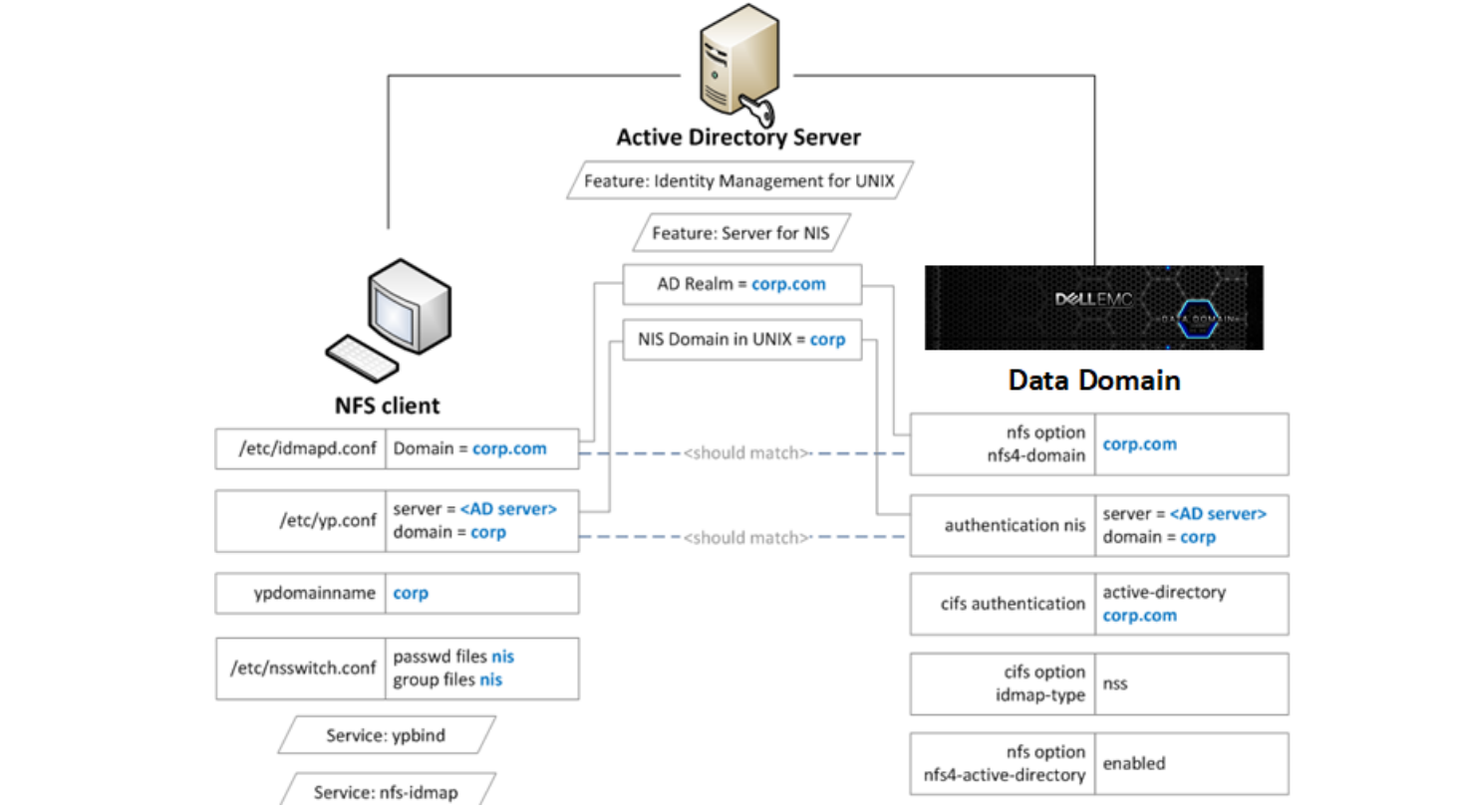
Enabling Active Directory
About this task
Configuring Active Directory authentication makes the protection system part of a Windows Active Directory realm. CIFS clients
and NFS clients use Kerberos authentication.
Steps
1. Join an active directory realm using the cifs set command:
# cifs set authentication active-directory <realm>
Kerberos is automatically set up on the system, and the required NFS/ service principal is automatically created on the KDC.
2. Configure NIS using the authentication nis command:
# authentication nis servers add <windows-ad-server>
# authentication nis domain set <ad-realm>
# authentication nis enable
3. Configure CIFS to use NSS for ID mapping by using cifs commands:
# cifs disable
# cifs option set idmap-type nss
# cifs enable
# filesys restart
4. Set the nfs4-domain to be the same as the Active Directory realm:
# nfs option set nfs4-domain 5. Enable Active Directory for NFSv4 id mapping by using the nfs command: # nfs option set nfs4-idmap-active-directory enabled
Configuring Active Directory
Steps
1. Install the Active Directory Domain Services (AD DS) role on the Windows server.
2. Install the Identity Management for UNIX components.
C:\Windows\system32>Dism.exe /online /enable-feature /featurename:adminui /all
C:\Windows\system32>Dism.exe /online /enable-feature /featurename:nis /all
3. Verify the NIS domain is configured on the server.
C:\Windows\system32>nisadmin
The following are the settings on localhost
Push Interval : 1 days
Logging Mode : Normal
NIS Domains
NIS Domain in AD Master server NIS Domain in UNIX
---------------- ------------- ----------------
corp win-ad-server corp
4. Assign AD users and groups UNIX UID/GIDs for the NFSv4 server.
a. Go to Server Manager > Tools > Active Directory.
b. Open the Properties for an AD user or group.
c. Under the UNIX Attributes tab, fill in the NIS domain, UID, and Primary GID fields.
Affected Products
Data DomainArticle Properties
Article Number: 000208505
Article Type: How To
Last Modified: 20 Jan 2026
Version: 3
Find answers to your questions from other Dell users
Support Services
Check if your device is covered by Support Services.