Dell VxRail: 如何在 NSX-T 管理器节点关闭且在群集中不可恢复时重新部署它 |NSX-T 3.2
Summary: 此知识库文章可用于在 NSX-T 管理器节点关闭且在群集中不可恢复时重新部署该节点 |NSX-T 3.2。
This article applies to
This article does not apply to
This article is not tied to any specific product.
Not all product versions are identified in this article.
Instructions
在使用此 KB 之前,请确保当前 NSX-T 管理器节点不可恢复,并且 NSX-T 群集中的其他节点仍在提供服务。
1.登录 NSX-T 管理器,并将问题节点与现有群集分离。
2.从 NSX Manager 群集中删除问题节点。

B。使用命令“detach node ”从群集中删除问题节点,其中 uuid 是上面标识的 UUID。

3.重新部署新的 NSX-T 节点。请参阅官方 VMware 文档以部署新的 NSX-T 管理器。
https://docs.vmware.com/en/VMware-Validated-Design/6.0.1/sddc-backup-and-restore/GUID-9D125AA7-202E-442E-874D-77D303389A11.html4.将新 NSX-T 节点添加到现有群集。


B。将节点添加到现有群集。

c. 检查群集状态。等待大约 10 分钟,所有服务都会启动。
1.登录 NSX-T 管理器,并将问题节点与现有群集分离。
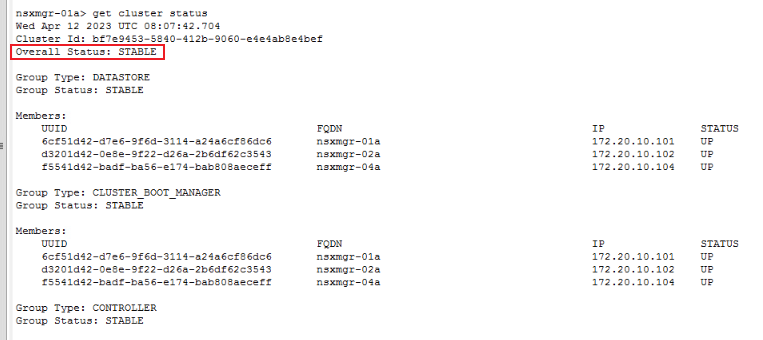
a.登录到 SSH 并运行命令“get cluster status”。
get cluster status
B。识别已关闭或出现故障的节点。
2.从 NSX Manager 群集中删除问题节点。
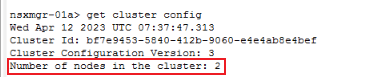
a.使用“get cluster config”查询问题节点 UUID。
get cluster config
B。使用命令“detach node ”从群集中删除问题节点,其中 uuid 是上面标识的 UUID。
detach node
3.重新部署新的 NSX-T 节点。请参阅官方 VMware 文档以部署新的 NSX-T 管理器。
https://docs.vmware.com/en/VMware-Validated-Design/6.0.1/sddc-backup-and-restore/GUID-9D125AA7-202E-442E-874D-77D303389A11.html4.将新 NSX-T 节点添加到现有群集。
a.准备现有 NSX-T 群集信息,然后再将新的 NSX-T 管理器节点添加到现有群集。
get cluster config | find cluster id
get certificate api thumbprint | NSX-T Manager API certificate
B。将节点添加到现有群集。
ssh to new NSX-T manager
join existing_manager_node_ip cluster-id cluster_id thumbprint api_thumbprint username admin
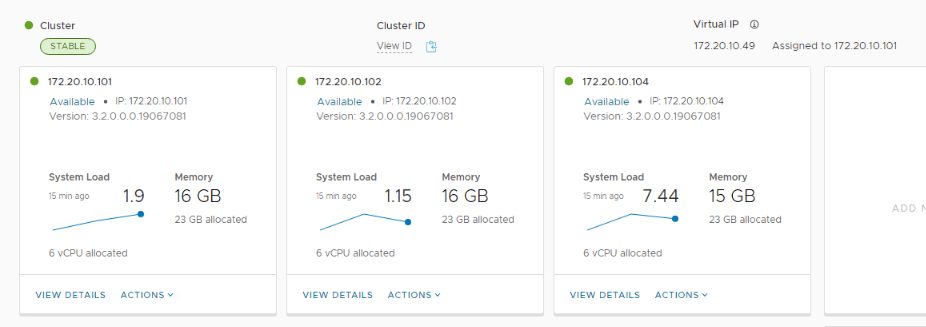
c. 检查群集状态。等待大约 10 分钟,所有服务都会启动。
get cluster status
Affected Products
VxRailArticle Properties
Article Number: 000209841
Article Type: How To
Last Modified: 12 Apr 2023
Version: 1
Find answers to your questions from other Dell users
Support Services
Check if your device is covered by Support Services.