OpenManage Enterprise: Unable to discover any devices error message
Summary: This article explains how to fix an error message when OpenManage Enterprise is unable to discover any device. Alert in OpenManage Enterprise (OME) - Event processing service - Activating ...
This article applies to
This article does not apply to
This article is not tied to any specific product.
Not all product versions are identified in this article.
Symptoms
The system reports an error message:
Unable to discover any devices with error message Network Address x.x.x.x is not reachable via ICMP PING.
Alert in OME | Event processing service -ActivatingCause
This error can happen with the ping on IP of discovery device is disabled.
Resolution
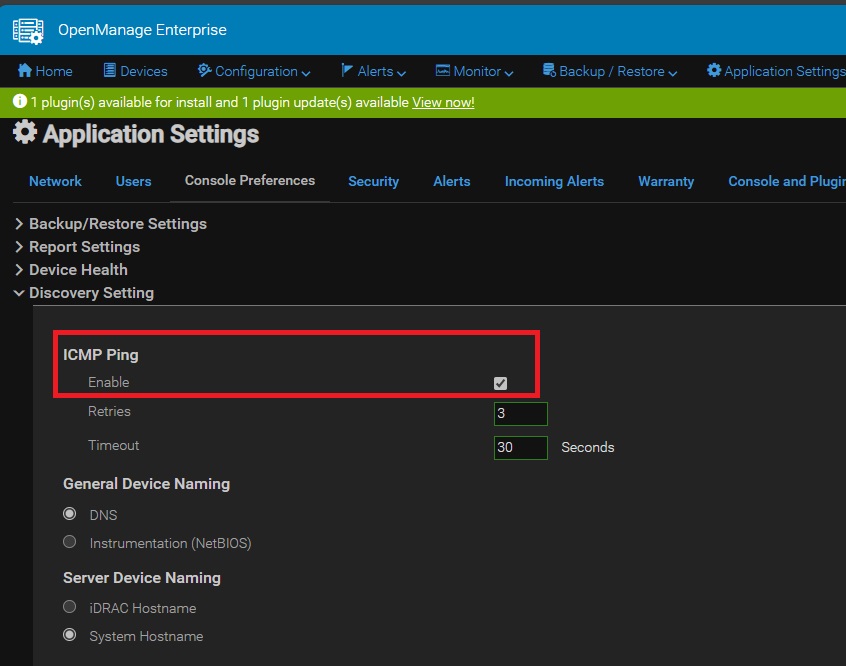
To solve the problem, clear the "ICMP Ping" box in "Discovery Setting" of the OpenManage Enterprise "Application Settings."
Affected Products
Dell EMC OpenManage EnterpriseArticle Properties
Article Number: 000209867
Article Type: Solution
Last Modified: 15 Apr 2025
Version: 4
Find answers to your questions from other Dell users
Support Services
Check if your device is covered by Support Services.