NetWorker: So aktivieren Sie Clientdateiindexbackups während Datenbackups
Summary: In diesem Artikel werden neue Funktionen beschrieben, die in NetWorker 19.8 hinzugefügt wurden, um CFI-Backups (Client File Indexes) in denselben Policy-Datenbackups zu aktivieren.
This article applies to
This article does not apply to
This article is not tied to any specific product.
Not all product versions are identified in this article.
Instructions
NetWorker 19.8 hat funktionen hinzugefügt, damit Backupadministratoren CFI-Backups (Client File Index) so konfigurieren können, dass sie unmittelbar nach Abschluss der Datenbackups eines Clients durchgeführt werden. Dies kann innerhalb der Backupaktion erfolgen, in der der Client geschützt ist. Zuvor war dies nur mithilfe der NetWorker "Server Protection Policy" möglich.
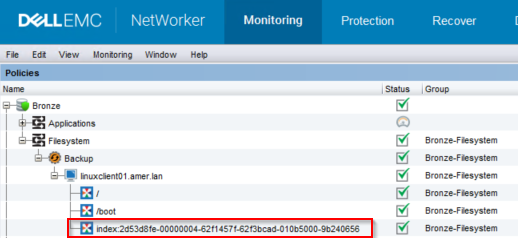
Abbildung 1: NetWorker-Backupmonitoring
2. Um CFI-Backups zu aktivieren, führen Sie den folgenden nsrpolicy-Befehl für die Backupaktion aus:
Anforderungen:
- Der NetWorker-Server muss sich auf NetWorker 19.8.0.0 oder höher befinden: https://www.dell.com/support/home/product-support/product/networker/overview
- Diese Funktion ist für "herkömmliche" (clientbasierte) Backups vorgesehen.
Abbildung 1: NetWorker-Backupmonitoring
root@linux1:~# mminfo -avot -t today
 volume        type   client           date     time         size ssid      fl   lvl name
ClientBackupPool.001 Data Domain linux1.amer.lan 02/27/2023 12:38:30 PM 74 MB 4277998791 cr 9 index:linuxclient01.amer.lan
ClientBackupPool.001 Data Domain linuxclient01.amer.lan 02/27/2023 12:39:32 PM 13 MB 16585916 cb incr /
ClientBackupPool.001 Data Domain linuxclient01.amer.lan 02/27/2023 12:39:37 PM 4  B 4294776000 cb incr /boot
HINWEIS: Durch Aktivieren dieser Funktion werden Clients, die ihr Indexbackup in einer Data-Protection-Policy durchführen, nicht von der Server-Schutz-Policy ausgeschlossen. Wenn die Server-Schutz-Policy ausgeführt wird, wird das Indexbackup erneut durchgeführt.
Es gibt zwei Methoden zum Aktivieren dieser Funktion.
Nsradmin-CLI:
- Führen Sie über die Eingabeaufforderung root oder admin auf dem NetWorker-Server den folgenden Befehl aus:
nsradmin
- Verwenden Sie in der nsradmin-Eingabeaufforderung die folgende Befehlssyntax, um die Details der Backupaktion zu drucken:
nsradmin> show Enable Cfi
nsradmin> print type: nsr protection policy action; name: ACTION_NAME; policy name: POLICY_NAME; workflow name: WORKFLOW_NAME
Beispiel:
nsradmin> show Enable Cfi
nsradmin> print type: nsr protection policy action; name: backup; policy name: Bronze; workflow name: Filesystem
Enable Cfi: No;
nsradmin>
- Um Cfi-Backups in der Backupaktion zu aktivieren, geben Sie den folgenden Befehl über die Eingabeaufforderung nsradmin ein:
nsradmin> update Enable Cfi: Yes
- Führen Sie den Druckbefehl erneut aus, um die Änderungen anzuzeigen:
nsradmin> print type: nsr protection policy action; name: backup; policy name: Bronze; workflow name: Filesystem
                  Enable Cfi: Yes;
Nsrpolicy-CLI:
- Führen Sie über eine Root- oder Admin-Eingabeaufforderung auf dem NetWorker-Server den folgenden nsrpolicy-Befehl aus, um die Attribute der Backupaktion anzuzeigen:
nsrpolicy action display -p POLICY_NAME -w WORKFLOW_NAME -A ACTION_NAME
ODER:
nsrpolicy action display --policy_name POLICY_NAME --workflow_name WORKFLOW_NAME --action_name ACTION_NAME
Beispiel:
root@linux1:~# nsrpolicy action display -p Bronze -w Filesystem -A backup
{
    "actionName": "Backup",
    "actionSpecific": {
        "actions": {
            "actionType": "backup",
            "actionBackupSubtypeSpecific": {
                "backupSubtypes": {
                    "abBackupSubtype": "traditional",
                    "abtDestinationPool": "ClientBackupPool",
                    "abForceBackupLevel": "",
                    "abtBrowsePeriod": "1 Months",
                    "abtDDRetentionLockTime": "",
                    "abtEnableCfiBackup": false,
                    "abtEnableDDRetentionLock": false,
                    "abtEstimate": false,
                    "abtFileInactivityAlertThreshold": 0,
                    "abtFileInactivityThreshold": 0,
                    "abtRevertToFullWhenSyntheticFullFails": true,
                    "abtTimestampFormat": "none",
                    "abtVerifySyntheticFull": true
                }
...
...
nsrpolicy action update backup traditional -p POLICY_NAME -w WORKFLOW_NAME -A ACTION_NAME --enable_cfi yes
ODER:
nsrpolicy action update backup traditional --policy_name POLICY_NAME --workflow_name WORKFLOW_NAME --action_name ACTION_NAME --enable_cfi yes
Beispiel:
root@linux1:~# nsrpolicy action update backup traditional -p Bronze -w Filesystem -A backup --enable_cfi yes
128947:nsrpolicy: Action 'backup' was successfully updated
- Um die Änderungen zu bestätigen, führen Sie den Befehl nsrpolicy display erneut aus:
root@linux1:~# nsrpolicy action display -p Bronze -w Filesystem -A backup
{
    "actionName": "Backup",
    "actionSpecific": {
        "actions": {
            "actionType": "backup",
            "actionBackupSubtypeSpecific": {
                "backupSubtypes": {
                    "abBackupSubtype": "traditional",
                    "abtDestinationPool": "ClientBackupPool",
                    "abForceBackupLevel": "",
                    "abtBrowsePeriod": "1 Months",
                    "abtDDRetentionLockTime": "",
                    "abtEnableCfiBackup": true,
                    "abtEnableDDRetentionLock": false,
                    "abtEstimate": false,
                    "abtFileInactivityAlertThreshold": 0,
                    "abtFileInactivityThreshold": 0,
                    "abtRevertToFullWhenSyntheticFullFails": true,
                    "abtTimestampFormat": "none",
                    "abtVerifySyntheticFull": true
                }
...
...
Affected Products
NetWorkerProducts
NetWorker Family, NetWorker, NetWorker SeriesArticle Properties
Article Number: 000210224
Article Type: How To
Last Modified: 16 May 2026
Version: 8
Find answers to your questions from other Dell users
Support Services
Check if your device is covered by Support Services.