Dock Wakes Up Laptop From Hibernate Even With Wake-on-LAN and Wake-up on Magic Packet Disabled
Summary: Learn why docking stations may wake a Latitude and Precision laptop from hibernation even if Wake-on-LAN and Wake-up On Magic Packet options are disabled.
This article applies to
This article does not apply to
This article is not tied to any specific product.
Not all product versions are identified in this article.
Symptoms
A laptop may wake up from a hibernate power state. This issue is experienced with the Wake-on-LAN (WOL) in BIOS and Wake-up on magic packet in Windows both disabled. The following image shows Wake-on-LAN disabled in the BIOS.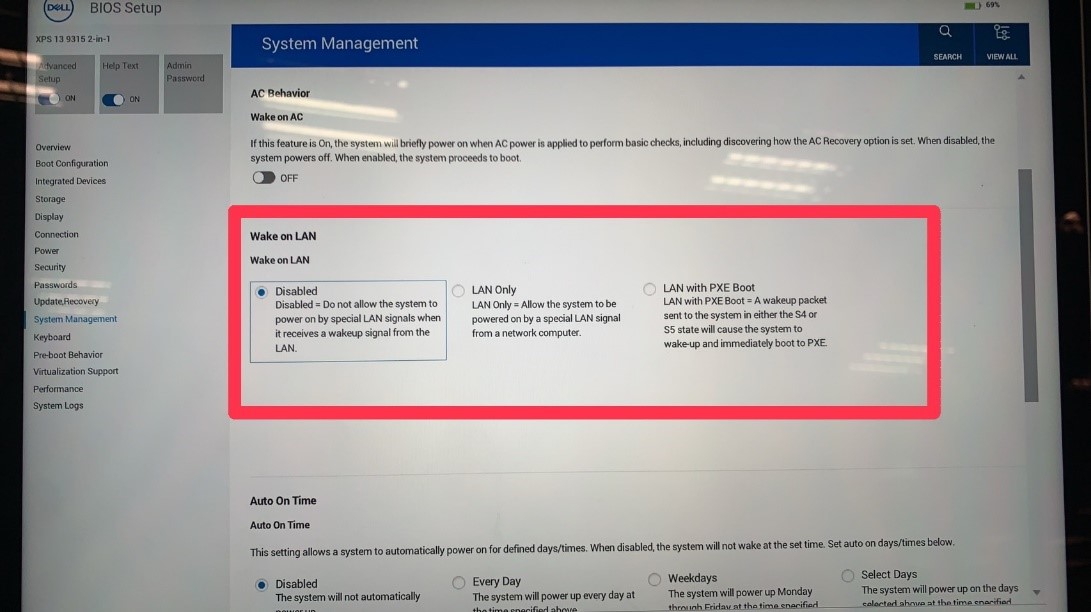
Affected Platforms:
- Latitude 5340
- Latitude 5540
- Latitude 7340
- Latitude 7440
- Latitude 7640
- Precision 3580
- Precision 3581
- XPS 13 Plus 9320
- XPS 14 9440
- Dell Thunderbolt Dock - WD19TB
- Dell Thunderbolt Dock - WD22TB4
- Dell Dual Charge Dock HD22Q
Cause
USB wake, which is a different function from the Wake-on-LAN function, may cause this issue. The Windows USB4 inbox driver setting controls USB LAN wake.
Resolution
Follow these instructions to disable the Shutdown Wake-On-Lan.
- Connect the docking station to the laptop if it is not already connected.
- Press the Win key + X.
- Click Device Manager.
- Under Network Adapter, right-click Realtek USB GbE Family Controller.
- Select Properties.
- Go to the Advanced tab.
- Under Property, select Shutdown Wake-On-Lan.
- Select Disabled in the Value field.
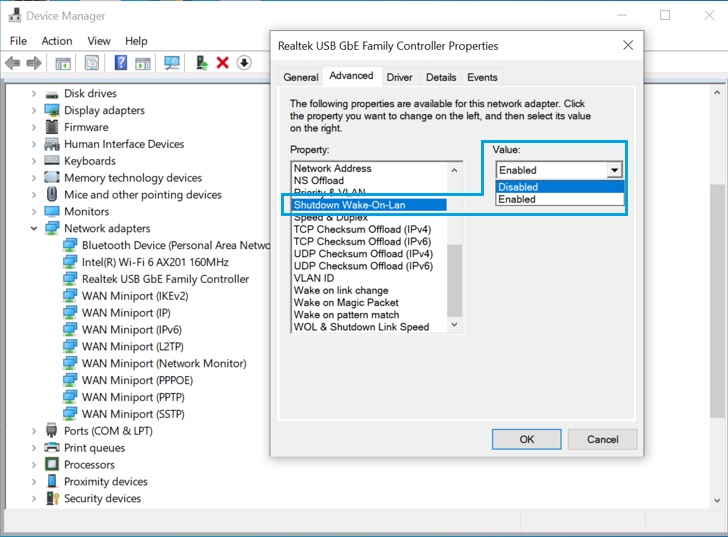
- Click OK to apply changes.
Affected Products
Dell Dual Charge Dock HD22Q, Dell Thunderbolt Dock - WD19TB, Latitude 5340, Latitude 7340, Latitude 7440, Latitude 5540, Latitude 7640, Precision 3580, Precision 3581, Dell Thunderbolt Dock – WD22TB4, XPS 13 Plus 9320, XPS 14 9440Article Properties
Article Number: 000210472
Article Type: Solution
Last Modified: 22 Apr 2025
Version: 7
Find answers to your questions from other Dell users
Support Services
Check if your device is covered by Support Services.