NetWorker: Interfaccia utente NMC "Impossibile avviare l'applicazione"
Summary: L'interfaccia utente di NetWorker Management Console (NMC) non si avvia. Errore generato: "Applicazione non firmata che richiede accesso illimitato al sistema. Unsigned resource comtsk.jar." ...
This article applies to
This article does not apply to
This article is not tied to any specific product.
Not all product versions are identified in this article.
Symptoms
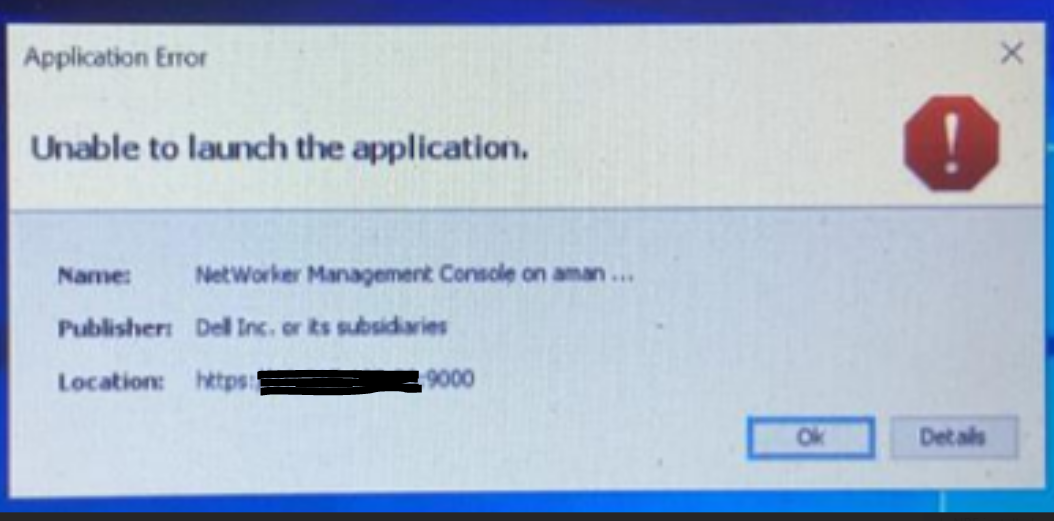
- Quando si avvia NetWorker Management Console (NMC), l'interfaccia utente non si avvia con "
Unable to launch application."
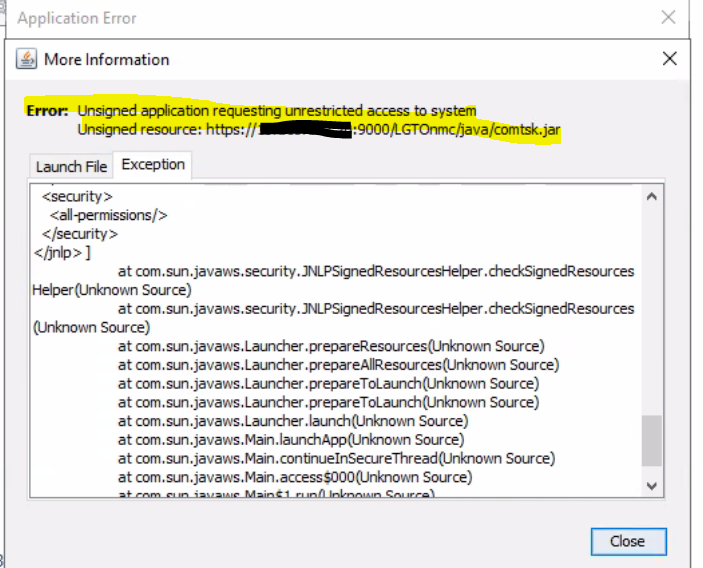
- La scheda Details riporta il seguente errore:
Error: Unsigned application requesting unrestricted access to system
Unsigned resource https://<NMC server>:9000/LGTOnmc/java/comtsk.jar
Cause
Dalla versione Java 8 Aggiornamento 131, le applicazioni firmate con gli algoritmi MD5withRSA o MD5withDSA vengono trattate come non firmate.
Resolution
1. Modificare il file java.security nel percorso di sicurezza di installazione NRE.
Per NRE, il percorso completo del file è C:\Program Files\NRE\java\<jre version>\lib\security\java.security.
2. Commentare la riga che inizia con "jdk.jar," come nell'esempio qui sotto-.
# jdk.jar.disabledAlgorithms=MD2, MD5, RSA keySize < 1024, \
#     DSA keySize < 1024, include jdk.disabled.namedCurves
3. Salvare le modifiche.
4. Avviare l'interfaccia utente NMC.
Affected Products
NetWorker, NetWorker Management ConsoleProducts
NetWorker Family, NetWorker SeriesArticle Properties
Article Number: 000210820
Article Type: Solution
Last Modified: 02 Mar 2026
Version: 3
Find answers to your questions from other Dell users
Support Services
Check if your device is covered by Support Services.