VxRail:部署錯誤:「無法驗證客戶供應的 vCenter 管理使用者身分。」
Summary: 外部 vCenter 的部署驗證失敗,並出現「無法驗證客戶提供的 vCenter 管理使用者角色」錯誤。
This article applies to
This article does not apply to
This article is not tied to any specific product.
Not all product versions are identified in this article.
Symptoms
在 VxRail 部署精靈中找到錯誤。
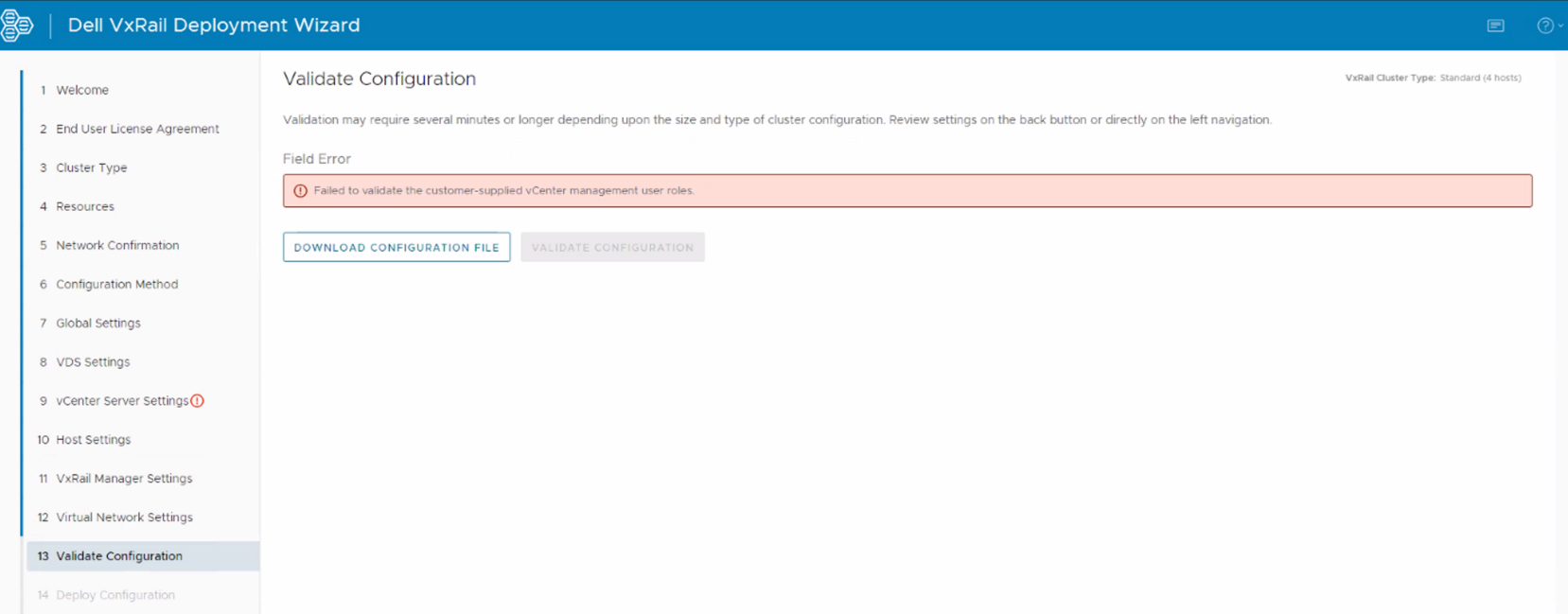
Dayone.log:
Failed to validate the customer-supplied vCenter management user roles.
Dayone.log:
"2022-07-19 14:11:33,668" microservice.nano-service "2022-07-19T14:11:32.850669536Z stdout F 2022-07-19 14:11:32,850 [ERROR] <Dummy-1062:139904847503944> validator.py execute() (89): Validation errors: errors=[{'type': 'THOROUGH-VALIDATOR', 'field': 'vcenter.accounts.management.username', 'code': 'E3100_VAL_116', 'placeholders': (), 'message': 'Failed to validate customer provided vCenter management user roles.'}]"
"2022-07-19 14:11:33,668" microservice.nano-service "2022-07-19T14:11:32.850758938Z stdout F 2022-07-19 14:11:32,850 [ERROR] <Dummy-1062:139904847503944> validator.py execute() (90): Validation invalid_fields: invalid_fields={'witness_node.witness_ip', 'vcenter.accounts.management.username'}"
Cause
用於執行部署的 vCenter 管理帳戶具有在外部 vCenter 中指派的角色。(系統管理員或 VxRail HCIA 角色)
此管理帳戶的建立應不加入任何角色,請遵循解決程序。
此管理帳戶的建立應不加入任何角色,請遵循解決程序。
Resolution
要解決此問題:
- 在外部 vCenter 中建立新的管理帳戶,不需要任何角色或權限。
- 在初始部署精靈中,vCenter 管理帳戶使用此新的管理帳戶。
- 重試驗證。
Affected Products
VxRail Appliance Family, VxRail Appliance SeriesArticle Properties
Article Number: 000211503
Article Type: Solution
Last Modified: 14 Jun 2024
Version: 2
Find answers to your questions from other Dell users
Support Services
Check if your device is covered by Support Services.