PowerScale: PowerScale OneFS와 S3 브라우저 간의 S3 오브젝트 및 데이터 타임스탬프 불일치
Summary: S3 브라우저에 표시되는 AWS S3 오브젝트 및 데이터 버킷 타임스탬프는 항상 기본적으로 GMT 시간대입니다. CIFS 공유 Isilon 버킷 경로 목록에 있는 파일이 올바른 현지 시간대로 표시됩니다.
This article applies to
This article does not apply to
This article is not tied to any specific product.
Not all product versions are identified in this article.
Symptoms
PowerScale OneFS
와 S3 오브젝트의 타임스탬프 불일치관찰:
test/test01/
PowerScale OneFS에서 버킷 s3demo-bk01에 s3browser-10-8-1.zip 파일을 업로드합니다.타임스
탬프가 올바른지 확인합니다.
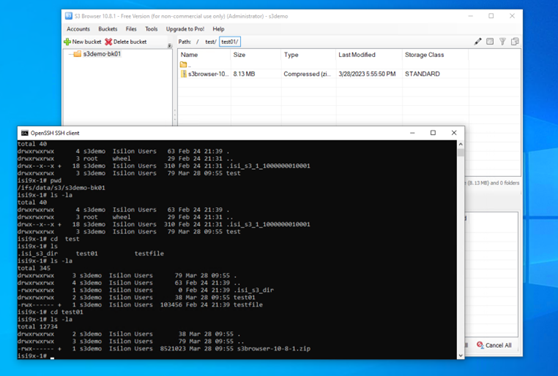
그림 1: 올바른 클라이언트 파일 타임스탬
프S3 브라우저 또는 AWS S3 CLI:
타임스탬프가 올바르지 않습니다.

그림 2: 잘못된 클라이언트 파일 타임스탬프
PCAP 표시:
와 S3 오브젝트의 타임스탬프 불일치관찰:
test/test01/
PowerScale OneFS에서 버킷 s3demo-bk01에 s3browser-10-8-1.zip 파일을 업로드합니다.타임스
탬프가 올바른지 확인합니다.
isi9x-1# ls -la
total 12734
drwxrwxrwx     2 s3demo  Isilon Users       38 Mar 28 09:55 .
drwxrwxrwx     3 s3demo  Isilon Users       79 Mar 28 09:55 ..
-rwx------ +   1 s3demo  Isilon Users  8521023 Mar 28 09:55 s3browser-10-8-1.zip
isi9x-1#
그림 1: 올바른 클라이언트 파일 타임스탬
프S3 브라우저 또는 AWS S3 CLI:
타임스탬프가 올바르지 않습니다.
PS C:\Users\Administrator> aws s3 ls s3://s3demo-bk01/test/test01/ --endpoint-url http://192.168.1.41:9020
2023-03-28 17:55:50    8521023 s3browser-10-8-1.zip
그림 2: 잘못된 클라이언트 파일 타임스탬프
PCAP 표시:
LastModified: 2023-03-28T09:55:50.000Z 이것은 GMT 시간을 나타내며 이는 잘못된 것입니다.
Cause
타임스탬프 불일치는 PowerScale OneFS 코드 문제로 인해 발생합니다. 현재 코드는 GMT만 사용합니다.
Resolution
PowerScale 엔지니어링 팀은 향후 PowerScale OneFS 버전 및 패치에서 릴리스될 것으로 예상되는 코드 수정 작업을 진행하고 있습니다.
Additional Information
Affected Products
PowerScale OneFSArticle Properties
Article Number: 000211774
Article Type: Solution
Last Modified: 08 Nov 2025
Version: 4
Find answers to your questions from other Dell users
Support Services
Check if your device is covered by Support Services.