VxRail: Vsandrv: Slechts X van de X vSAN-schijven in gebruik op dit knooppunt
Summary: Schijven van de host dragen niet bij aan vSAN-storage vanwege een verkeerde configuratie op de PERC/HBA-storageadapter van vSAN-schijven.
This article applies to
This article does not apply to
This article is not tied to any specific product.
Not all product versions are identified in this article.
Symptoms
1 - Storagecontroller ontbreekt onder Host - Configureren - Storageadapters.
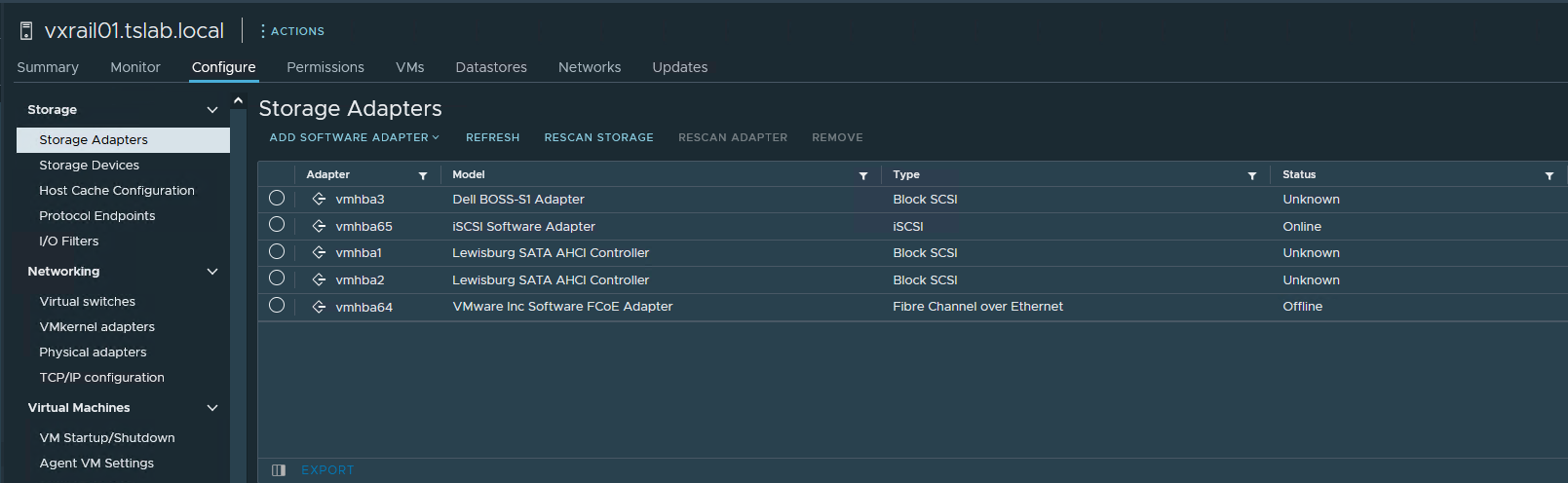
2 - Wanneer u naar "Cluster - Configure - vSAN - Disk management" en "Disks in use" gaat, geeft een van de hosts 0/0 weer.
3 - U gaat naar "iDRAC - Storage - Controllers" en de controller is er.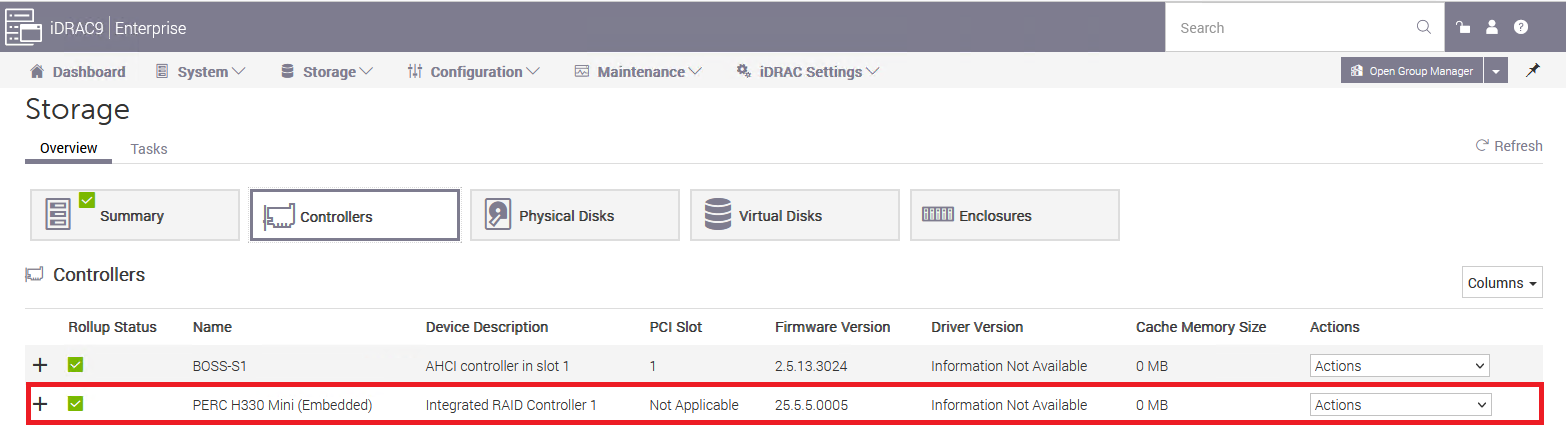
4 - Ook in "iDRAC - Storage - Fysieke schijven" zijn alle schijven aanwezig.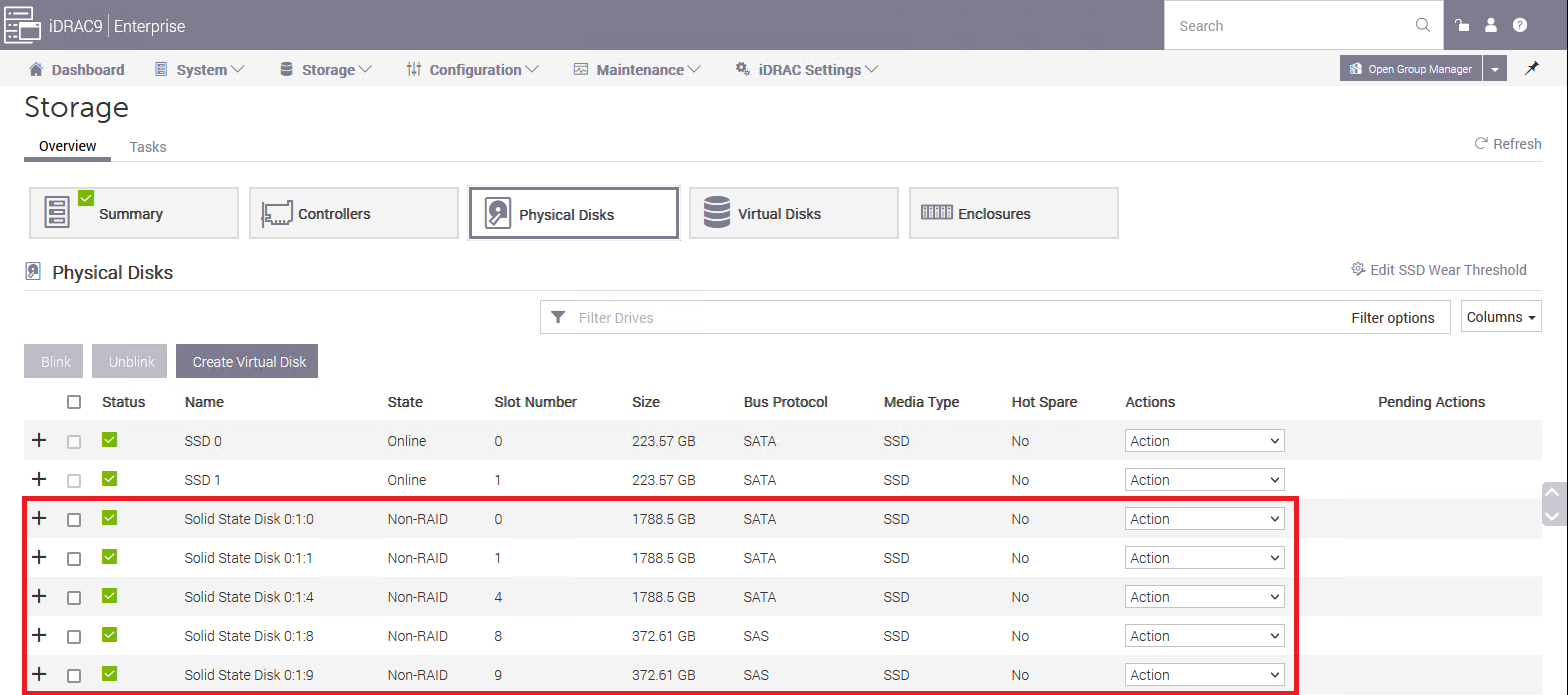
5 - U maakt verbinding met de host via SSH en voert "esxcli storage core adapter list" en vmhbaX (in ons geval is vmhab0) ontbreekt.
[root@vxrail01:~] esxcli storage core adapter list
HBA Name  Driver     Link State  UID                                     Capabilities         Description
--------  ---------  ----------  --------------------------------------  -------------------  -----------
vmhba1    vmw_ahci   link-n/a    sata.vmhba1                                                  (0000:00:11.5) Intel Corporation Lewisburg SATA AHCI Controller
vmhba2    vmw_ahci   link-n/a    sata.vmhba2                                                  (0000:00:17.0) Intel Corporation Lewisburg SATA AHCI Controller
vmhba3    vmw_ahci   link-n/a    sata.vmhba3                                                  (0000:3b:00.0) Marvell Technology Group Ltd. Dell BOSS-S1 Adapter
vmhba64   vmkfcoe    link-down   fcoe.1000000c2902a258:2000000c2902a258  Second Level Lun ID  VMware Inc Software FCoE Adapter
vmhba65   iscsi_vmk  online      iscsi.vmhba65                           Second Level Lun ID  iSCSI Software Adapter
6 - Wanneer u de PCI-apparaten vermeldt met "lspci | grep -i hba", de PERC/HBA daar
[root@vxrail01:~] lspci | grep -i hba
0000:00:11.5 SATA controller: Intel Corporation Lewisburg SATA AHCI Controller [vmhba1]
0000:00:17.0 SATA controller: Intel Corporation Lewisburg SATA AHCI Controller [vmhba2]
0000:18:00.0 RAID bus controller: Broadcom PERC H330 Mini [vmhba0]
0000:3b:00.0 SATA controller: Marvell Technology Group Ltd. Dell BOSS-S1 Adapter [vmhba3]
7 - Controleer de eigenschappen van HBA door "lspci -p | grep -i vmhbaX"
[root@vxrail01:~] lspci -p | grep -i vmhba0
0000:18:00.0 1000:005f 1028:1f4b 255/   /     A P pciPassthru  vmhba0
In dit geval, zoals we kunnen zien, is de vmhba0 ingesteld op "pciPassthru", dat is het probleem.
Cause
Dit wordt veroorzaakt wanneer iemand de PCI-passthrough inschakelt op de HBA die verantwoordelijk is voor de vSAN-schijven.
Resolution
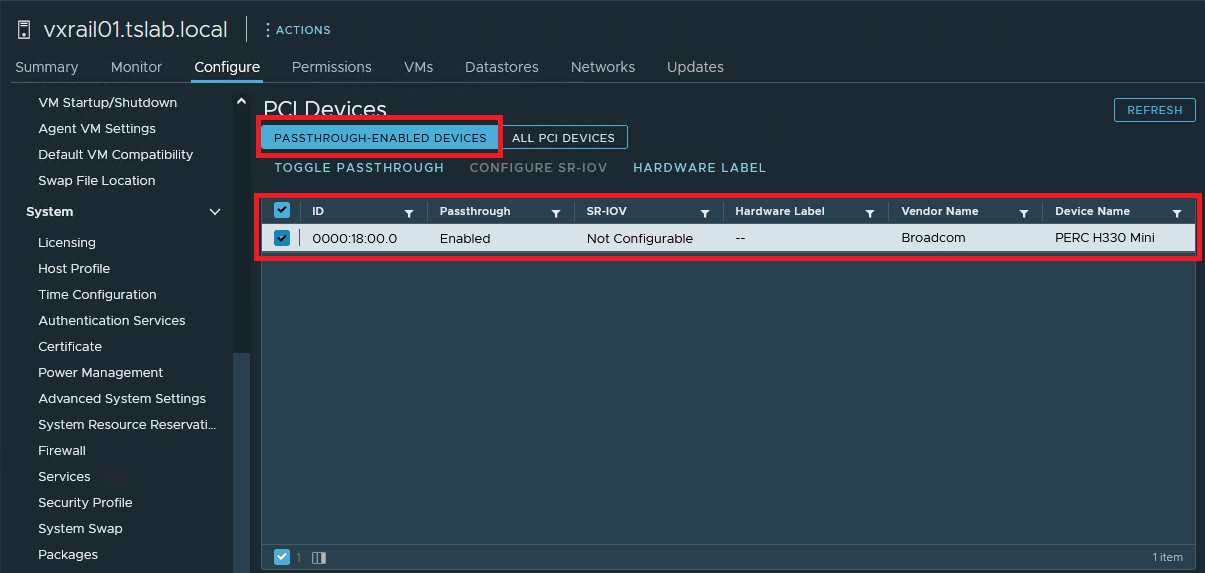
1 - Klik op de host waarin de HBA niet wordt weergegeven. Ga naar "Configure - Hardware - PCI Devices", onder het tabblad "PASSTHROUGH-ENABLED DEVICES" moet u de HBA zien die problemen heeft. Selecteer het en klik op "TOGGLE PASSTHROUGH"
Affected Products
VxRail SoftwareArticle Properties
Article Number: 000212003
Article Type: Solution
Last Modified: 21 Aug 2025
Version: 3
Find answers to your questions from other Dell users
Support Services
Check if your device is covered by Support Services.