PowerScale:Active Directory 使用者升級至 OneFS 9.5 或更新版本後,未定義屬性驗證失敗
Summary: 從任何先前版本升級至 OneFS 9.5.x 或更新版本時,升級前代碼檢查可能會識別「msds-SupportedEncryptionTypes」的 NULL/0 值。如果未解決此問題,可能會導致身份驗證失敗 (DU)。
This article applies to
This article does not apply to
This article is not tied to any specific product.
Not all product versions are identified in this article.
Symptoms
如果叢集升級到 OneFS 9.5,則機器帳戶屬性的值 msDS-SupportedEncryptionTypes 未設置,身份驗證可能會失敗。Active Directory 提供者可能顯示為無樣式狀態,或可能從中遺失 isi auth 狀態輸出。
依預設,當叢集首次加入 Active Directory 時,此值會設為 31 (或十六進位0xF1)。根據 Dell 支援 PowerScale OneFS 產品頁面上的 OneFS 9.5 安全性組態指南,我們為 SMB 和 Kerberos 提供了許多支援的加密類型。
注意:Dell 手冊頁面需要驗證。
如果有人想修改以下內容的屬性
msDS-SupportedEncryptionTypes,如果它不排除運行所需的加密類型,這是可以接受的。例如,有些人可能希望調整該值以省略對 RC4 的支援。
在啟用進階功能的屬性中屬性的範例:
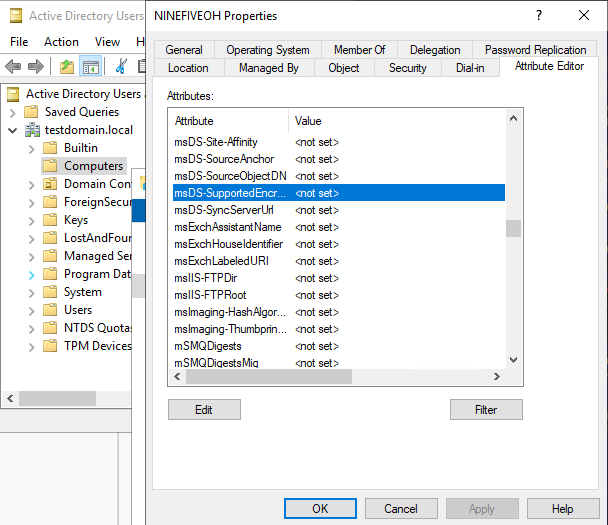
圖 1:的值 msDS-SupportedEncryptionTypes 屬性顯示為 <未設定>。
Powershell 的範例:
DistinguishedName : CN=NINEFIVEOH,CN=Computers,DC=testdomain,DC=local
DNSHostName       : ninefiveoh.testdomain.local
Enabled           : True
Name              : NINEFIVEOH
ObjectClass       : computer
ObjectGUID        : 8dbed342-6a12-41ff-889f-8249cc39b673
SamAccountName    : NINEFIVEOH$
SID               : S-1-5-21-3532647020-1821455699-3245163308-1110
UserPrincipalName :
上述輸出不包含屬性的欄位 msDS-SupportedEncryptionTypes,它通常會報告一個整數值。
下面是另一個集群的示例,我們確實看到屬性填充了設置值:
DistinguishedName             : CN=COREBUDDY,CN=Computers,DC=testdomain,DC=local
DNSHostName                   : corebuddy.testdomain.local
Enabled                       : True
msDS-SupportedEncryptionTypes : 31   <<<<<<<<<<<<<<<<
Name                          : COREBUDDY
ObjectClass                   : computer
ObjectGUID                    : e29236a7-cc36-4686-bca9-010ba4143ca3
SamAccountName                : COREBUDDY$
SID                           : S-1-5-21-3532647020-1821455699-3245163308-1104
UserPrincipalName             :
另一個症狀是填入特定訊息 /var/log/lsass.d.log 檔案,如下所示:
2023-04-14T02:40:07.877593+00:00 <30.3> ninefiveoh-1(id1) lsass[13628]: [lsass] Failed to read msDS-SupportedEncryptionTypes for account CN=NINEFIVEOH,CN=Computers,DC=testdomain,DC=local
2023-04-14T02:40:07.877656+00:00 <30.3> ninefiveoh-1(id1) lsass[13628]: [lsass] Error 40044 (symbol: LW_ERROR_NO_SUCH_DOMAIN) occurred while putting an LDAP connection back in the domain free list.
2023-04-14T02:40:23.903189+00:00 <30.3> ninefiveoh-1(id1) lsass[13628]: [lsass] Failed to read msDS-SupportedEncryptionTypes for account CN=NINEFIVEOH,CN=Computers,DC=testdomain,DC=local
2023-04-14T02:40:23.903268+00:00 <30.3> ninefiveoh-1(id1) lsass[13628]: [lsass] Error 40044 (symbol: LW_ERROR_NO_SUCH_DOMAIN) occurred while putting an LDAP connection back in the domain free list.
若要確認這是問題所在,管理員必須在 Active Directory 中檢查叢集的機器帳戶物件。這可以通過以下兩種方式之一完成:
- 在 DC 上開啟 Active Directory 使用者和電腦 (ADUC)。
- 在視窗的頂部功能區中,選擇 “查看 ”,然後按兩下 “高級功能”。
- 右鍵按下 物件 並轉到 屬性編輯器 選項卡並滾動以找到
msDS-SupportedEncryptionTypes屬性。 - 按兩下 屬性 欄位,然後檢查新視窗中報告的十進位數。
- 在具有正確機器帳戶名稱的 DC 上使用下列 Powershell 命令。
Get-ADComputer -Identity <machine account name> -Properties msDS-SupportedEncryptionTypes
針對上述問題,系統管理員必須使用在 Active Directory 中具有網域層級權限的帳戶來解決問題。
Cause
手動刪除 msDS-SupportedEncryptionTypes 叢集機器帳戶物件上的屬性會導致 Active Directory 報告 NULL 值。這無法通過較新代碼中的檢查,這是一系列增強功能的一部分,以獲得更好的安全支援。
未設定此值而加入 Active Directory 的較舊叢集也可能受到此問題影響。這是因為除非執行重新加入 Active Directory,否則不會設定任何值。
Resolution
因應措施:
將屬性更改為空值以外的值。安全的選項是根據安全性需求選擇預設值 31 或 24。這是透過 UI 或 Powershell 完成。
您可以在 Microsoft 網站部落格上找到值清單及其支援的加密類型。
DC 上的 Active Directory 系統管理員可能會使用下列命令 (插入正確的機器帳戶名稱和整數),而不是 UI 為屬性指定值。

Set-ADComputer -Identity COMPUTERNAME$ -Add @{'msDS-SupportedEncryptionTypes'="<INTEGER>"}
以下範例將 msDS-SupportedEncryptionTypes 群集電腦帳戶的預設值 31 的屬性 NINEFIVEOH$:
Set-ADComputer -Identity NINEFIVEOH$ -Add @{'msDS-SupportedEncryptionTypes'="31"}
套用變更後,必須複製到 Active Directory 環境中的所有網域控制站。之後,可能需要在叢集上進行驗證重新整理或目標 LSASS 重新開機,以清除此狀況。
Dell 工程部門已在 OneFS 9.5.0.3 中發佈了程式碼增強功能,以解決此問題。如果系統管理員在升級前未設定值,則可能仍會看到 IOCA 升級預先檢查失敗。如果系統管理員已限制 AD 中的叢集權限以修改屬性,則必須在進行任何升級活動之前手動更新屬性。若叢集沒有足夠的權限,無法在升級前更新屬性,將會導致資料不可用性。
注意:OneFS 9.5 及更新版本需要此屬性
msDS-SupportedEncryptionTypes。執行沒有或不支援此屬性的 Windows Server 版本的系統管理員必須升級其網域控制站。此需求沒有因應措施。未能在 OneFS 升級前在支援的 Windows Server 版本上具備網域控制站,可能會導致資料不可用性。
Additional Information
Affected Products
PowerScale OneFSArticle Properties
Article Number: 000212387
Article Type: Solution
Last Modified: 25 Aug 2025
Version: 12
Find answers to your questions from other Dell users
Support Services
Check if your device is covered by Support Services.