Data Protection Central 19.8: Single Sign On redirect does not finish with the message "Invalid parameter: redirect_uri"
Summary: In Data Protection Central (DPC) 19.8, when using Single Sign On (SSO) and clicking "Avamar UI" or other UI link, redirection does not finish. DPC UI displays the message: Invalid parameter: redirect_uri ...
This article applies to
This article does not apply to
This article is not tied to any specific product.
Not all product versions are identified in this article.
Symptoms
In DPC 19.8, when SSO is configured and you click Avamar UI or another UI link, the redirection does not finish.
The DPC UI shows the error message:

Figure 1: Screenshot of Invalid Parameter in DPC UI
The DPC UI shows the error message:
Invalid parameter : redirect_uri
Figure 1: Screenshot of Invalid Parameter in DPC UI
Cause
The hostname entered in System Management for Avamar is case-sensitive. Usually, it is in UPPERCASE LETTERS.
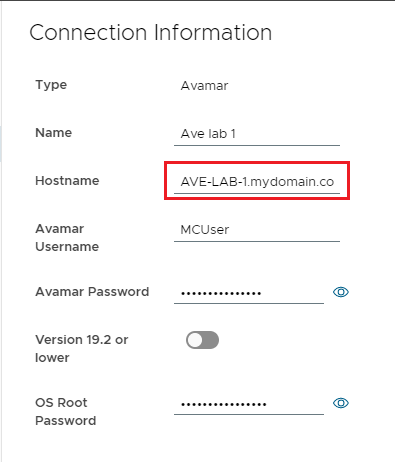
Figure 2: Screenshot of Connection information showing uppercase letters
Resolution
To address this issue:
- Delete the affected system from System Management as seen in this screenshot:
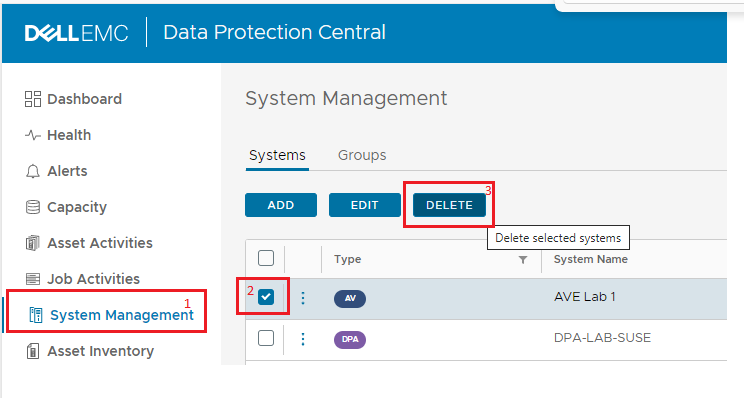
Figure 3: Screenshot of System Management screen with deletion of affected system
- Add the affected system back into System Management, this time using lowercase name for the hostname field.
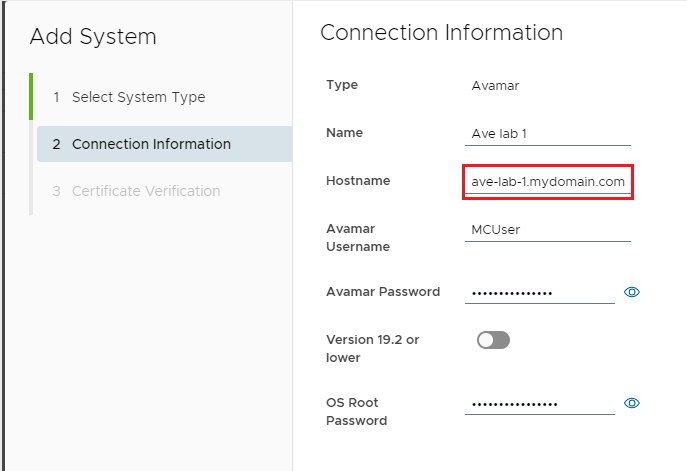
Figure 4: Screenshot of Add affected system back in.
- Once the system is added back in, launch the Avamar UI to test SSO.
Article Properties
Article Number: 000212456
Article Type: Solution
Last Modified: 13 Jan 2026
Version: 4
Find answers to your questions from other Dell users
Support Services
Check if your device is covered by Support Services.