「IDPA:ACM LDAP匿名ルックアップを無効にした後、ACMがUIのパスワードを変更できない
Summary: IDPAバージョン2.7.3以前では、Dellの記事196092に従ってACM LDAP匿名ルックアップを無効にすると、UIからパスワードを変更するときにACMでエラー「ACM Secure openLDAP-idpauserユーザーの接続を検証できませんでした」が報告されます。
This article applies to
This article does not apply to
This article is not tied to any specific product.
Not all product versions are identified in this article.
Symptoms
Dellの記事196092「PowerProtect DPシリーズ アプライアンスおよびIDPA: アプライアンスConfiguration Managerで許可されたLDAP匿名ディレクトリー アクセス。ACM LDAP匿名ルックアップを無効にするために、UIからアプライアンス パスワードを変更しようとすると、ACMは「ACM Secure openLDAP-idpauserユーザーの接続を検証できませんでした」というエラーを報告します。
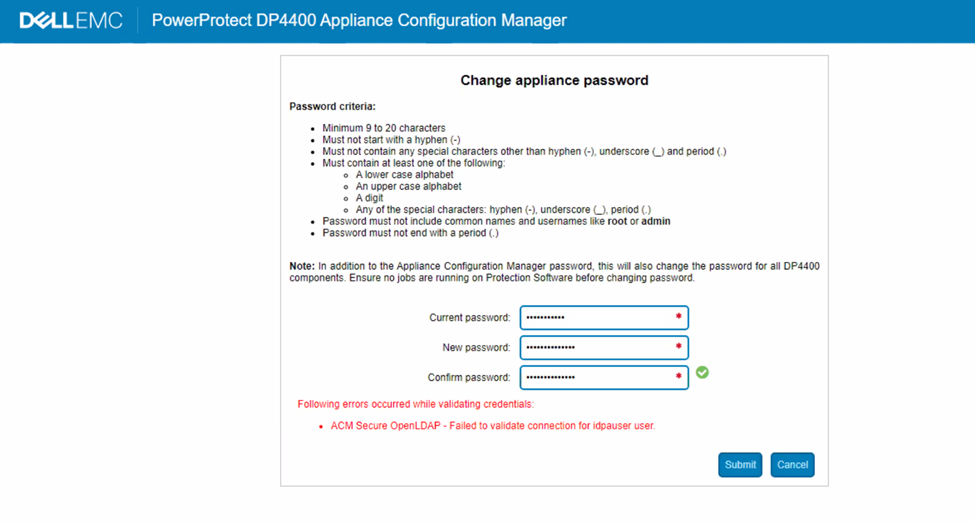
図1: DPシリーズのエラー メッセージ「idpauserユーザーへの接続を検証できませんでした」のスクリーンショット
Cause
ACM server.logでは、パスワードの検証中に次のエラーが表示されます。
2023-05-01 06:59:28,768 INFO  [https-openssl-apr-8543-exec-1]-util.SSHUtil: Remote command using SSH execution status:  Host     : [ACM IP] User     : [root]       Password : [**********] Command  : [ldapsearch -x -b "dc=idpa,dc=local" -h <ACM FQDN> "(&(objectClass=posixGroup)(cn=idpagroup)(gidNumber=1000))"]   STATUS   : [48]
2023-05-01 06:59:28,768 INFO  [https-openssl-apr-8543-exec-1]-util.SSHUtil:     STDOUT   : [ldap_bind: Inappropriate authentication (48)^M
                        additional info: anonymous bind disallowed^M]
2023-05-01 06:59:28,769 INFO  [https-openssl-apr-8543-exec-1]-util.SSHUtil:     STDERR   : []
2023-05-01 06:59:28,769 ERROR [https-openssl-apr-8543-exec-1]-util.SSHUtil: Failed to executed remote command using SSH.
2023-05-01 06:59:28,769 ERROR [https-openssl-apr-8543-exec-1]-ldapintegration.LDAPIntegrationService: validatePosixGroup --> Failed to execute command - ldapsearch -x -b "dc=idpa,dc=local" -h <ACM FQDN> "(&(objectClass=posixGroup)(cn=idpagroup)(gidNumber=1000))"
2023-05-01 06:59:28,769 INFO  [https-openssl-apr-8543-exec-1]-ldapintegration.LDAPIntegrationService: validatePosixGroup --> Failed to validate posix group name.
com.emc.vcedpa.common.exception.ApplianceException: Failed to validate posix group.
2023-05-01 06:59:58,298 INFO  [https-openssl-apr-8543-exec-1]-appliancecredentialsmanager.ApplianceCredentialsManager: ACM test connection is successful for root
2023-05-01 06:59:58,298 INFO  [https-openssl-apr-8543-exec-1]-appliancecredentialsmanager.ApplianceCredentialsManager: Change password validation status: ApplianceCredentialsConnectionStatus [productCredentialsStatusList=[ProductCredentialsStatus [productName=ACM Secure OpenLDAP, failedCredentialsStatusList=[ACM Secure OpenLDAP - Failed to validate connection for idpauser user.], sameCredentialsStatusList=[]], ProductCredentialsStatus [productName=Protection Storage, failedCredentialsStatusList=[], sameCredentialsStatusList=[]], ProductCredentialsStatus [productName=Protection Software, failedCredentialsStatusList=[], sameCredentialsStatusList=[]], ProductCredentialsStatus [productName=Data Protection Central, failedCredentialsStatusList=[], sameCredentialsStatusList=[]], ProductCredentialsStatus [productName=Reporting & Analytics, failedCredentialsStatusList=[], sameCredentialsStatusList=[]], ProductCredentialsStatus [productName=Search, failedCredentialsStatusList=[], sameCredentialsStatusList=[]], ProductCredentialsStatus [productName=Hypervisor Manager, failedCredentialsStatusList=[], sameCredentialsStatusList=[]], ProductCredentialsStatus [productName=Hypervisor, failedCredentialsStatusList=[], sameCredentialsStatusList=[]], ProductCredentialsStatus [productName=Appliance Configuration Manager, failedCredentialsStatusList=[], sameCredentialsStatusList=[]]], resultStatus=false, sameCredentialStatus=false]
server.logは、コマンドを実行しようとしたときにLDAP匿名ルックアップが無効になったことを示しています。
acm-:/ # ldapsearch -x -b "dc=idpa,dc=local" -h <ACM FQDN> "(&(objectClass=posixGroup)(cn=idpagroup)(gidNumber=1000))"
ldap_bind: Inappropriate authentication (48)
        additional info: anonymous bind disallowed
acm-: #
IDPAバージョン2.7.3以前の現在のACMアプライアンス パスワード変更ワークフローでは、パスワード検証に匿名のLDAPルックアップが使用されます。ACMでLDAP匿名ルックアップが無効になっている場合、パスワード検証は失敗します。
エンジニアリング エスカレーションが送信され、今後のソフトウェア リリースで恒久的な解決が予定されています。以下の回避策に従って、恒久的な解決策が利用可能になるまでアプライアンスのパスワードを変更します。
Resolution
回避策:
ACMで匿名LDAPルックアップを有効にするには、次の手順に従います。
- rootユーザーを使用してACMにSSH接続します
- 「/etc/openldap」フォルダーに移動します。
cd /etc/openldap
- 次のコマンドを使用して、「ldif」ファイルを作成します。
vi ldap_enable_bind_anon.ldif
「i」を使用してvi挿入モードに入り、ファイルに次のコンテンツを貼り付けます。
dn: cn=config
changetype: modify
delete: olcDisallows
olcDisallows: bind_anon

dn: cn=config
changetype: modify
delete: olcRequires
olcRequires: authc

dn: olcDatabase={-1}frontend,cn=config
changetype: modify
delete: olcRequires
olcRequires: authc
- ファイルを保存します。キーボードの「Esc」を押して、viコマンド モードに戻ります。「:wq!」を押してファイルを保存します。
- 次のコマンドを使用して、ファイルの内容を確認します。
cat ldap_enable_bind_anon.ldif
出力例:
acm:/etc/openldap # cat ldap_enable_bind_anon.ldif
dn: cn=config
changetype: modify
delete: olcDisallows
olcDisallows: bind_anon

dn: cn=config
changetype: modify
delete: olcRequires
olcRequires: authc

dn: olcDatabase={-1}frontend,cn=config
changetype: modify
delete: olcRequires
olcRequires: authc
acm:/etc/openldap #
- 次のコマンドを使用して、匿名LDAPルックアップを有効にします。
ldapadd -Y EXTERNAL -H ldapi:/// -f /etc/openldap/ldap_enable_bind_anon.ldif
出力例:
acm:/etc/openldap # ldapadd -Y EXTERNAL -H ldapi:/// -f /etc/openldap/ldap_enable_bind_anon.ldif
SASL/EXTERNAL authentication started
SASL username: gidNumber=0+uidNumber=0,cn=peercred,cn=external,cn=auth
SASL SSF: 0
modifying entry "cn=config"

modifying entry "cn=config"

modifying entry "olcDatabase={-1}frontend,cn=config"

acm-:/etc/openldap #
- LDPAサーバーを再起動します。
systemctl restart slapd
- 次のコマンドを実行して、匿名LDAPルックアップが有効であることを確認します。
ldapsearch -x -b "dc=idpa,dc=local" -h <ACM FQDN> "(&(objectClass=posixGroup)(cn=idpagroup)(gidNumber=1000))"
or
ldapsearch -x -b "dc=idpa,dc=local" -h `hostname -f` "(&(objectClass=posixGroup)(cn=idpagroup)(gidNumber=1000))"
出力例:
acm:/etc/openldap # ldapsearch -x -b "dc=idpa,dc=local" -h `hostname -f` "(&(objectClass=posixGroup)(cn=idpagroup)(gidNumber=1000))"
# extended LDIF
#
# LDAPv3
# base <dc=idpa,dc=local> with scope subtree
# filter: (&(objectClass=posixGroup)(cn=idpagroup)(gidNumber=1000))
# requesting: ALL
#

# idpagroup, Group, idpa.local
dn: cn=idpagroup,ou=Group,dc=idpa,dc=local
objectClass: top
objectClass: posixGroup
cn: idpagroup
memberUid: idpauser
gidNumber: 1000

# search result
search: 2
result: 0 Success

# numResponses: 2
# numEntries: 1
acm:/etc/openldap #
- ACM UIにログインし、アプライアンスのパスワードを再度変更します。問題なく完了するはずです。
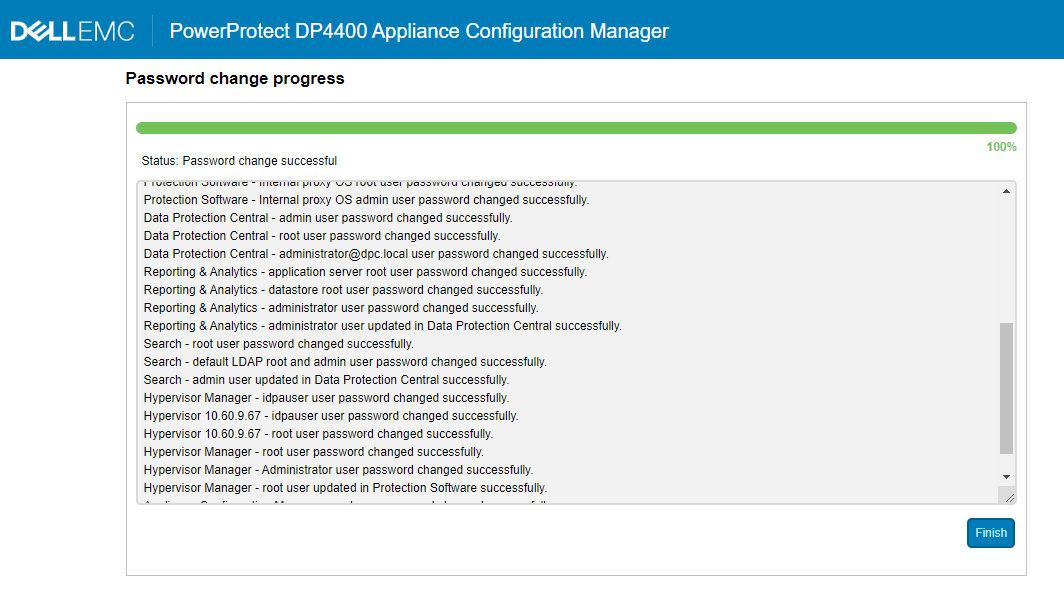
図2:DPシリーズのパスワード変更が進行中のスクリーンショット
- ACM匿名LDAPルックアップを無効にする必要があるかどうかを確認します。「はい」の場合は、Dellの記事196092「PowerProtect DPシリーズ アプライアンスとIDPA: Appliance Configuration Managerで許可されたLDAP匿名ディレクトリー アクセスを選択して、匿名ルックアップを再度無効にします。
Affected Products
PowerProtect DP4400, PowerProtect DP5300, PowerProtect DP5800, PowerProtect DP8300, PowerProtect DP8800, PowerProtect Data Protection Software, Integrated Data Protection Appliance Family, Integrated Data Protection Appliance Software
, PowerProtect DP5900, PowerProtect DP8400, PowerProtect DP8900
...
Article Properties
Article Number: 000212941
Article Type: Solution
Last Modified: 01 Aug 2025
Version: 5
Find answers to your questions from other Dell users
Support Services
Check if your device is covered by Support Services.