IDPA:禁用 ACM LDAP 匿名查找后,ACM 无法在 UI 上更改密码
Summary: 在 IDPA 版本 2.7.3 或之前,按照戴尔文章196092禁用 ACM LDAP 匿名查找后,在从 UI 更改密码时,ACM 报告错误“ACM Secure openLDAP-Failed to validate connection for idpauser user”。
This article applies to
This article does not apply to
This article is not tied to any specific product.
Not all product versions are identified in this article.
Symptoms
按照戴尔文章 196092作后,PowerProtect DP 系列备份一体机和 IDPA:Appliance Configuration Manager 上允许 LDAP 匿名目录访问,要禁用 ACM LDAP 匿名查找,ACM 在尝试从 UI 更改设备密码时报告错误“ACM Secure openLDAP-Failed to validate connection for idpauser user”:

图 1:DP 系列错误消息“无法验证与 idpauser 用户的连接”的屏幕截图
Cause
在密码验证期间,ACM server.log显示以下错误:
2023-05-01 06:59:28,768 INFO  [https-openssl-apr-8543-exec-1]-util.SSHUtil: Remote command using SSH execution status:  Host     : [ACM IP] User     : [root]       Password : [**********] Command  : [ldapsearch -x -b "dc=idpa,dc=local" -h <ACM FQDN> "(&(objectClass=posixGroup)(cn=idpagroup)(gidNumber=1000))"]   STATUS   : [48]
2023-05-01 06:59:28,768 INFO  [https-openssl-apr-8543-exec-1]-util.SSHUtil:     STDOUT   : [ldap_bind: Inappropriate authentication (48)^M
                        additional info: anonymous bind disallowed^M]
2023-05-01 06:59:28,769 INFO  [https-openssl-apr-8543-exec-1]-util.SSHUtil:     STDERR   : []
2023-05-01 06:59:28,769 ERROR [https-openssl-apr-8543-exec-1]-util.SSHUtil: Failed to executed remote command using SSH.
2023-05-01 06:59:28,769 ERROR [https-openssl-apr-8543-exec-1]-ldapintegration.LDAPIntegrationService: validatePosixGroup --> Failed to execute command - ldapsearch -x -b "dc=idpa,dc=local" -h <ACM FQDN> "(&(objectClass=posixGroup)(cn=idpagroup)(gidNumber=1000))"
2023-05-01 06:59:28,769 INFO  [https-openssl-apr-8543-exec-1]-ldapintegration.LDAPIntegrationService: validatePosixGroup --> Failed to validate posix group name.
com.emc.vcedpa.common.exception.ApplianceException: Failed to validate posix group.
2023-05-01 06:59:58,298 INFO  [https-openssl-apr-8543-exec-1]-appliancecredentialsmanager.ApplianceCredentialsManager: ACM test connection is successful for root
2023-05-01 06:59:58,298 INFO  [https-openssl-apr-8543-exec-1]-appliancecredentialsmanager.ApplianceCredentialsManager: Change password validation status: ApplianceCredentialsConnectionStatus [productCredentialsStatusList=[ProductCredentialsStatus [productName=ACM Secure OpenLDAP, failedCredentialsStatusList=[ACM Secure OpenLDAP - Failed to validate connection for idpauser user.], sameCredentialsStatusList=[]], ProductCredentialsStatus [productName=Protection Storage, failedCredentialsStatusList=[], sameCredentialsStatusList=[]], ProductCredentialsStatus [productName=Protection Software, failedCredentialsStatusList=[], sameCredentialsStatusList=[]], ProductCredentialsStatus [productName=Data Protection Central, failedCredentialsStatusList=[], sameCredentialsStatusList=[]], ProductCredentialsStatus [productName=Reporting & Analytics, failedCredentialsStatusList=[], sameCredentialsStatusList=[]], ProductCredentialsStatus [productName=Search, failedCredentialsStatusList=[], sameCredentialsStatusList=[]], ProductCredentialsStatus [productName=Hypervisor Manager, failedCredentialsStatusList=[], sameCredentialsStatusList=[]], ProductCredentialsStatus [productName=Hypervisor, failedCredentialsStatusList=[], sameCredentialsStatusList=[]], ProductCredentialsStatus [productName=Appliance Configuration Manager, failedCredentialsStatusList=[], sameCredentialsStatusList=[]]], resultStatus=false, sameCredentialStatus=false]
server.log显示 LDAP 匿名查找在尝试运行命令时被禁用:
acm-:/ # ldapsearch -x -b "dc=idpa,dc=local" -h <ACM FQDN> "(&(objectClass=posixGroup)(cn=idpagroup)(gidNumber=1000))"
ldap_bind: Inappropriate authentication (48)
        additional info: anonymous bind disallowed
acm-: #
在当前 ACM 更改设备密码工作流中,在 IDPA 版本 2.7.3 上或之前,匿名 LDAP 查找用于密码验证。在 ACM 中禁用 LDAP 匿名查找时,密码验证将失败。
工程部门上报已提交,预计在即将发布的软件版本中提供永久解决方案。请按照以下解决方法更改设备密码,直至永久解决方案可用。
Resolution
解决方法:
按照以下步骤在 ACM 中启用匿名 LDAP 查找:
- 使用 root 用户身份通过 SSH 连接到 ACM
- 转至“/etc/openldap”文件夹。
cd /etc/openldap
- 使用以下命令创建“ldif”文件:
vi ldap_enable_bind_anon.ldif
使用“i”进入vi插入模式,然后将以下内容粘贴到文件中:
dn: cn=config
changetype: modify
delete: olcDisallows
olcDisallows: bind_anon

dn: cn=config
changetype: modify
delete: olcRequires
olcRequires: authc

dn: olcDatabase={-1}frontend,cn=config
changetype: modify
delete: olcRequires
olcRequires: authc
- 保存 文件。按键盘上的“Esc”返回 vi 命令模式。按“:wq!”保存文件。
- 使用以下命令验证文件内容:
cat ldap_enable_bind_anon.ldif
示例输出:
acm:/etc/openldap # cat ldap_enable_bind_anon.ldif
dn: cn=config
changetype: modify
delete: olcDisallows
olcDisallows: bind_anon

dn: cn=config
changetype: modify
delete: olcRequires
olcRequires: authc

dn: olcDatabase={-1}frontend,cn=config
changetype: modify
delete: olcRequires
olcRequires: authc
acm:/etc/openldap #
- 使用以下命令启用匿名 LDAP 查找:
ldapadd -Y EXTERNAL -H ldapi:/// -f /etc/openldap/ldap_enable_bind_anon.ldif
示例输出:
acm:/etc/openldap # ldapadd -Y EXTERNAL -H ldapi:/// -f /etc/openldap/ldap_enable_bind_anon.ldif
SASL/EXTERNAL authentication started
SASL username: gidNumber=0+uidNumber=0,cn=peercred,cn=external,cn=auth
SASL SSF: 0
modifying entry "cn=config"

modifying entry "cn=config"

modifying entry "olcDatabase={-1}frontend,cn=config"

acm-:/etc/openldap #
- 重新启动 LDPA 服务器:
systemctl restart slapd
- 运行以下命令以验证是否已启用匿名 LDAP 查找:
ldapsearch -x -b "dc=idpa,dc=local" -h <ACM FQDN> "(&(objectClass=posixGroup)(cn=idpagroup)(gidNumber=1000))"
or
ldapsearch -x -b "dc=idpa,dc=local" -h `hostname -f` "(&(objectClass=posixGroup)(cn=idpagroup)(gidNumber=1000))"
示例输出:
acm:/etc/openldap # ldapsearch -x -b "dc=idpa,dc=local" -h `hostname -f` "(&(objectClass=posixGroup)(cn=idpagroup)(gidNumber=1000))"
# extended LDIF
#
# LDAPv3
# base <dc=idpa,dc=local> with scope subtree
# filter: (&(objectClass=posixGroup)(cn=idpagroup)(gidNumber=1000))
# requesting: ALL
#

# idpagroup, Group, idpa.local
dn: cn=idpagroup,ou=Group,dc=idpa,dc=local
objectClass: top
objectClass: posixGroup
cn: idpagroup
memberUid: idpauser
gidNumber: 1000

# search result
search: 2
result: 0 Success

# numResponses: 2
# numEntries: 1
acm:/etc/openldap #
- 登录到 ACM UI 并再次更改一体机密码。它应该可以正常完成,而不会出现问题:
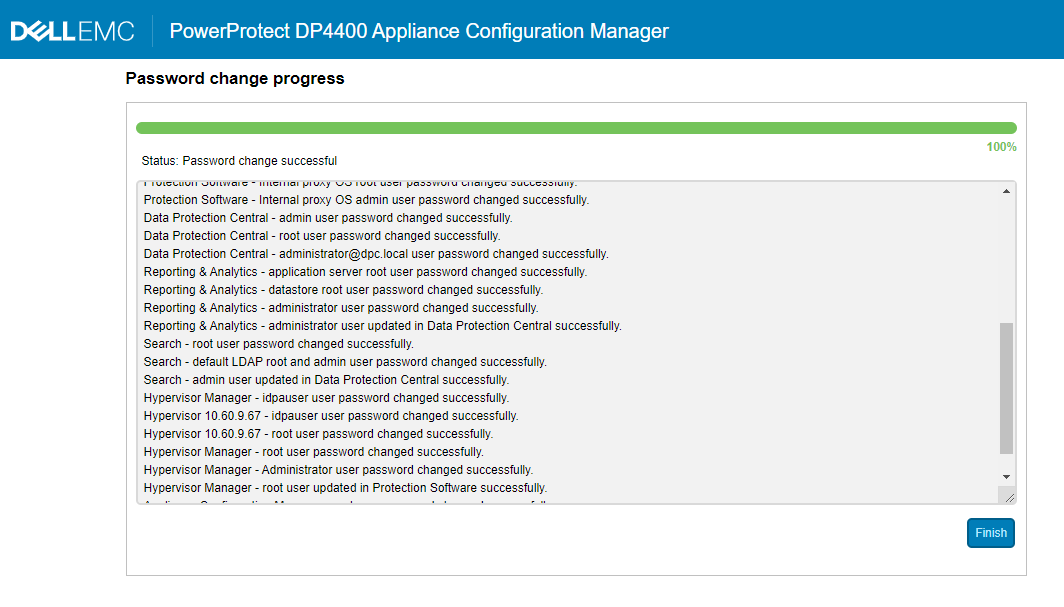
图 2:正在更改 DP 系列密码的屏幕截图
- 查看是否必须禁用 ACM 匿名 LDAP 查找。如果是,请遵循戴尔文章 196092 PowerProtect DP 系列备份一体机和 IDPA:Appliance Configuration Manager 上允许 LDAP 匿名目录访问,以再次禁用匿名查找。
Affected Products
PowerProtect DP4400, PowerProtect DP5300, PowerProtect DP5800, PowerProtect DP8300, PowerProtect DP8800, PowerProtect Data Protection Software, Integrated Data Protection Appliance Family, Integrated Data Protection Appliance Software
, PowerProtect DP5900, PowerProtect DP8400, PowerProtect DP8900
...
Article Properties
Article Number: 000212941
Article Type: Solution
Last Modified: 01 Aug 2025
Version: 5
Find answers to your questions from other Dell users
Support Services
Check if your device is covered by Support Services.