IDPA: ACM kunne ikke ændre adgangskoden på brugergrænsefladen efter deaktivering af det anonyme ACM LDAP-opslag
Summary: På eller før IDPA version 2.7.3, efter at du har fulgt Dell-artikel 196092 om at deaktivere det anonyme ACM LDAP-opslag, rapporterer ACM en fejl "ACM Secure openLDAP-Failed to validate connection for idpauser user", når adgangskoden ændres fra brugergrænsefladen. ...
This article applies to
This article does not apply to
This article is not tied to any specific product.
Not all product versions are identified in this article.
Symptoms
Efter følgende Dell-artikel 196092, PowerProtect DP-seriens enhed og IDPA: LDAP anonym biblioteksadgang tilladt i Appliance Configuration Manager, for at deaktivere anonymt ACM LDAP-opslag, rapporterer ACM fejlen "ACM Secure openLDAP-Failed to validate connection for idpauser user", når du forsøger at ændre applianceadgangskoden fra brugergrænsefladen:
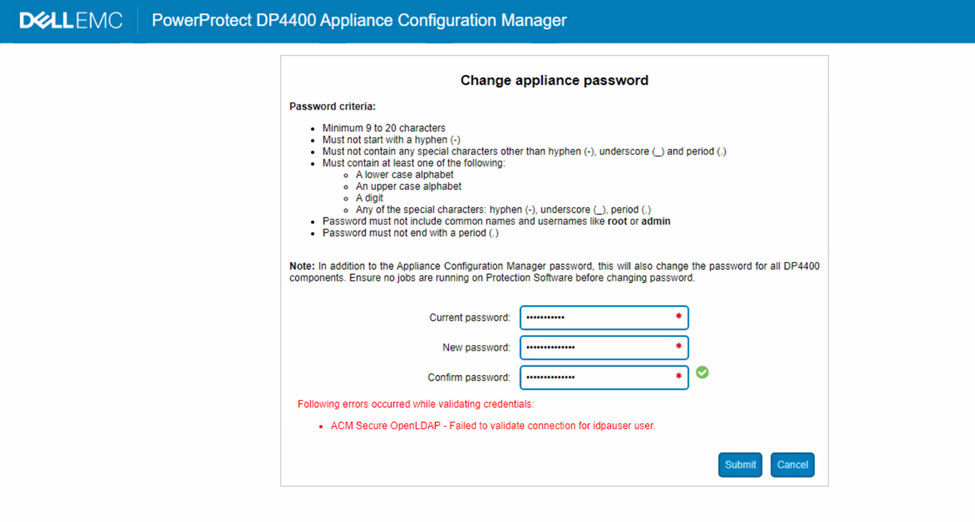
Figur 1: Screenshot af DP-seriens fejlmeddelelse, forbindelsen til idpauser-brugeren kunne ikke valideres
Cause
ACM-server.log viser følgende fejl under valideringen af adgangskoden:
2023-05-01 06:59:28,768 INFO  [https-openssl-apr-8543-exec-1]-util.SSHUtil: Remote command using SSH execution status:  Host     : [ACM IP] User     : [root]       Password : [**********] Command  : [ldapsearch -x -b "dc=idpa,dc=local" -h <ACM FQDN> "(&(objectClass=posixGroup)(cn=idpagroup)(gidNumber=1000))"]   STATUS   : [48]
2023-05-01 06:59:28,768 INFO  [https-openssl-apr-8543-exec-1]-util.SSHUtil:     STDOUT   : [ldap_bind: Inappropriate authentication (48)^M
                        additional info: anonymous bind disallowed^M]
2023-05-01 06:59:28,769 INFO  [https-openssl-apr-8543-exec-1]-util.SSHUtil:     STDERR   : []
2023-05-01 06:59:28,769 ERROR [https-openssl-apr-8543-exec-1]-util.SSHUtil: Failed to executed remote command using SSH.
2023-05-01 06:59:28,769 ERROR [https-openssl-apr-8543-exec-1]-ldapintegration.LDAPIntegrationService: validatePosixGroup --> Failed to execute command - ldapsearch -x -b "dc=idpa,dc=local" -h <ACM FQDN> "(&(objectClass=posixGroup)(cn=idpagroup)(gidNumber=1000))"
2023-05-01 06:59:28,769 INFO  [https-openssl-apr-8543-exec-1]-ldapintegration.LDAPIntegrationService: validatePosixGroup --> Failed to validate posix group name.
com.emc.vcedpa.common.exception.ApplianceException: Failed to validate posix group.
2023-05-01 06:59:58,298 INFO  [https-openssl-apr-8543-exec-1]-appliancecredentialsmanager.ApplianceCredentialsManager: ACM test connection is successful for root
2023-05-01 06:59:58,298 INFO  [https-openssl-apr-8543-exec-1]-appliancecredentialsmanager.ApplianceCredentialsManager: Change password validation status: ApplianceCredentialsConnectionStatus [productCredentialsStatusList=[ProductCredentialsStatus [productName=ACM Secure OpenLDAP, failedCredentialsStatusList=[ACM Secure OpenLDAP - Failed to validate connection for idpauser user.], sameCredentialsStatusList=[]], ProductCredentialsStatus [productName=Protection Storage, failedCredentialsStatusList=[], sameCredentialsStatusList=[]], ProductCredentialsStatus [productName=Protection Software, failedCredentialsStatusList=[], sameCredentialsStatusList=[]], ProductCredentialsStatus [productName=Data Protection Central, failedCredentialsStatusList=[], sameCredentialsStatusList=[]], ProductCredentialsStatus [productName=Reporting & Analytics, failedCredentialsStatusList=[], sameCredentialsStatusList=[]], ProductCredentialsStatus [productName=Search, failedCredentialsStatusList=[], sameCredentialsStatusList=[]], ProductCredentialsStatus [productName=Hypervisor Manager, failedCredentialsStatusList=[], sameCredentialsStatusList=[]], ProductCredentialsStatus [productName=Hypervisor, failedCredentialsStatusList=[], sameCredentialsStatusList=[]], ProductCredentialsStatus [productName=Appliance Configuration Manager, failedCredentialsStatusList=[], sameCredentialsStatusList=[]]], resultStatus=false, sameCredentialStatus=false]
Den server.log viser, at det anonyme LDAP-opslag blev deaktiveret, da du forsøgte at køre kommandoen:
acm-:/ # ldapsearch -x -b "dc=idpa,dc=local" -h <ACM FQDN> "(&(objectClass=posixGroup)(cn=idpagroup)(gidNumber=1000))"
ldap_bind: Inappropriate authentication (48)
        additional info: anonymous bind disallowed
acm-: #
I den aktuelle arbejdsgang for ACM-ændring af enhedsadgangskode på eller før IDPA version 2.7.3 bruges et anonymt LDAP-opslag til adgangskodebekræftelse. Når det anonyme LDAP-opslag er deaktiveret i ACM, mislykkes adgangskodebekræftelsen.
Der er indsendt en teknisk eskalering, og en permanent løsning forventes i en kommende softwareudgivelse. Følg løsningen nedenfor for at ændre enhedens adgangskode, indtil en permanent løsning er tilgængelig.
Resolution
Løsning:
Følg trinene for at aktivere anonymt LDAP-opslag i ACM:
- SSH til ACM ved hjælp af rodbruger
- Gå til mappen "/etc/openldap".
cd /etc/openldap
- Opret en "ldif"-fil ved hjælp af følgende kommando:
vi ldap_enable_bind_anon.ldif
Brug "i" til at gå ind i tilstanden vi Indsæt, og indsæt derefter følgende indhold i filen:
dn: cn=config
changetype: modify
delete: olcDisallows
olcDisallows: bind_anon

dn: cn=config
changetype: modify
delete: olcRequires
olcRequires: authc

dn: olcDatabase={-1}frontend,cn=config
changetype: modify
delete: olcRequires
olcRequires: authc
- Gem filen. Tryk på "Esc" på tastaturet for at vende tilbage til vi-kommandotilstand. Tryk på ":wq!" for at gemme filen.
- Kontroller filindholdet ved hjælp af kommandoen:
cat ldap_enable_bind_anon.ldif
Eksempel på output:
acm:/etc/openldap # cat ldap_enable_bind_anon.ldif
dn: cn=config
changetype: modify
delete: olcDisallows
olcDisallows: bind_anon

dn: cn=config
changetype: modify
delete: olcRequires
olcRequires: authc

dn: olcDatabase={-1}frontend,cn=config
changetype: modify
delete: olcRequires
olcRequires: authc
acm:/etc/openldap #
- Aktivér anonymt LDAP-opslag med følgende kommando:
ldapadd -Y EXTERNAL -H ldapi:/// -f /etc/openldap/ldap_enable_bind_anon.ldif
Eksempel på output:
acm:/etc/openldap # ldapadd -Y EXTERNAL -H ldapi:/// -f /etc/openldap/ldap_enable_bind_anon.ldif
SASL/EXTERNAL authentication started
SASL username: gidNumber=0+uidNumber=0,cn=peercred,cn=external,cn=auth
SASL SSF: 0
modifying entry "cn=config"

modifying entry "cn=config"

modifying entry "olcDatabase={-1}frontend,cn=config"

acm-:/etc/openldap #
- Genstart LDPA-serveren:
systemctl restart slapd
- Kør følgende kommando for at bekræfte, at anonymt LDAP-opslag er aktiveret:
ldapsearch -x -b "dc=idpa,dc=local" -h <ACM FQDN> "(&(objectClass=posixGroup)(cn=idpagroup)(gidNumber=1000))"
or
ldapsearch -x -b "dc=idpa,dc=local" -h `hostname -f` "(&(objectClass=posixGroup)(cn=idpagroup)(gidNumber=1000))"
Eksempel på output:
acm:/etc/openldap # ldapsearch -x -b "dc=idpa,dc=local" -h `hostname -f` "(&(objectClass=posixGroup)(cn=idpagroup)(gidNumber=1000))"
# extended LDIF
#
# LDAPv3
# base <dc=idpa,dc=local> with scope subtree
# filter: (&(objectClass=posixGroup)(cn=idpagroup)(gidNumber=1000))
# requesting: ALL
#

# idpagroup, Group, idpa.local
dn: cn=idpagroup,ou=Group,dc=idpa,dc=local
objectClass: top
objectClass: posixGroup
cn: idpagroup
memberUid: idpauser
gidNumber: 1000

# search result
search: 2
result: 0 Success

# numResponses: 2
# numEntries: 1
acm:/etc/openldap #
- Log ind på ACM-brugergrænsefladen, og skift adgangskoden til enheden igen. Det skal udfyldes uden problemer:

Figur 2: Screenshot af ændring af DP-seriens adgangskode i gang
- Gennemgå, om det anonyme ACM-LDAP-opslag skal være deaktiveret eller ej. Hvis ja, skal du følge Dell-artikel 196092, PowerProtect DP Series Appliance og IDPA: LDAP Anonym biblioteksadgang er tilladt i Appliance Configuration Manager for at deaktivere det anonyme opslag igen.
Affected Products
PowerProtect DP4400, PowerProtect DP5300, PowerProtect DP5800, PowerProtect DP8300, PowerProtect DP8800, PowerProtect Data Protection Software, Integrated Data Protection Appliance Family, Integrated Data Protection Appliance Software
, PowerProtect DP5900, PowerProtect DP8400, PowerProtect DP8900
...
Article Properties
Article Number: 000212941
Article Type: Solution
Last Modified: 01 Aug 2025
Version: 5
Find answers to your questions from other Dell users
Support Services
Check if your device is covered by Support Services.