PowerFlex 3.6: PowerFlex Manager에서 알 수 없거나 관련이 없는 오류를 지우는 방법
Summary: 호스트의 PFxM(PowerFlex Manager)에 임의의 오류가 표시됩니다. 빨간색 x가 표시되는 오류
This article applies to
This article does not apply to
This article is not tied to any specific product.
Not all product versions are identified in this article.
Instructions
증상:
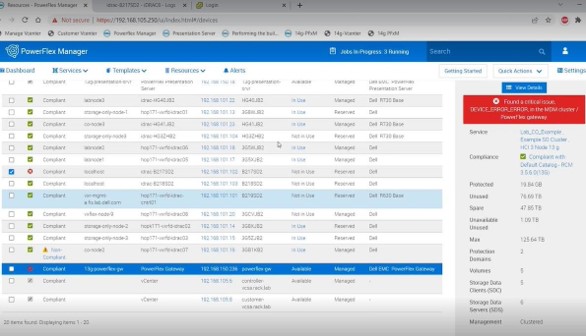
빨간색 x로 표시되는 임의 오류는 호스트의 PFxM에 표시됩니다.- 오류 예:

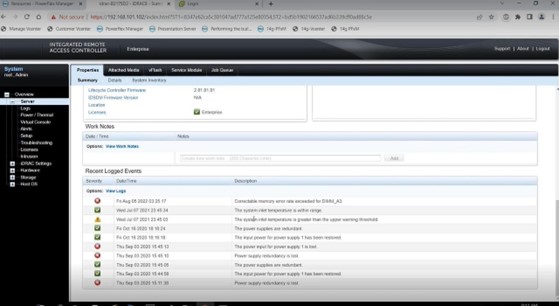
- 오류를 조사하려면 해당 노드의 iDRAC 사용자 인터페이스에 로그인하여 관련 오류 또는 문제가 표시되는지 확인합니다. 일부 오류는 아래 스크린샷 예제에 나열된 오류와 같이 수정 가능한 오류의 형태로 나타날 수 있습니다.
시도 결의안:
- iDRAC 사용자 인터페이스의 Logs 영역으로 이동하고 오른쪽 하단 모서리에 있는 Clear Log를 클릭하여 노드의 로그를 지웁니다.

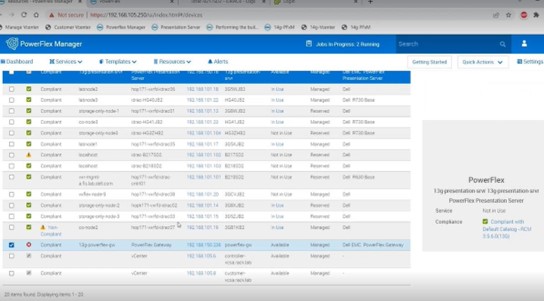
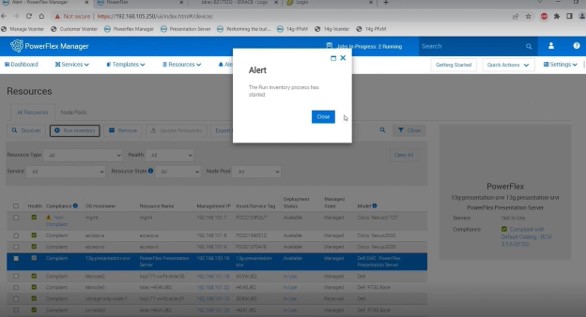
- 오류가 발생한 노드 옆의 확인란을 선택하고 All Resources 메뉴의 상단으로 돌아가서 Run Inventory를 클릭하여 오류가 지워지는지 확인합니다.
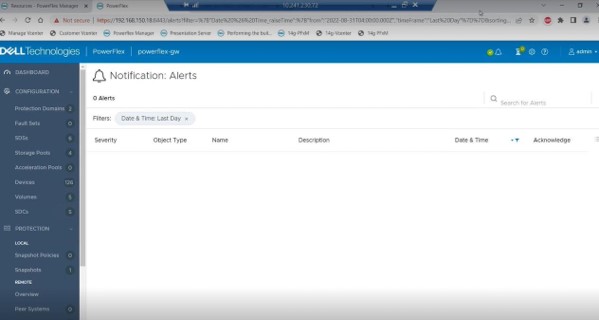
- 게이트웨이에 대해 표시되는 PFxM의 오류의 경우 프레젠테이션 서버 사용자 인터페이스로 이동하여 아래 스크린샷에 따라 해당 끝의 오류를 지우고 확인합니다. 이러한 오류는 PFxM에서 지워진 것으로 표시되는 데 몇 분 정도 걸릴 수 있습니다. 한 시간쯤 지나도 오류가 사라지지 않으면 주 MDM이 이 정보를 캐시할 수 있으므로 주 MDM과 보조 MDM 역할을 전환해 보십시오.

Affected Products
PowerFlex rack, VxFlex Ready Nodes, PowerFlex appliance connectivity, PowerFlex appliance R650, PowerFlex appliance R6525, PowerFlex appliance R660, PowerFlex appliance R6625, Powerflex appliance R750, PowerFlex appliance R760
, PowerFlex appliance R7625, PowerFlex custom node, PowerFlex appliance R640, PowerFlex appliance R740XD, PowerFlex appliance R7525, PowerFlex appliance R840
...
Article Properties
Article Number: 000213161
Article Type: How To
Last Modified: 22 May 2025
Version: 6
Find answers to your questions from other Dell users
Support Services
Check if your device is covered by Support Services.