PowerFlex 3.6:如何在 PowerFlex Manager 中清除未知或不相关的错误
Summary: 主机的随机错误显示在 PowerFlex Manager (PFxM) 中。错误显示红色 x。
This article applies to
This article does not apply to
This article is not tied to any specific product.
Not all product versions are identified in this article.
Instructions
症状:
主机的 PFxM 中显示为红色 x 的随机错误。- 错误示例:
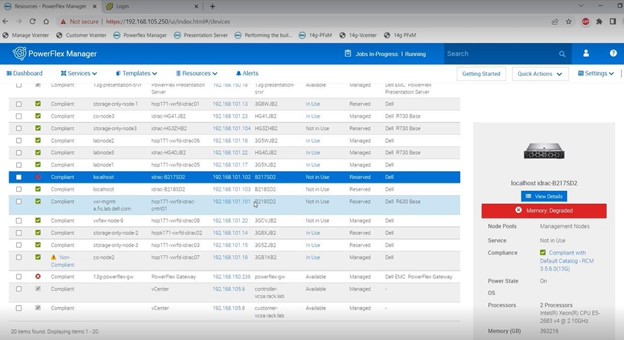
- 要调查错误,请登录到相关节点的 iDRAC 用户界面,以查看是否显示任何相关的错误或问题。某些错误可能以可纠正错误的形式出现,例如下面屏幕截图示例中列出的错误。

尝试的解决方法:
- 转至 iDRAC 用户界面中的 Logs区域,单击右下角的 Clear Log以清除节点的日志。

- 选中遇到错误的相关节点旁边的复选框,返回到“所有资源”菜单的顶部,然后单击“运行资源清册”以查看这是否清除了错误。


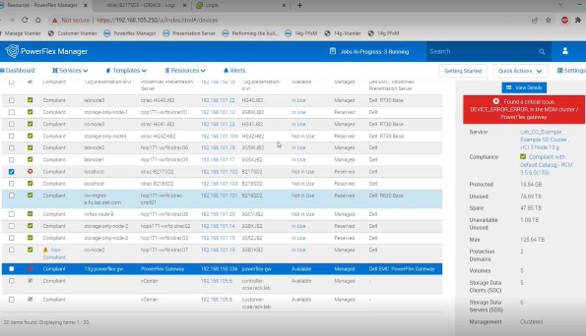
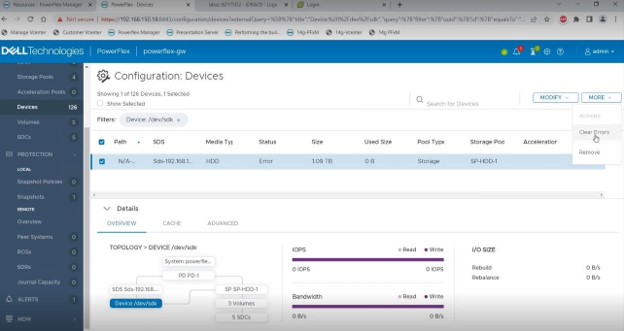
- 对于针对网关显示的 PFxM 中的错误,请转至演示服务器用户界面,并根据下面的屏幕截图清除并确认该端的错误。这些错误可能需要几分钟才能在 PFxM 中显示为已清除。如果在一小时左右后错误未清除,请尝试切换主 MDM 和辅助 MDM 角色,因为主 MDM 可以缓存此信息。
Affected Products
PowerFlex rack, VxFlex Ready Nodes, PowerFlex appliance connectivity, PowerFlex appliance R650, PowerFlex appliance R6525, PowerFlex appliance R660, PowerFlex appliance R6625, Powerflex appliance R750, PowerFlex appliance R760
, PowerFlex appliance R7625, PowerFlex custom node, PowerFlex appliance R640, PowerFlex appliance R740XD, PowerFlex appliance R7525, PowerFlex appliance R840
...
Article Properties
Article Number: 000213161
Article Type: How To
Last Modified: 22 May 2025
Version: 6
Find answers to your questions from other Dell users
Support Services
Check if your device is covered by Support Services.