PowerFlex 3.6:如何清除 PowerFlex Manager 中的未知或不相關錯誤
Summary: 在 PowerFlex Manager (PFxM) 中會顯示主機的隨機錯誤。錯誤顯示一個紅色的 x。
This article applies to
This article does not apply to
This article is not tied to any specific product.
Not all product versions are identified in this article.
Instructions
症狀:
在主機的 PFxM 中,顯示為紅色 x 的隨機錯誤。- 錯誤範例:

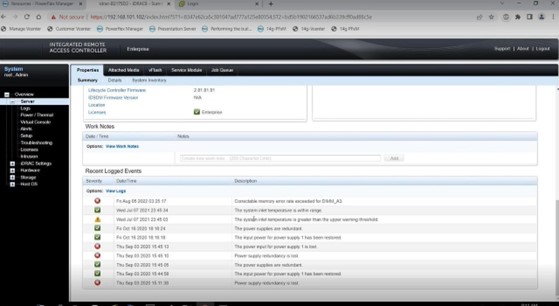
- 若要調查此錯誤,請登入相關節點的 iDRAC 使用者介面,查看是否顯示任何相關錯誤或問題。有些錯誤可能會以可修正錯誤的形式出現,例如下方螢幕擷取畫面範例中所列的錯誤。
嘗試的解決方案:
- 前往 iDRAC 使用者介面中的記錄區域,按一下右下角的清除記錄,以清除節點的記錄。

- 選取遇到錯誤的相關節點旁的核取方塊,回到「所有資源」功能表的頂端,然後按一下執行清查,查看是否能清除錯誤。


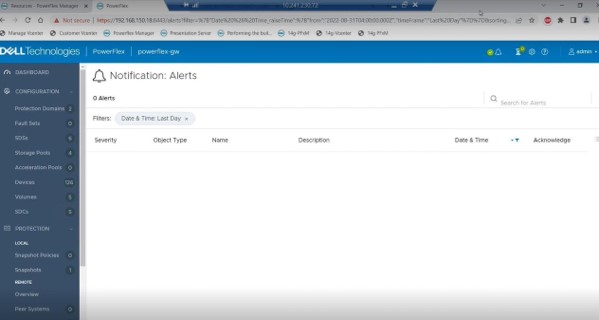
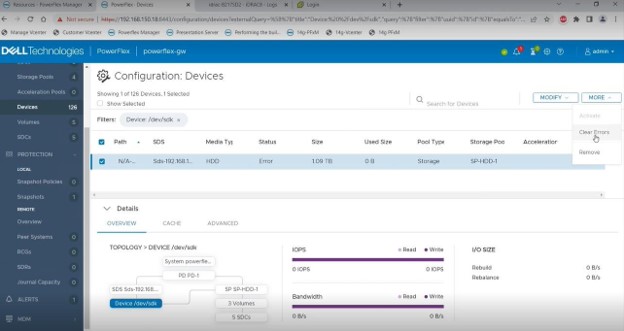
- 對於閘道顯示的 PFxM 中的錯誤,請前往簡報伺服器使用者介面,並根據下方螢幕擷取畫面清除並確認該端的錯誤。這些錯誤可能需要幾分鐘才會在 PFxM 中顯示為已清除。如果錯誤在一小時左右後仍未清除,請嘗試切換主要和次要 MDM 角色,因為主要 MDM 可以快取此資訊。

Affected Products
PowerFlex rack, VxFlex Ready Nodes, PowerFlex appliance connectivity, PowerFlex appliance R650, PowerFlex appliance R6525, PowerFlex appliance R660, PowerFlex appliance R6625, Powerflex appliance R750, PowerFlex appliance R760
, PowerFlex appliance R7625, PowerFlex custom node, PowerFlex appliance R640, PowerFlex appliance R740XD, PowerFlex appliance R7525, PowerFlex appliance R840
...
Article Properties
Article Number: 000213161
Article Type: How To
Last Modified: 22 May 2025
Version: 6
Find answers to your questions from other Dell users
Support Services
Check if your device is covered by Support Services.