NetWorker: nsrdispd Daemon Frequently Producing Core Dumps
Summary: NetWorker server configured for VMware protection. The VMware inventory process (nsrvim) fails and reports a nsrdispd core dump.
This article applies to
This article does not apply to
This article is not tied to any specific product.
Not all product versions are identified in this article.
Symptoms
The NetWorker server is running 19.12.x or older.
The NetWorker server is configured to backup VMware VMs with the NetWorker VMware Protection (NVP) vProxy appliance.
The NetWorker server's nsrdispd daemon is failing frequently.
An alert is shown in the NetWorker Management Console (NMC) or NetWorker server's daemon.raw log indicating that the nsrdispd process produced a core dump.
- See Dell article 22793 for instructions on how to render .raw files: NetWorker: How to use nsr_render_log
Cause
This issue was raised to NetWorker engineering
Resolution
Upgrade to NetWorker 19.13.
NOTE: NetWorker 19.13 uses a newer VMware API when performing inventory operations. The new method further reduces load on both the vCenter and NetWorker server, reducing core dumps that may appear due to resource pressure in large scale VMware protection environments.
Workaround:
Disable console events, and console cancel on the NSR Hypervisor resources on the NetWorker server. Disabling console events, removes the NetWorker related "events" from appearing in the vSphere web client. Disabling "console cancel" removes the ability for a VMware admin to cancel NetWorker related tasks from vSphere; however, since console events are disabled, these events do not appear. Disabling both of these functions reduces the amount of API calls made between NetWorker and the vCenter server. These requests are handled through the nsrdispd process on the NetWorker server.
- From an administrator or root command prompt on the NetWorker server, run:
nsradmin
- Run the following command to show the NSR hypervisor resources:
print type: nsr hypervisor
- Run the following command to disable console events:
update console events: No
- You are prompted to confirm, enter YES or Y.
NOTE: If you have multiple vCenter servers configured in NetWorker, you are prompted to confirm the changes for each vCenter. Once the change is applied to all NSR Hypervisor resources, the nsradmin prompt returns.
Example:
nsradmin> update console events: No
Update? y
- Run the following command to disable console cancel:
update console cancel: No
- You are prompted to confirm, enter YES or Y.
NOTE: If you have multiple vCenter servers configured in NetWorker, you are prompted to confirm the changes for each vCenter. Once the change is applied to all NSR Hypervisor resources, the nsradmin prompt returns.
Example:
nsradmin> update console cancel: No
Update? y
You can run the print command shown in step 2 again to confirm the changes. The changes should look similar to:
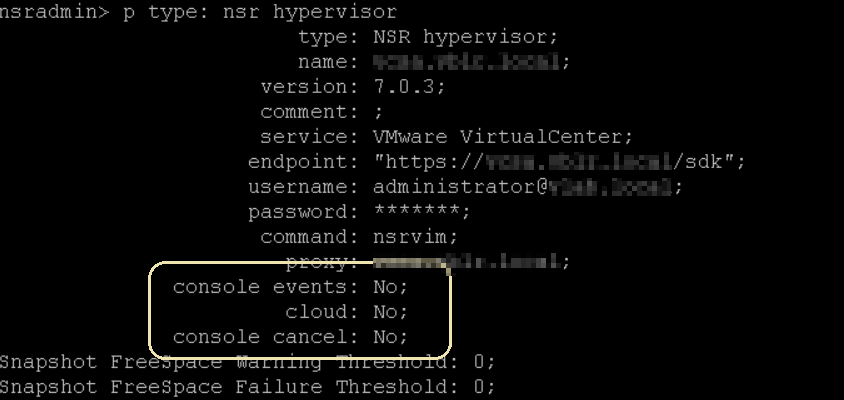
Figure 1: Print Command Showing Hypervisor Resource
Additional Information
Affected Products
NetWorkerArticle Properties
Article Number: 000213230
Article Type: Solution
Last Modified: 01 Dec 2025
Version: 13
Find answers to your questions from other Dell users
Support Services
Check if your device is covered by Support Services.