Ubuntu 22.04 全磁盘加密作系统安装或引导的 BIOS 设置前提条件
Summary: Ubuntu 22.04 全磁盘加密 (FDE) 是 Ubuntu 的特殊版本,可在部分戴尔计算机上提供可信平台模块 (TPM) 全磁盘加密支持。在当前的计算机设计中,在执行全新的作系统 (OS) 安装或引导至作系统之前,需要特定的 BIOS 设置。
This article applies to
This article does not apply to
This article is not tied to any specific product.
Not all product versions are identified in this article.
Instructions
Ubuntu 全磁盘加密
要应用所需的设置,请在打开计算机电源后按 F12 键引导至 BIOS 设置。在 BIOS 设置菜单中,执行以下步骤:
- 将“Secure Boot”设为“On”:
- 在左侧窗格中,单击“Boot Configuration”。
- 滚动到右侧窗格并找到“Secure Boot - Enable Secure Boot”设置。单击开关以切换到“ON”。
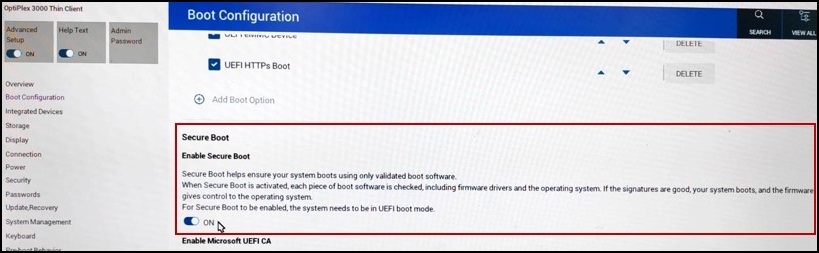
- 将“Absolute”切换为“Off”:
- 在左侧窗格中,单击“Security”。
- 滚动到右侧窗格,找到“Absolute”设置。选中“Disable Absolute”单选按钮。
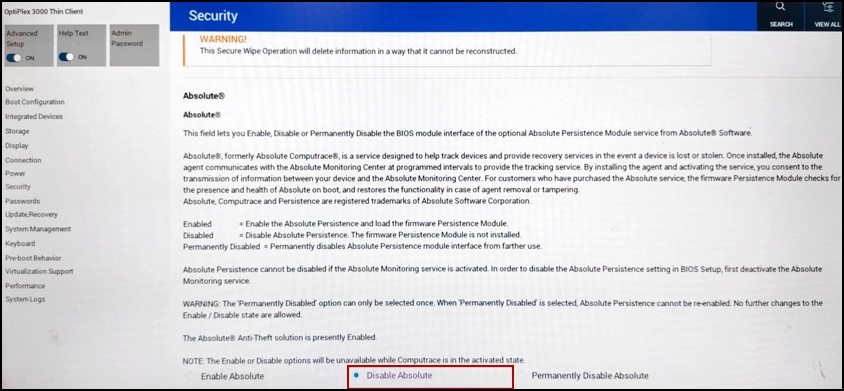
- 清除“TPM”:
- 在左侧窗格中,单击“Security”。
- 滚动右侧窗格,找到“TPM 2.0 Security - Clear”设置,然后单击切换到“>ON”。

应用更改并重新启动计算机后,您可以继续安装作系统或引导至作系统。
提醒:如果没有正确的 BIOS 设置,您将无法启动至作系统桌面。
Affected Products
OptiPlex 3000 Thin ClientArticle Properties
Article Number: 000213375
Article Type: How To
Last Modified: 31 Oct 2025
Version: 2
Find answers to your questions from other Dell users
Support Services
Check if your device is covered by Support Services.