PowerEdge:16G — SEKM044:安全的 VOSS SDPM 卷需要重启
Summary: 采用软件定义的永久性内存 (SDPM) 的 PowerEdge 16G 服务器在通过 iDRAC Secure Enterprise Key Manager (SEKM) 功能进行安全保护后,将需要额外的电源关闭后重启。
This article applies to
This article does not apply to
This article is not tied to any specific product.
Not all product versions are identified in this article.
Symptoms
存储区优化存储解决方案 (VOSS) 中的软件定义的永久性内存 (SDPM) NVM Express M.2 驱动器支持通过 iDRAC9 的 Secure Enterprise Key Manager (SEKM) 功能进行保护。首次在 VOSS SDPM 卷上配置 SEKM 时,主机服务器需要额外的电源重启(冷重启)以启用安全性。除了最初创建 SDPM 卷所执行的冷重新启动之外,还需要此电源重启。在服务器热重新启动之前,生命周期日志记录一个SEKM044,指示卷不支持安全保护。
在 SDPM M.2 NVM Express 卷上启用 SEKM 时,有两个不同的工作流。请参见下文,了解需要额外冷重新启动的情况:
工作流 1:为现有 SDPM 卷启用 SEKM 安全。
- 在 F2 系统 BIOS 中创建 VOSS SDPM 卷
- 冷启动服务器
- 通过 iDRAC 在 VOSS 控制器上启用 SEKM
- 另一个热重启或冷重启服务器
工作流 2:在 SDPM 卷之前的 VOSS 上启用 SEKM。
- 通过 iDRAC 在 VOSS 控制器上启用 SEKM
- 在 F2 系统设置中创建 VOSS SDPM 卷
- 冷启动服务器
- 另一个冷重启服务器
生命周期日志示例:
2023-04-18 21:30:42    SEKM044    iDRAC is unable to secure Disk.Bay.8:Enclosure.Internal.0-1 because the device is not security capable.
2023-04-18 21:30:13    SEKM080    VOSS.SL.11-1 has been secured successfully.
2023-04-18 21:30:13    SEKM080    VOSS.SL.11-1 has been secured successfully.
2023-04-18 21:30:13    SEKM080    VOSS.SL.11-1 has been secured successfully.
Cause
启用 SDPM 后,iDRAC 通过 SMA 事务从系统 BIOS 接收卷设置。此序列中存在延迟,导致无法及时中继容量状态。
Resolution
iDRAC9 7.00.60.00(2023 年 12 月)修复了此计时条件,允许 SDPM 卷在初始冷启动时获得安全保障。
解决方法:
为了保护 VOSS SDPM 卷,可以利用 iDRAC 电源作对受影响的主机发出冷启动指令。
iDRAC9 UI >电源重启系统(冷引导) 示例: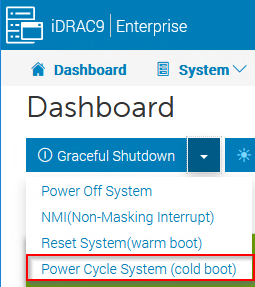
RACADM 示例:
racadm>>racadm serveraction powercycle
Server power operation initiated successfully
Affected Products
iDRAC9, iDRAC9 - 6.xx SeriesArticle Properties
Article Number: 000213554
Article Type: Solution
Last Modified: 10 Apr 2025
Version: 4
Find answers to your questions from other Dell users
Support Services
Check if your device is covered by Support Services.