PowerEdge: Slik distribuerer du nettverkstjeneste i Red Hat Linux System
Summary: Dette er generell veiledning om hvordan du distribuerer nettverkstjeneste i Red Hat Linux-systemet.
This article applies to
This article does not apply to
This article is not tied to any specific product.
Not all product versions are identified in this article.
Instructions
I noen tilfeller må nettverkstjenester distribueres i Red Hat Linux-systemet. For eksempel DNS, DHCP, NTP, FTP, HTTP, EMail-tjenester og så videre.
I denne artikkelen deles sammendragstrinnene nedenfor for å distribuere disse nettverkstjenestene.
MERK: Alle logger i denne artikkelen er fra det lokale virtuelle laboratoriet i VMware-miljøet.
I denne artikkelen deles sammendragstrinnene nedenfor for å distribuere disse nettverkstjenestene.
Kort oppsummering av trinnene
- Søk etter og installer tjeneste (yum/rpm)
- Start og aktiver tjeneste (systemctl)
- Brannmurtillatelsestjeneste (brannmur-cmd)
- Søke etter og endre tjenestekonfigurasjonsfiler etter første sikkerhetskopiering av standard konfigurasjonsfiler (*.conf, *.cnf, *.cfg, osv.) Bruk "mann" for å finne hjelp og eksempler. Bruk "vim" for å redigere konfigurasjonsfiler. Sjekk syntaksen.
- Gjennomgå og angi filtillatelse og sikkerhetsretningslinjer (chmod/chown/setfacl/selinux)
- Start tjenesten på nytt og foreta feilsøking (hvis tjenesten ikke startes på nytt)
- Teste og bekrefte servicestatusen (kontroller at resultatet er forventet)
Sammendragstrinn med spesifikke kommandoer for DHCP-tjenesten
- Søk etter og installer DHCP-tjenesten
[root@servera ~]# yum search dhcp*
Last metadata expiration check: 0:13:07 ago on Thu 18 May 2023 06:54:40 AM GMT.
============================================================== Name Matched: dhcp* ===============================================================

dhcp-libs.x86_64 : Shared libraries used by ISC dhcp client and server
dhcp-libs.i686 : Shared libraries used by ISC dhcp client and server
dhcp-libs.x86_64 : Shared libraries used by ISC dhcp client and server
dhcp-relay.x86_64 : Provides the ISC DHCP relay agent
dhcp-client.x86_64 : Provides the ISC DHCP client daemon and dhclient-script
dhcp-common.noarch : Common files used by ISC dhcp client, server and relay agent
dhcp-client.x86_64 : Provides the ISC DHCP client daemon and dhclient-script
dhcp-common.noarch : Common files used by ISC dhcp client, server and relay agent
dhcp-server.x86_64 : Provides the ISC DHCP server      <-- this is the dhcp service installation package
[root@servera ~]#

[root@servera ~]# yum list dhcp-server
Last metadata expiration check: 0:15:12 ago on Thu 18 May 2023 06:54:40 AM GMT.
Available Packages      <-- this package is available, if it shows "Installed Packages", means the service already installed
dhcp-server.x86_64                 12:4.3.6-34.el8                 rhel-8.1-for-x86_64-baseos-rpms
[root@servera ~]#

[root@servera ~]# yum provides dhcp-server
Last metadata expiration check: 0:17:31 ago on Thu 18 May 2023 06:54:40 AM GMT.
dhcp-server-12:4.3.6-34.el8.x86_64 : Provides the ISC DHCP server
Repo        : rhel-8.1-for-x86_64-baseos-rpms      <-- this is the yum repository that provide the service package
Matched from:
Provide    : dhcp-server = 12:4.3.6-34.el8
[root@servera ~]#

[root@servera ~]# yum -y install dhcp-server
Last metadata expiration check: 0:20:30 ago on Thu 18 May 2023 06:54:40 AM GMT.
Dependencies resolved.
==============================================================================
 Package                       Architecture             Version                           Repository                                         Size
==============================================================================
Installing:
 dhcp-server                   x86_64                   12:4.3.6-34.el8                   rhel-8.1-for-x86_64-baseos-rpms                   530 k
Transaction Summary
==============================================================================
Install  1 Package
Total download size: 530 k
Installed size: 1.3 M
Downloading Packages:
dhcp-server-4.3.6-34.el8.x86_64.rpm                                                                               5.6 MB/s | 530 kB     00:00
-----------------------------------------------------------------------------------------------------------------------------------------------
Total                                                                                                             5.3 MB/s | 530 kB     00:00
Running transaction check
Transaction check succeeded.
Running transaction test
Transaction test succeeded.
Running transaction
  Preparing        :                                                                                                                          1/1
  Running scriptlet: dhcp-server-12:4.3.6-34.el8.x86_64                                                                                       1/1
  Installing       : dhcp-server-12:4.3.6-34.el8.x86_64                                                                                       1/1
  Running scriptlet: dhcp-server-12:4.3.6-34.el8.x86_64                                                                                       1/1
  Verifying        : dhcp-server-12:4.3.6-34.el8.x86_64                                                                                       1/1
Installed:
  dhcp-server-12:4.3.6-34.el8.x86_64
Complete!
[root@servera ~]#
- Start og aktiver DHCP-tjenesten
[root@servera ~]# rpm -ql dhcp-server | grep .service
/usr/lib/systemd/system/dhcpd.service      <-- find out the service name after installation
/usr/lib/systemd/system/dhcpd6.service
[root@servera ~]#

[root@servera ~]# systemctl list-unit-files | grep dhcp
dhcpd.service                              disabled      <-- service disable by default
dhcpd6.service                             disabled
[root@servera ~]#

[root@servera ~]# systemctl enable --now dhcpd      <-- start and enable dhcp service
Created symlink /etc/systemd/system/multi-user.target.wants/dhcpd.service → /usr/lib/systemd/system/dhcpd.service.
Job for dhcpd.service failed because the control process exited with error code.
See "systemctl status dhcpd.service" and "journalctl -xe" for details.
[root@servera ~]#

[root@servera ~]# systemctl status dhcpd      <-- check dhcp service status
● dhcpd.service - DHCPv4 Server Daemon
   Loaded: loaded (/usr/lib/systemd/system/dhcpd.service; enabled; vendor preset: disabled)      <-- service enabled
   Active: failed (Result: exit-code) since Thu 2023-05-18 07:24:16 GMT; 56s ago      <-- status is failed (Result: exit-code)
     Docs: man:dhcpd(8)      <-- you can get help from here, by "man dhcpd" and "man dhcpd.conf"
           man:dhcpd.conf(5)
  Process: 3963 ExecStart=/usr/sbin/dhcpd -f -cf /etc/dhcp/dhcpd.conf -user dhcpd -group dhcpd --no-pid $DHCPDARGS (code=exited, status=1/FAILURE)      <-- showed mistakes why failure
 Main PID: 3963 (code=exited, status=1/FAILURE)
May 18 07:24:16 servera dhcpd[3963]: have been made to the base software release in order to make
May 18 07:24:16 servera dhcpd[3963]: it work better with this distribution.
May 18 07:24:16 servera dhcpd[3963]:
May 18 07:24:16 servera dhcpd[3963]: Please report issues with this software via:
May 18 07:24:16 servera dhcpd[3963]: bugzilla-redhat-com
May 18 07:24:16 servera dhcpd[3963]:
May 18 07:24:16 servera dhcpd[3963]: exiting.
May 18 07:24:16 servera systemd[1]: dhcpd.service: Main process exited, code=exited, status=1/FAILURE
May 18 07:24:16 servera systemd[1]: dhcpd.service: Failed with result 'exit-code'.
May 18 07:24:16 servera systemd[1]: Failed to start DHCPv4 Server Daemon.
[root@servera ~]#
- Brannmurtillatelsestjeneste
[root@servera ~]# firewall-cmd --permanent --add-service=dhcp
success
[root@servera ~]#

[root@servera ~]# firewall-cmd --reload
success
[root@servera ~]#

[root@servera ~]# firewall-cmd --list-all
public (active)
  target: default
  icmp-block-inversion: no
  interfaces: eth0 eth1
  sources:
  services: cockpit dhcp dhcpv6-client ssh
  ports:
  protocols:
  masquerade: no
  forward-ports:
  source-ports:
  icmp-blocks:
  rich rules:
[root@servera ~]#
- Søke etter og endre tjenestekonfigurasjonsfiler
[root@servera ~]# rpm -qc dhcp-server
/etc/dhcp/dhcpd.conf      <-- this is the main configuration file
/etc/dhcp/dhcpd6.conf
/etc/openldap/schema/dhcp.schema
/etc/sysconfig/dhcpd      <-- this is another configuration file should review
/var/lib/dhcpd/dhcpd.leases
/var/lib/dhcpd/dhcpd6.leases
[root@servera ~]#

[root@servera ~]# cat /etc/dhcp/dhcpd.conf
#
# DHCP Server Configuration file.
#   see /usr/share/doc/dhcp-server/dhcpd.conf.example      <-- this is configuration example
#   see dhcpd.conf(5) man page
#
[root@servera ~]#

[root@servera ~]# cp /etc/dhcp/dhcpd.conf /etc/dhcp/dhcpd.conf.bak      <-- backup main configuration
[root@servera ~]#

[root@servera ~]# vim /etc/dhcp/dhcpd.conf      <-- edit the main configuration file
:r /usr/share/doc/dhcp-server/dhcpd.conf.example      <-- read and copy example to this main configuration file
Then make changes, get following result finally :
#
# dhcpd.conf
#
option domain-name "example-net";
option domain-name-servers 172.25.254.254;
default-lease-time 800;
max-lease-time 7200;
authoritative;
log-facility local7;
subnet 192.168.0.0 netmask 255.255.255.0 {
  range 192.168.0.200 192.168.0.254;
  option domain-name-servers 172.25.254.254;
  option domain-name "example-net";
  option routers 192.168.0.1;
  option broadcast-address 192.168.0.255;
  default-lease-time 800;
  max-lease-time 7200;
}
# assign one specific ip address to host serverb
host serverb {
  hardware ethernet 52:54:00:01:fa:0b;
  fixed-address 192.168.0.102;
}

[root@servera ~]# cat /etc/sysconfig/dhcpd
# WARNING: This file is NOT used anymore.
# If you are here to restrict what interfaces should dhcpd listen on,
# be aware that dhcpd listens *only* on interfaces for which it finds subnet
# declaration in dhcpd.conf. It means that explicitly enumerating interfaces
# also on command line should not be required in most cases.
# If you still insist on adding some command line options,
# copy dhcpd.service from /lib/systemd/system to /etc/systemd/system and modify
# it there.
# example:      <-- follow above guide to set dhcp running interface
# $ cp /usr/lib/systemd/system/dhcpd.service /etc/systemd/system/
# $ vi /etc/systemd/system/dhcpd.service
# $ ExecStart=/usr/sbin/dhcpd -f -cf /etc/dhcp/dhcpd.conf -user dhcpd -group dhcpd --no-pid <your_interface_name(s)>
# $ systemctl --system daemon-reload
# $ systemctl restart dhcpd.service
[root@servera ~]#

[root@servera ~]# vi /etc/systemd/system/dhcpd.service
...
[Service]
...
ExecStart=/usr/sbin/dhcpd -f -cf /etc/dhcp/dhcpd.conf -user dhcpd -group dhcpd --no-pid eth1      <-- set interface "eth1"
...
[root@servera ~]# dhcpd -t      <-- syntax check after configuration file modified
Internet Systems Consortium DHCP Server 4.3.6
Copyright 2004-2017 Internet Systems Consortium.
All rights reserved.
For info, please visit www-isc-org/software/dhcp/
ldap_gssapi_principal is not set,GSSAPI Authentication for LDAP will not be used
Not searching LDAP since ldap-server, ldap-port and ldap-base-dn were not specified in the config file
Config file: /etc/dhcp/dhcpd.conf
Database file: /var/lib/dhcpd/dhcpd.leases
PID file: /var/run/dhcpd.pid
Source compiled to use binary-leases
[root@servera ~]#

[root@servera ~]# echo $?
0      <-- it means there's no errors, all fine for syntax check by command "dhcpd -t"
[root@servera ~]#
- Gå gjennom og angi filtillatelser og sikkerhetspolicyer
Om filtillatelse og sikkerhetspolicy, trenger du ikke gjøre noen endringer for DHCP-tjenesten. Hvis du har noen spesifikke krav her, gjør du endringene i henhold til designet ditt.
- Start tjenesten på nytt
[root@servera ~]# systemctl --system daemon-reload
[root@servera ~]#

[root@servera ~]# systemctl restart dhcpd.service
[root@servera ~]#

[root@servera ~]# systemctl status dhcpd
● dhcpd.service - DHCPv4 Server Daemon
   Loaded: loaded (/etc/systemd/system/dhcpd.service; enabled; vendor preset: disabled)
   Active: active (running) since Thu 2023-05-18 08:00:00 GMT; 16s ago      <-- status is active (running)
     Docs: man:dhcpd(8)
           man:dhcpd.conf(5)
 Main PID: 4514 (dhcpd)
   Status: "Dispatching packets..."
    Tasks: 1 (limit: 11251)
   Memory: 5.2M
   CGroup: /system.slice/dhcpd.service
           └─4514 /usr/sbin/dhcpd -f -cf /etc/dhcp/dhcpd.conf -user dhcpd -group dhcpd --no-pid eth1

May 18 08:00:00 servera systemd[1]: Started DHCPv4 Server Daemon.
May 18 08:00:12 servera dhcpd[4514]: DHCPDISCOVER from 52:54:00:01:fa:0d via eth1
May 18 08:00:12 servera dhcpd[4514]: DHCPDISCOVER from 52:54:00:02:fa:0d via eth1
May 18 08:00:13 servera dhcpd[4514]: DHCPOFFER on 192.168.0.200 to 52:54:00:01:fa:0d (serverd) via eth1
May 18 08:00:13 servera dhcpd[4514]: DHCPREQUEST for 192.168.0.200 (192.168.0.10) from 52:54:00:01:fa:0d (serverd) via eth1
May 18 08:00:13 servera dhcpd[4514]: DHCPACK on 192.168.0.200 to 52:54:00:01:fa:0d (serverd) via eth1
May 18 08:00:13 servera dhcpd[4514]: ICMP Echo Reply for 192.168.0.200 late or spurious.
May 18 08:00:13 servera dhcpd[4514]: DHCPOFFER on 192.168.0.201 to 52:54:00:02:fa:0d (serverd) via eth1
May 18 08:00:13 servera dhcpd[4514]: DHCPREQUEST for 192.168.0.201 (192.168.0.10) from 52:54:00:02:fa:0d (serverd) via eth1
May 18 08:00:13 servera dhcpd[4514]: DHCPACK on 192.168.0.201 to 52:54:00:02:fa:0d (serverd) via eth1
[root@servera ~]#

Notes:
If service fails to restart, you should do further trouble-shooting to resolve it.
From the below logs, you may find some valuable clues.
[root@server ~]# tail /var/log/messages
[root@server ~]# journalctl -u [service unit name]
- Teste og bekrefte tjenestestatusen
From another host serverb to check if dhcp service working fine.
[root@serverb ~]# nmcli connection show | grep eth1
Wired connection 2  706e063c-ee02-349e-8311-2c9837611ec4  ethernet  eth1
[root@serverb ~]#

[root@serverb ~]# nmcli connection modify Wired\ connection\ 2 ipv4.method auto connection.autoconnect yes
[root@serverb ~]#

[root@serverb ~]# nmcli connection up Wired\ connection\ 2
Connection successfully activated (D-Bus active path: /org/freedesktop/NetworkManager/ActiveConnection/260)
[root@serverb ~]#

[root@serverb ~]# ip address show eth1
3: eth1: <BROADCAST,MULTICAST,UP,LOWER_UP> mtu 1500 qdisc fq_codel state UP group default qlen 1000
    link/ether 52:54:00:01:fa:0b brd ff:ff:ff:ff:ff:ff
    inet 192.168.0.102/24 brd 192.168.0.255 scope global dynamic noprefixroute eth1
       valid_lft 777sec preferred_lft 777sec
    inet6 fe80::dead:38b9:8837:8c6e/64 scope link noprefixroute
       valid_lft forever preferred_lft forever
[root@serverb ~]#

[root@serverb ~]# ping 192.168.0.10      <-- servera is reachable
PING 192.168.0.10 (192.168.0.10) 56(84) bytes of data.
64 bytes from 192.168.0.10: icmp_seq=1 ttl=64 time=3.21 ms
64 bytes from 192.168.0.10: icmp_seq=2 ttl=64 time=1.64 ms
64 bytes from 192.168.0.10: icmp_seq=3 ttl=64 time=1.19 ms
^C
--- 192.168.0.10 ping statistics ---
3 packets transmitted, 3 received, 0% packet loss, time 10ms
rtt min/avg/max/mdev = 1.189/2.013/3.210/0.867 ms
[root@serverb ~]#

[root@servera ~]# ip address show eth1
3: eth1: <BROADCAST,MULTICAST,UP,LOWER_UP> mtu 1500 qdisc fq_codel state UP group default qlen 1000
    link/ether 52:54:00:01:fa:0a brd ff:ff:ff:ff:ff:ff
    inet 192.168.0.10/24 brd 192.168.0.255 scope global noprefixroute eth1
       valid_lft forever preferred_lft forever
    inet6 fe80::8779:8d69:d3cf:3fab/64 scope link noprefixroute
       valid_lft forever preferred_lft forever
[root@servera ~]#
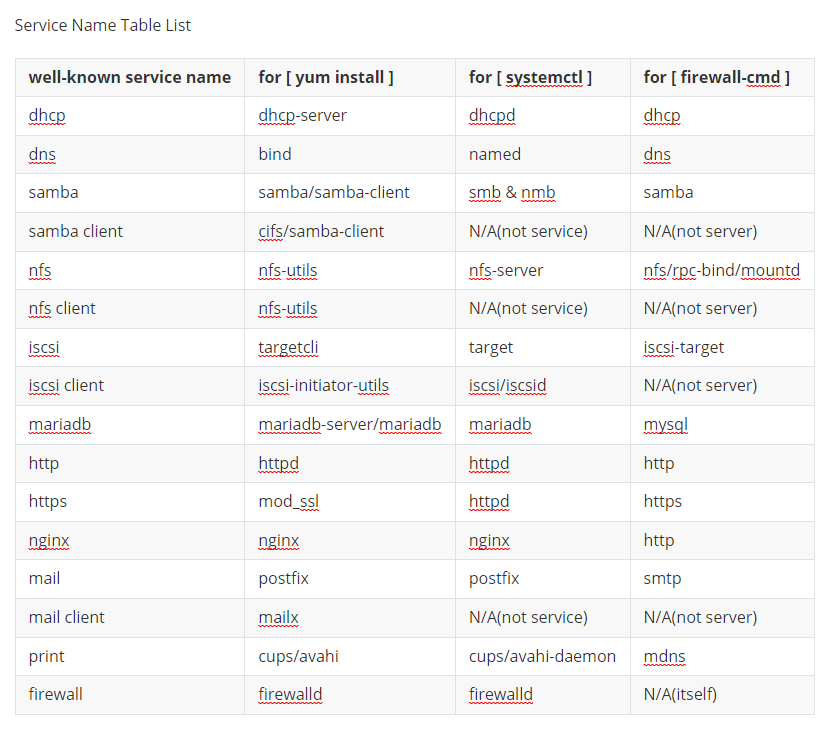
Nedenfor er noen kjente tabelllister over tjenestenavn:
Figur 1: Tabellliste for tjenestenavn
MERK: Alle logger i denne artikkelen er fra det lokale virtuelle laboratoriet i VMware-miljøet.
Affected Products
Red Hat Enterprise Linux Version 8Article Properties
Article Number: 000213739
Article Type: How To
Last Modified: 03 Aug 2026
Version: 5
Find answers to your questions from other Dell users
Support Services
Check if your device is covered by Support Services.