Dell Unity: Opgradering til Operating Environment 5.3 medfører, at SSH-protokollen deaktiveres – kan rettes af brugeren
Summary: Opgradering til Unity Operating Environment (OE) 5.3 deaktiverer SSH-protokollen.
This article applies to
This article does not apply to
This article is not tied to any specific product.
Not all product versions are identified in this article.
Symptoms
SSH-protokollen ændres til deaktiveret efter opgradering til Unity Operating Environment (OE) 5.3.
Cause
SSH-tjenesten opgraderes også, når du opgraderer til Unity OE 5.3.
Opgradering af SSH-tjenesterne får protokollen til at vende tilbage til standardtilstanden (deaktiveret). Dette er ikke en fejlfunktion, men fungerer efter hensigten.
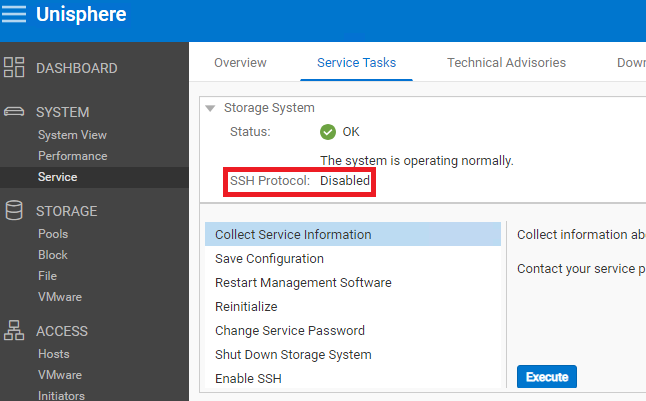
Figur 1: SSH-protokol vender tilbage til standardtilstanden (deaktiveret).
Resolution
Løsningen er at aktivere SSH. Se Dell-artikel 22526, Dell EMC Unity: Sådan aktiveres eller deaktiveres Secure Shell på systemet (kan rettes af brugeren) for at få instruktioner til aktivering af SSH i Unity.
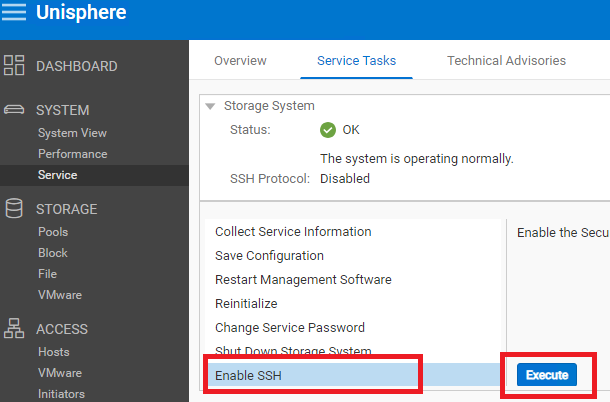
Figur 2: Aktiver SSH i Unity
Affected Products
Dell EMC Unity, Dell EMC Unity 300F, Dell EMC Unity 350F, Dell EMC Unity 400, Dell EMC Unity 400F, Dell EMC Unity 450F, Dell EMC Unity 500, Dell EMC Unity 500F, Dell EMC Unity 550F, Dell EMC Unity 600Products
Dell Unity 300, Dell EMC Unity XT 380, Dell EMC Unity XT 380F, Dell EMC Unity XT 480, Dell EMC Unity XT 480F, Dell EMC Unity 600F, Dell EMC Unity 650F, Dell EMC Unity XT 680, Dell EMC Unity XT 680F, Dell EMC Unity XT 880, Dell EMC Unity XT 880F
, Dell EMC Unity Family |Dell EMC Unity All Flash, Dell EMC Unity Family, Dell EMC Unity Hybrid, Dell EMC UnityVSA Professional Edition/Unity Cloud Edition
...
Article Properties
Article Number: 000214546
Article Type: Solution
Last Modified: 29 Aug 2023
Version: 4
Find answers to your questions from other Dell users
Support Services
Check if your device is covered by Support Services.