OpenManage Enterprise: Some pop-out windows are missing fields causing them to be unusable
Summary: When logged into the OpenManage Enterprise web interface version 3.10 or earlier, some pop-out windows are unusable due to certain missing fields.
This article applies to
This article does not apply to
This article is not tied to any specific product.
Not all product versions are identified in this article.
Symptoms
When logged in to the OpenManage Enterprise web interface, some pop-out windows are unusable due to missing fields. This occurs when accessing the web interface with a chromium-based browser such as Google Chrome, Microsoft Edge, and Firefox versions 114.x and later.
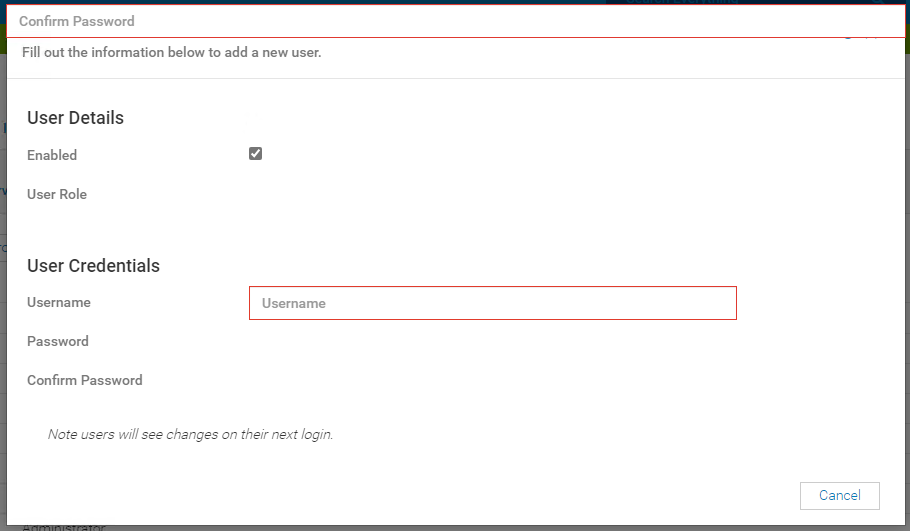
Figure 1: Add or Edit User pop-out window.
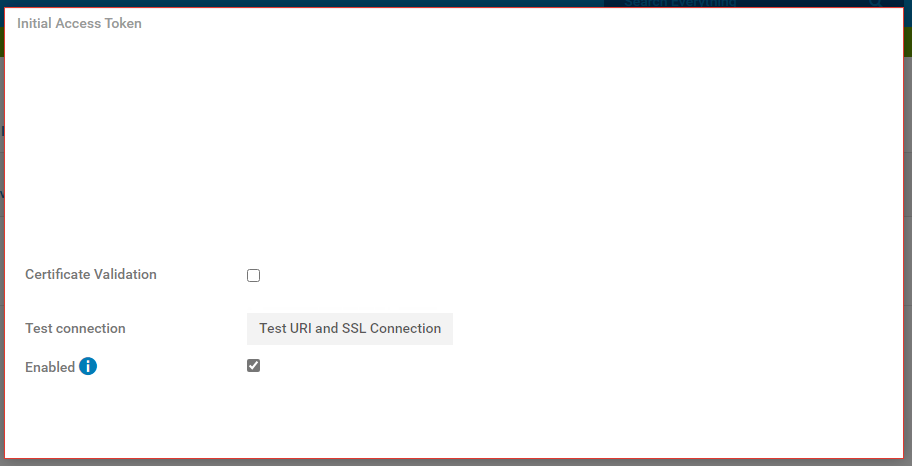
Figure 2: OIDC connector pop-out window
The following pop-out windows are impacted:
- Add or Edit User under Application Settings > Users - Users
Figure 1: Add or Edit User pop-out window.
- Add or Edit OpenID Connect (OIDC) integration under Application Settings > Users - OIDC
Figure 2: OIDC connector pop-out window
Cause
Chromium-based browsers now incorporate Popover Application Programming Interface (API) support that sometimes causes interference with native Java-based elements of the same name. OpenManage Enterprise version 3.10.x and earlier versions do not carry support for the Popover API implementation.
More information can be found in the following link. Popover API - Web APIs | mozilla.org
More information can be found in the following link. Popover API - Web APIs | mozilla.org
Resolution
As of OpenManage Enterprise version 4.x Popover API support has been added. Migrate to the latest version to get this changes.
If migrating to the latest version is not possible, use the OpenManage Enterprise REST APIs to make the necessary changes - Explore APIs | Dell Technologies Developer.
Affected Products
Dell EMC OpenManage EnterpriseProducts
C Series, Modular Infrastructure, Rack Servers, Tower ServersArticle Properties
Article Number: 000214772
Article Type: Solution
Last Modified: 13 May 2025
Version: 6
Find answers to your questions from other Dell users
Support Services
Check if your device is covered by Support Services.