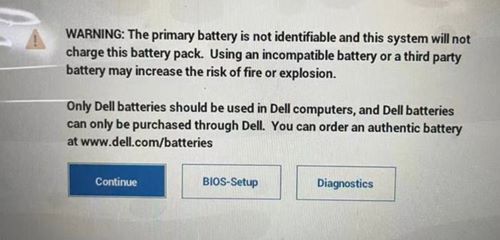
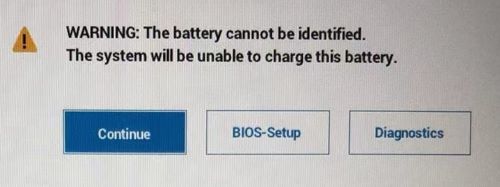
Bateria nie może się naładować, gdy komputer włącza się, pojawia się komunikat ostrzegawczy systemu BIOS i dioda LED wyświetla wartość 1A1 W
Summary: Nie można naładować baterii, gdy komputer włącza się i wyświetla komunikat ostrzegawczy systemu BIOS.
This article applies to
This article does not apply to
This article is not tied to any specific product.
Not all product versions are identified in this article.
Symptoms
Dotyczy platform:
- 14-calowy DC14255 firmy Dell
- Dell 14 Plus 2 w 1 DB04255
- Dell 14 Plus DB14255
- Dell 16 Plus DB16255Dell Pro 14 Essential PV14255
- Inspiron 13 5320
- Inspiron 13 5330
- Inspiron 14 5420
- Inspiron 14 5425
- Inspiron 14 5430
- Inspiron 14 5435
- Inspiron 14 7425 2 w 1
- Inspiron 14 7430 2 w 1
- Inspiron 14 7435 2 w 1
- Inspiron 14 7445 typu "2 w 1"
- Inspiron 14 Plus 7420
- Inspiron 16 5620
- Inspiron 16 5630
- Inspiron 16 5635
- Inspiron 16 7630 2 w 1
- Inspiron 16 7635 typu "2 w 1"
- Inspiron 16 Plus 7620
- Inspiron 5410
- Inspiron 5418
- Inspiron 5510
- Inspiron 5518
- Inspiron 5625
- Latitude 3330
- Latitude 3420
- Latitude 3430
- Latitude 3520
- Latitude 3530
- Vostro 16 z serii 5630
- Vostro 5320
- Vostro 5410
- Vostro 5510
- Vostro 5620
- Vostro 7620
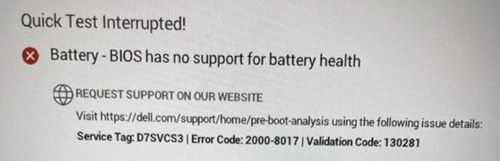
Po włączeniu komputera notebook zablokuje komunikat ostrzegawczy systemu BIOS i komputer nie będzie mógł naładować baterii.
Cause
EC nie może uzyskać informacji związanych z baterią i przestaje się ładować z powodu błędu uwierzytelnienia i stwierdzenia, że jest to bateria innej firmy niż Dell.
Resolution
Zabezpieczenie, gdy problem już wystąpił:
- W przypadku platform Intel użytkownicy końcowi powinni odłączyć zasilanie i wyłączyć komputer na co najmniej dwie minuty, a następnie włączyć komputer.
- W przypadku platform AMD użytkownicy końcowi muszą odłączyć zasilacz sieciowy i wyłączyć komputer na co najmniej dwie minuty, a następnie dwukrotnie włączyć komputer.
Zaktualizuj system BIOS, aby rozwiązać problem:
| Komputer firmy Dell | BIOS Version (Wersja systemu BIOS) |
|---|---|
| 14-calowy DC14255 firmy Dell | Wersja 1.6.2 ma zostać wydana w grudniu 2025 r. |
| Dell Pro 14 Essential PV14255 | |
| Inspiron 14 7445 typu "2 w 1" | |
| Dell 14 Plus 2 w 1 DB04255 | Wersja 1.6.1 ma zostać wydana w grudniu 2025 r. |
| Dell 14 Plus DB14255 | |
| Dell 16 Plus DB16255 | |
| Latitude 3420/3520 | 1.26.0 |
| Latitude 3430/3530 | 1.8.0 |
| Inspiron 14 5425 | |
| Inspiron 5625 | |
| Inspiron 14 7425 2 w 1 | |
| Inspiron 5410/5418 | 2.19.0 |
| Inspiron 5510/5518 | |
| Vostro 5410 | |
| Vostro 5510 | |
| Inspiron 13 5320 | 1.10.0 |
| Vostro 5320 | |
| Inspiron 14 5420 | 1.13.0 |
| Inspiron 16 5620 | |
| Vostro 5620 | |
| Inspiron 14 Plus 7420 | 1.12.0 |
| Inspiron 16 Plus 7620 | |
| Vostro 7620 | |
| Latitude 3330 | |
| Inspiron 13 5330 | 1.2.0 |
| Inspiron 14 7430 2 w 1 | 1.2.1 |
| Inspiron 14 5430 | |
| Inspiron 16 5630 | |
| Inspiron 16 7630 2 w 1 | |
| Vostro 16 z serii 5630 | |
| Inspiron 14 7435 2 w 1 | 1.0.0 |
| Inspiron 14 5435 | |
| Inspiron 16 5635 | |
| Inspiron 16 7635 typu "2 w 1" |
Affected Products
Dell 14 Plus 2-in-1 DB04255, Dell 14 Plus DB14255, Dell 16 Plus DB16255, Dell 14 DC14255, Dell Pro 14 Essential PV14255, Inspiron 13 5320, Inspiron 13 5330, Inspiron 14 5410/5418, Inspiron 14 5420, Inspiron 14 5425, Inspiron 14 5430, Inspiron 14 5435
, Inspiron 14 Plus 7420, Inspiron 14 7425 2-in-1, Inspiron 14 7430 2-in-1, Inspiron 14 7435 2-in-1, Inspiron 14 7445 2-in-1, Inspiron 15 5510/5518, Inspiron 16 5620, Inspiron 16 5625, Inspiron 16 5630, Inspiron 16 5635, Inspiron 16 Plus 7620, Inspiron 16 7630 2-in-1, Inspiron 16 7635 2-in-1, Latitude 3330, Latitude 3420, Latitude 3430, Latitude 3520, Latitude 3530, Vostro 5320, Vostro 14 5410, Vostro 15 5510, Vostro 5620, Vostro 16 5630, Vostro 7620
...
Article Properties
Article Number: 000214810
Article Type: Solution
Last Modified: 27 Nov 2025
Version: 6
Find answers to your questions from other Dell users
Support Services
Check if your device is covered by Support Services.