Sådan finder du USB-donglen til Dell Pro-tastatur og -mus KM5221W
Summary: Få mere at vide om, hvordan du finder Dell Pro-tastaturet og -musen KM5221W USB-donglen ved at følge disse trinvise instruktioner.
This article applies to
This article does not apply to
This article is not tied to any specific product.
Not all product versions are identified in this article.
Instructions
Dell Pro-tastatur og -mus bruger KM5221W en almindelig trådløs USB-dongle til både tastatur og mus.
Berørt tastatur:
- Dell Pro-KM5221W til tastatur og mus
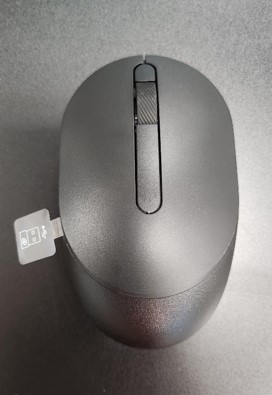
- Når du pakker KM5221W ud, skal du kigge efter USB-donglemærkaten, der stikker ud fra musen.
- Fjern forsigtigt musens topdæksel, og find derefter donglen.
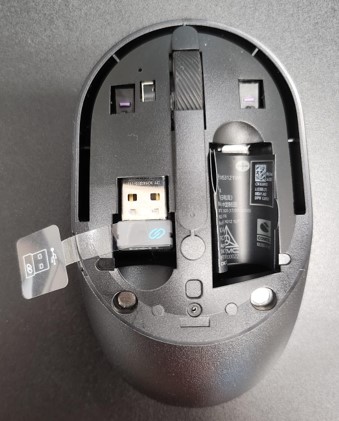
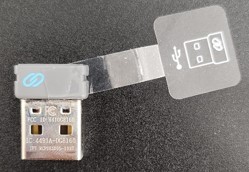
- Fjern USB-donglen fra donglelageret i musen.
- Gå til Support til Dell Pro Keyboard and Mouse KM5221W , og se Dell Pro Keyboard and Mouse KM5221W Quick Setup Guide eller brugervejledningen for at fuldføre opsætningen.
Affected Products
Alienware, Dell All-in-One, Dell Pro All-in-One, Dell Pro Max Micro, Dell Pro Max Slim, Dell Pro Max Tower, Dell Pro Micro, Dell Pro Slim, Dell Pro Tower, Dell Slim, Dell Tower, Inspiron, OptiPlex, Vostro, XPS, G Series, Chromebook, G Series
, Alienware, Dell Plus, Dell Pro, Dell Pro Max, Dell Pro Plus, Dell Pro Premium, Inspiron, Latitude, Dell Pro Rugged, Vostro, XPS, Fixed Workstations, Mobile Workstations, Dell Pro Max Micro XE FCM2250, Dell Pro Keyboard and Mouse KM5221W
...
Article Properties
Article Number: 000214907
Article Type: How To
Last Modified: 07 May 2025
Version: 5
Find answers to your questions from other Dell users
Support Services
Check if your device is covered by Support Services.