Dell Pro -näppäimistön ja -hiiren USB-sovittimen paikantaminen KM5221W
Summary: Katso lisätietoja Dell Pro -näppäimistön ja -hiiren KM5221W USB-sovittimen paikantamisesta näiden vaiheittaisten ohjeiden mukaisesti.
This article applies to
This article does not apply to
This article is not tied to any specific product.
Not all product versions are identified in this article.
Instructions
Dell Pro -näppäimistön ja -hiiren KM5221W käytetään yhtä yhteistä langatonta USB-donglea sekä näppäimistölle että hiirelle.
Näppäimistö, jota asia koskee:
- Dell Pro -näppäimistön ja -hiiren KM5221W
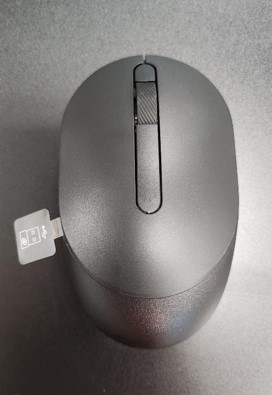
- Kun irrotat KM5221W pakkauksesta, etsi hiirestä erottuva USB-sovittimen tarra.
- Poista varovasti hiiren yläkansi ja paikanna dongle.
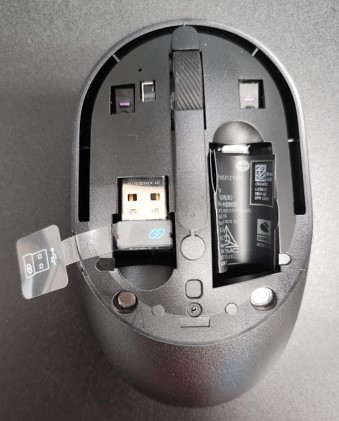
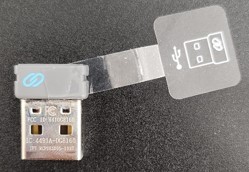
- Irrota USB-sovitin hiiren sisällä olevasta dongle-tallennustilasta.
- Siirry Dell Pro -näppäimistön ja -hiiren KM5221W tuki ja viimeistele asennus Dell Pro -näppäimistön ja hiiren pikaoppaasta KM5221W käyttöoppaasta.
Affected Products
Alienware, Dell All-in-One, Dell Pro All-in-One, Dell Pro Max Micro, Dell Pro Max Slim, Dell Pro Max Tower, Dell Pro Micro, Dell Pro Slim, Dell Pro Tower, Dell Slim, Dell Tower, Inspiron, OptiPlex, Vostro, XPS, G Series, Chromebook, G Series
, Alienware, Dell Plus, Dell Pro, Dell Pro Max, Dell Pro Plus, Dell Pro Premium, Inspiron, Latitude, Dell Pro Rugged, Vostro, XPS, Fixed Workstations, Mobile Workstations, Dell Pro Max Micro XE FCM2250, Dell Pro Keyboard and Mouse KM5221W
...
Article Properties
Article Number: 000214907
Article Type: How To
Last Modified: 07 May 2025
Version: 5
Find answers to your questions from other Dell users
Support Services
Check if your device is covered by Support Services.