Dell Proキーボードおよびマウス KM5221WのUSBドングルを見つける方法
Summary: 次の手順に従って、Dell ProキーボードおよびマウスKM5221W USBドングルの位置を確認します。
This article applies to
This article does not apply to
This article is not tied to any specific product.
Not all product versions are identified in this article.
Instructions
Dell Proキーボードおよびマウス KM5221Wでは、キーボードとマウスの両方に1つの共通USBワイヤレス ドングルを使用します。
影響を受けるキーボード:
- Dell Proキーボードおよびマウス KM5221W
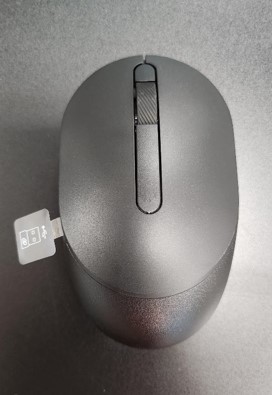
- KM5221Wを箱から取り出すときは、USBドングル ラベルがマウスから突き出ていないか確認します。
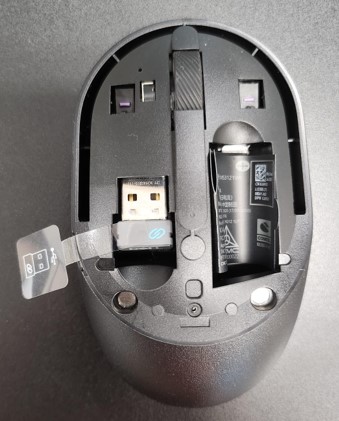
- マウスのトップ カバーを慎重に取り外し、ドングルの位置を確認します。
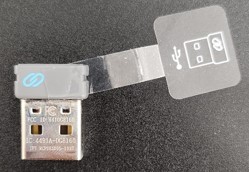
- USBドングルをマウス内のドングル ストレージから取り外します。
- 「Dell Proキーボードおよびマウス KM5221Wのサポート」にアクセスし、「Dell Proキーボードおよびマウス KM5221W クイック セットアップ ガイド」または「ユーザー ガイド」を参照してセットアップを完了します。
Affected Products
Alienware, Dell All-in-One, Dell Pro All-in-One, Dell Pro Max Micro, Dell Pro Max Slim, Dell Pro Max Tower, Dell Pro Micro, Dell Pro Slim, Dell Pro Tower, Dell Slim, Dell Tower, Inspiron, OptiPlex, Vostro, XPS, G Series, Chromebook, G Series
, Alienware, Dell Plus, Dell Pro, Dell Pro Max, Dell Pro Plus, Dell Pro Premium, Inspiron, Latitude, Dell Pro Rugged, Vostro, XPS, Fixed Workstations, Mobile Workstations, Dell Pro Max Micro XE FCM2250, Dell Pro Keyboard and Mouse KM5221W
...
Article Properties
Article Number: 000214907
Article Type: How To
Last Modified: 07 May 2025
Version: 5
Find answers to your questions from other Dell users
Support Services
Check if your device is covered by Support Services.