PowerProtect:VMware 即时访问还原和 FLR 失败 装载失败
Summary: 虚拟机 (VM) 即时访问 (IA) 或文件级恢复 (FLR) 失败,并显示错误“Mount failed:无法完成 Sysinfo作”
This article applies to
This article does not apply to
This article is not tied to any specific product.
Not all product versions are identified in this article.
Symptoms
- VM FLR 和 IA 失败并显示网络文件系统 (NFS) 装载错误”
Mount failed: Unable to complete Sysinfo operation - 新选项成功时虚拟机将恢复。
- 虚拟机备份没有问题。
- 已确认 ESXI 与 DD 的通信按照 PowerProtect Data Manager 的规定正常工作:虚拟机还原未使用 PowerProtect DD IP 接口时出错
即时访问还原或 FLR 失败,并在 VM Direct Engine (VMDE) 装载日志中显示以下错误。
日志: mount-xxxxxxxxxx.log
日志位置:(嵌入式 VMDE) /opt/emc/vproxy/runtime/logs/recycle/vproxyd/ | /opt/emc/vproxy/runtime/logs/recycle/vbackupd/ (外部 VMDE)
YYYY-MM-DDThh:mm:ss.270Z NOTICE: [8d389cdc46ece06b;96ae9dbd0918a908] "Text": "Session '07fae483-61e9-43da-acca-b32f48656db0' is unsuccessful: Unable to create datastore: Unable to create datastore 'DELL-vProxy-ppdm01.fqdn 1682513359' using '*.*.*.*:/data/col1/Dev-Test-ppdm01-71b45/PLCTLP-XXXX/Restores/yyyy/zzzz-zzzz/1683583862592975399/1682025362/vProxy-ppdm01.fqdn xxxxxxx': ServerFaultCode: An error occurred during host configuration. Operation failed, diagnostics report: Mount failed: Unable to complete Sysinfo operation. Please see the VMkernel log file for more details.: Unable to query remote mount point's attributes",例如,在较新版本的 PowerProtect Data Manager 19.18 或 19.19 中,不会创建装载日志,并且可以在还原作业上观察到以下故障。

PowerProtect Data Manager vmdm 日志包含以下失败错误。
日志: vmdm.log
日志位置: /var/log/brs/vmdm
2025-04-11T11:58:16.470Z WARN [] [request-dispatch-service-1] [][][][][] [c.e.b.v.r.c.StreamCountService.exchange(282)] - Exception Response Body {"code":500,"reason":"Cannot invoke \"com.emc.brs.datadomain.
ddboost.DdConnectionInfo.getConnDesc()\" because \"ddConnection\" is null","remediation":null,"timestamp":1744372696467,"path":"/api/v2/copies/a33f6343-85a8-4044-a992-dc4b8487d9fe/recovery-stream-counts","ex
tendedInfo":null}
2025-04-11T11:58:16.471Z ERROR [] [request-dispatch-service-1] [][][][][] [c.e.b.v.r.d.InstantAccessDispatchService.isRequestDispatchable(75)] - Exception checking allowance
com.emc.brs.vmdm.error.ComponentException: Cannot invoke "com.emc.brs.datadomain.ddboost.DdConnectionInfo.getConnDesc()" because "ddConnection" is null
        at com.emc.brs.vmdm.vpe.service.clients.RestClientBase.exchange(RestClientBase.java:284)
        at com.emc.brs.vmdm.vpe.service.clients.RestClientBase.get(RestClientBase.java:201)
        at com.emc.brs.vmdm.recovery.clients.StreamCountService.getStreamCounts(StreamCountService.java:51)
        at com.emc.brs.vmdm.recovery.dispatch.InstantAccessSessionService.exceedsAllowance(InstantAccessSessionService.java:90)
        at com.emc.brs.vmdm.recovery.dispatch.InstantAccessDispatchService.isRequestDispatchable(InstantAccessDispatchService.java:73)
        at com.emc.brs.vmdm.recovery.dispatch.InstantAccessDispatchService.isRequestDispatchable(InstantAccessDispatchService.java:31)
        at com.emc.brs.vmdm.recovery.dispatch.BaseRequestDispatchService.getRequestFromWaiting(BaseRequestDispatchService.java:301)
        at com.emc.brs.vmdm.recovery.dispatch.BaseRequestDispatchService.getRequest(BaseRequestDispatchService.java:232)
        at com.emc.brs.vmdm.recovery.dispatch.BaseRequestDispatchService.checkRequests(BaseRequestDispatchService.java:120)
        at com.emc.brs.vmdm.recovery.dispatch.BaseRequestDispatchService.lambda$startChecking$2(BaseRequestDispatchService.java:101)
        at java.base/java.util.concurrent.Executors$RunnableAdapter.call(Executors.java:539)
        at java.base/java.util.concurrent.FutureTask.runAndReset(FutureTask.java:305)
        at java.base/java.util.concurrent.ScheduledThreadPoolExecutor$ScheduledFutureTask.run(ScheduledThreadPoolExecutor.java:305)
        at java.base/java.util.concurrent.ThreadPoolExecutor.runWorker(ThreadPoolExecutor.java:1136)
        at java.base/java.util.concurrent.ThreadPoolExecutor$Worker.run(ThreadPoolExecutor.java:635)
        at java.base/java.lang.Thread.run(Thread.java:840)
Cause
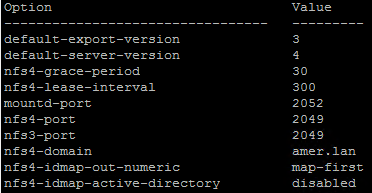
还原失败与 PowerProtect DD (DD) 上启用的 NFS 配置有关。ESXi 主机无法装载 NFSv4 导出。在撰写本文时,ESXi 主机只能装载 NFSv3 或 NFSv4.1 导出。
场景一:
DD 启用了 NFSv3 和 NFSv4 版本,NFSv4 在 DD 上设置为默认值。

DD 命令显示默认服务器。
nfs option show
场景二:
DD 仅启用了 NFSv4。
Resolution
根据当前的 DD NFS 配置,启用 NFSv3 并确保 DD 到 NFSv3 上的默认 NFS 导出版本:
- 通过 SSH 连接到 DD。
- 确认您当前的 NFS 配置。
nfs option showNFSv3 已启用但 NFS 默认服务器为 NFSv4 的示例。
- 如果禁用,则启用 NFSv3。
nfs disable version 3-
- 如果 NFS 是版本 4,则设置为 NFSv3。
nfs option set default-server-version 3- 再次执行即时访问或文件级还原。
Affected Products
PowerProtect Data Manager Appliance, PowerProtect Data Manager, PowerProtect Data Manager SoftwareArticle Properties
Article Number: 000214971
Article Type: Solution
Last Modified: 18 Jul 2025
Version: 3
Find answers to your questions from other Dell users
Support Services
Check if your device is covered by Support Services.