PowerProtect: PPDM VM FLR fails with ARV0039 Using Sudo User Account
Summary: The PowerProtect Data Manager (PPDM) FLR Using Sudo User Account. The File Level Recovery fails with ARV0039 and does not mount disks
This article applies to
This article does not apply to
This article is not tied to any specific product.
Not all product versions are identified in this article.
Symptoms
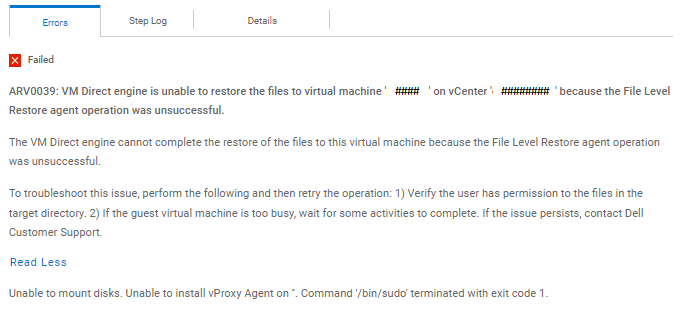
ERROR:
PowerProtect Data Manager_####.log:
Vproxyd_####.log:
PowerProtect Data Manager_####.log:
{
  "status" : "FAILED",
  "summaries" : [ "Unmount complete" ],
  "error" : {
    "code" : "ARV0039",
    "reason" : "VM Direct engine is unable to restore the files to virtual machine 'target_VMname' on vCenter 'myvCenter' because the File Level Restore agent operation was unsuccessful.",
    "detailedDescription" : "The VM Direct engine cannot complete the restore of the files to this virtual machine because the File Level Restore agent operation was unsuccessful.",
    "remediation" : "To troubleshoot this issue, perform the following and then retry the operation: 1) Verify the user has permission to the files in the target directory. 2) If the guest virtual machine is too busy, wait for some activities to complete. If the issue persists, contact Dell Customer Support.",
    "extendedReason" : "Unable to mount disks.  Unable to install vProxy Agent on ''.  Command '/bin/sudo' terminated with exit code 1.",
    "messageID" : "ARV0039",
    "arguments" : [ {
      "name" : "vCenterName",
      "value" : "myvCenter"
    }, {
      "name" : "vmName",
      "value" : "target_VMname"
    } ]
  },
  "bytesTransferred" : null
}
Vproxyd_####.log:
mount-####.log: YYYY-MM-DDTHH:MM:47.147Z ERROR:  [####;####] Unable to install vProxy Agent on ''.  Command '/bin/sudo' terminated with exit code 1.
mount-####.log: YYYY-MM-DDTHH:MM:47.147Z TRACE:  [####;####] Disconnecting from vProxy Agent on VM 'target_VMname' (vm-####) ...
mount-####.log: YYYY-MM-DDTHH:MM:47.147Z INFO:   [####;####] vim: Disconnected from session on vCenter 'my_vCenter'.
mount-####.log: YYYY-MM-DDTHH:MM:47.147Z INFO:   [####;####] Disconnected from vProxy Agent on VM 'target_VMname' (vm-####).
mount-####.log: YYYY-MM-DDTHH:MM:47.147Z INFO:   [####;####] Host agent lock released.
mount-####.log: YYYY-MM-DDTHH:MM:47.147Z INFO:   [####;####] Step 'Verifying agent readiness' done: Failed
mount-####.log: YYYY-MM-DDTHH:MM:47.148Z INFO:   [####;####] Unmounting after mount unsuccessful: Unable to install vProxy Agent on ''.  Command '/bin/sudo' terminated with exit code 1..
mount-####.log: YYYY-MM-DDTHH:MM:47.149Z TRACE:  [####;####] Entering doUnmount.
mount-####.log: YYYY-MM-DDTHH:MM:47.152Z INFO:   [####;####] Unlocking VM
mount-####.log: YYYY-MM-DDTHH:MM:47.156Z TRACE:  [####;####] Searching for virtual machine with MORef 'vm-####' ...
mount-####.log: YYYY-MM-DDTHH:MM:47.163Z INFO:   [####;####] Found virtual machine 'target_VMname' with MORef 'vm-####'.
mount-####.log: YYYY-MM-DDTHH:MM:47.163Z TRACE:  [####;####] Unlocking VM ...
mount-####.log: YYYY-MM-DDTHH:MM:47.168Z TRACE:  [####;####] Attempting to clear virtual machine's lock tag 'Dell VM Direct Engine Session' ...
mount-####.log: YYYY-MM-DDTHH:MM:47.168Z TRACE:  [####;####] Setting custom attribute 'Dell VM Direct Engine Session' value for object vm-#### to '' ...
mount-####.log: YYYY-MM-DDTHH:MM:47.173Z INFO:   [####;####] Set custom attribute 'Dell VM Direct Engine Session' value for object vm-#### to ''.
mount-####.log: YYYY-MM-DDTHH:MM:47.173Z INFO:   [####;####] Unlocked virtual machine.
mount-####.log: YYYY-MM-DDTHH:MM:47.173Z TRACE:  [####;####] Unmount complete
mount-####.log: YYYY-MM-DDTHH:MM:47.174Z INFO:   [####;####] Finalized steps: [
mount-####.log: YYYY-MM-DDTHH:MM:47.174Z INFO:   [####;####]     {
mount-####.log: YYYY-MM-DDTHH:MM:47.174Z INFO:   [####;####]         "Name": "Verifying connectivity",
mount-####.log: YYYY-MM-DDTHH:MM:47.174Z INFO:   [####;####]         "Status": "Success",
mount-####.log: YYYY-MM-DDTHH:MM:47.174Z INFO:   [####;####]         "Description": "",
mount-####.log: YYYY-MM-DDTHH:MM:47.174Z INFO:   [####;####]         "StartTime": "YYYY-MM-DDT15:28:30.042313669-04:00",
mount-####.log: YYYY-MM-DDTHH:MM:47.174Z INFO:   [####;####]         "DurationInMillis": 1516
mount-####.log: YYYY-MM-DDTHH:MM:47.174Z INFO:   [####;####]     },
mount-####.log: YYYY-MM-DDTHH:MM:47.174Z INFO:   [####;####]     {
mount-####.log: YYYY-MM-DDTHH:MM:47.174Z INFO:   [####;####]         "Name": "Verifying agent readiness",
mount-####.log: YYYY-MM-DDTHH:MM:47.174Z INFO:   [####;####]         "Status": "Failed",
mount-####.log: YYYY-MM-DDTHH:MM:47.174Z INFO:   [####;####]         "Description": "",
mount-####.log: YYYY-MM-DDTHH:MM:47.174Z INFO:   [####;####]         "StartTime": "YYYY-MM-DDT15:28:31.559661415-04:00",
mount-####.log: YYYY-MM-DDTHH:MM:47.174Z INFO:   [####;####]         "DurationInMillis": 15588
mount-####.log: YYYY-MM-DDTHH:MM:47.174Z INFO:   [####;####]     },
mount-####.log: YYYY-MM-DDTHH:MM:47.174Z INFO:   [####;####]     {
mount-####.log: YYYY-MM-DDTHH:MM:47.174Z INFO:   [####;####]         "Name": "Creating datastore",
mount-####.log: YYYY-MM-DDTHH:MM:47.174Z INFO:   [####;####]         "Status": "Canceled",
mount-####.log: YYYY-MM-DDTHH:MM:47.174Z INFO:   [####;####]         "Description": "",
mount-####.log: YYYY-MM-DDTHH:MM:47.174Z INFO:   [####;####]         "StartTime": "####-##-##T##:##:00Z",
mount-####.log: YYYY-MM-DDTHH:MM:47.174Z INFO:   [####;####]         "DurationInMillis": 0
mount-####.log: YYYY-MM-DDTHH:MM:47.174Z INFO:   [####;####]     },
mount-####.log: YYYY-MM-DDTHH:MM:47.174Z INFO:   [####;####]     {
mount-####.log: YYYY-MM-DDTHH:MM:47.174Z INFO:   [####;####]         "Name": "Hot adding disks",
mount-####.log: YYYY-MM-DDTHH:MM:47.174Z INFO:   [####;####]         "Status": "Canceled",
mount-####.log: YYYY-MM-DDTHH:MM:47.174Z INFO:   [####;####]         "Description": "",
mount-####.log: YYYY-MM-DDTHH:MM:47.174Z INFO:   [####;####]         "StartTime": "####-##-##T##:##:00Z",
mount-####.log: YYYY-MM-DDTHH:MM:47.174Z INFO:   [####;####]         "DurationInMillis": 0
mount-####.log: YYYY-MM-DDTHH:MM:47.174Z INFO:   [####;####]     },
mount-####.log: YYYY-MM-DDTHH:MM:47.174Z INFO:   [####;####]     {
mount-####.log: YYYY-MM-DDTHH:MM:47.174Z INFO:   [####;####]         "Name": "Mounting disks",
mount-####.log: YYYY-MM-DDTHH:MM:47.174Z INFO:   [####;####]         "Status": "Canceled",
mount-####.log: YYYY-MM-DDTHH:MM:47.174Z INFO:   [####;####]         "Description": "",
mount-####.log: YYYY-MM-DDTHH:MM:47.174Z INFO:   [####;####]         "StartTime": "####-##-##T##:##:00Z",
mount-####.log: YYYY-MM-DDTHH:MM:47.174Z INFO:   [####;####]         "DurationInMillis": 0
mount-####.log: YYYY-MM-DDTHH:MM:47.174Z INFO:   [####;####]     },
mount-####.log: YYYY-MM-DDTHH:MM:47.174Z INFO:   [####;####]     {
mount-####.log: YYYY-MM-DDTHH:MM:47.174Z INFO:   [####;####]         "Name": "Unmounting disks",
mount-####.log: YYYY-MM-DDTHH:MM:47.174Z INFO:   [####;####]         "Status": "Canceled",
mount-####.log: YYYY-MM-DDTHH:MM:47.174Z INFO:   [####;####]         "Description": "",
mount-####.log: YYYY-MM-DDTHH:MM:47.174Z INFO:   [####;####]         "StartTime": "####-##-##T##:##:00Z",
mount-####.log: YYYY-MM-DDTHH:MM:47.174Z INFO:   [####;####]         "DurationInMillis": 0
mount-####.log: YYYY-MM-DDTHH:MM:47.174Z INFO:   [####;####]     },
mount-####.log: YYYY-MM-DDTHH:MM:47.174Z INFO:   [####;####]     {
mount-####.log: YYYY-MM-DDTHH:MM:47.174Z INFO:   [####;####]         "Name": "Removing disks",
mount-####.log: YYYY-MM-DDTHH:MM:47.174Z INFO:   [####;####]         "Status": "Canceled",
mount-####.log: YYYY-MM-DDTHH:MM:47.174Z INFO:   [####;####]         "Description": "",
mount-####.log: YYYY-MM-DDTHH:MM:47.174Z INFO:   [####;####]         "StartTime": "####-##-##T##:##:00Z",
mount-####.log: YYYY-MM-DDTHH:MM:47.174Z INFO:   [####;####]         "DurationInMillis": 0
mount-####.log: YYYY-MM-DDTHH:MM:47.174Z INFO:   [####;####]     },
mount-####.log: YYYY-MM-DDTHH:MM:47.174Z INFO:   [####;####]     {
mount-####.log: YYYY-MM-DDTHH:MM:47.174Z INFO:   [####;####]         "Name": "Deleting datastore",
mount-####.log: YYYY-MM-DDTHH:MM:47.174Z INFO:   [####;####]         "Status": "Canceled",
mount-####.log: YYYY-MM-DDTHH:MM:47.174Z INFO:   [####;####]         "Description": "",
mount-####.log: YYYY-MM-DDTHH:MM:47.174Z INFO:   [####;####]         "StartTime": "####-##-##T##:##:00Z",
mount-####.log: YYYY-MM-DDTHH:MM:47.174Z INFO:   [####;####]         "DurationInMillis": 0
mount-####.log: YYYY-MM-DDTHH:MM:47.174Z INFO:   [####;####]     }
mount-####.log: YYYY-MM-DDTHH:MM:47.174Z INFO:   [####;####] ]
mount-####.log: YYYY-MM-DDTHH:MM:47.175Z INFO:   [####;####] Disconnected from session on vCenter 'my_vCenter'.
mount-####.log: YYYY-MM-DDTHH:MM:47.175Z ERROR:  [####;####] Unable to mount disks.
mount-####.log: YYYY-MM-DDTHH:MM:47.176Z INFO:   [####;####] Resource data: {
Cause
Configuration Issue with the sudoers File: /etc/sudoers.d/linuxuser
Resolution
**** >>> Assuming sudo user account name is flr_user <<<< ****
Step # 1
Using visudo -f >>> Type or Copy paste below lines to create new /etc/sudoers.d/linuxuser
flr_user ALL=NOPASSWD: /usr/bin/rpm, /opt/emc/vproxyra/bin/postinstall.sh, /opt/emc/vproxyra/bin/preremove.sh, /opt/emc/vproxyra/bin/vflrbrowse, /opt/emc/vproxyra/bin/vflrcopy
Defaults:flr_user !requiretty
Note: When you save it you Must Not see "syntax error near ..." - Otherwise fix the linuxuser file and save it againStep # 2
If you have FLR Agent already installed then remove it following below three steps:
Step # 3
root@linuxclient01 ~]# rpm -qa | grep emc
emc-vProxy-FLRAgent-####.x86_64
emc-vProxy-FLRAgent-####.x86_64
Step # 4
[root@linuxclient01 ~]# /opt/emc/vproxyra/bin/preremove.sh
Stopping vProxy Agent...
Stopping vProxy Agent...
Step # 5
[root@linuxclient01 ~]# rpm -e emc-vProxy-FLRAgent-####.x86_64
Step # 6
[root@linuxclient01 ~]# rpm -qa | grep emc
Step # 7
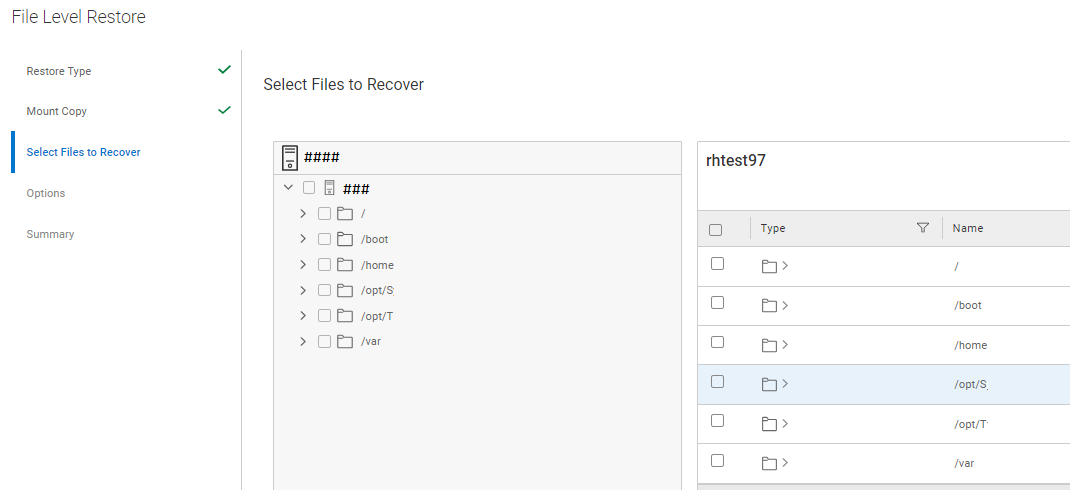
Now Test the FLR from PPDM Web GUI - This should work
Article Properties
Article Number: 000215074
Article Type: Solution
Last Modified: 23 Oct 2024
Version: 4
Find answers to your questions from other Dell users
Support Services
Check if your device is covered by Support Services.