PowerEdge: Excluindo uma assinatura do Redfish no iDRAC9 usando a API do Postman
Summary: Este artigo fornece um guia passo a passo sobre como excluir assinaturas do Redfish (não desabilitando totalmente o Redfish) no iDRAC9 usando a API.
This article applies to
This article does not apply to
This article is not tied to any specific product.
Not all product versions are identified in this article.
Instructions
As etapas apresentadas abaixo visam remover as assinaturas Redfish existentes no iDRAC9. O Redfish permanece ativado.
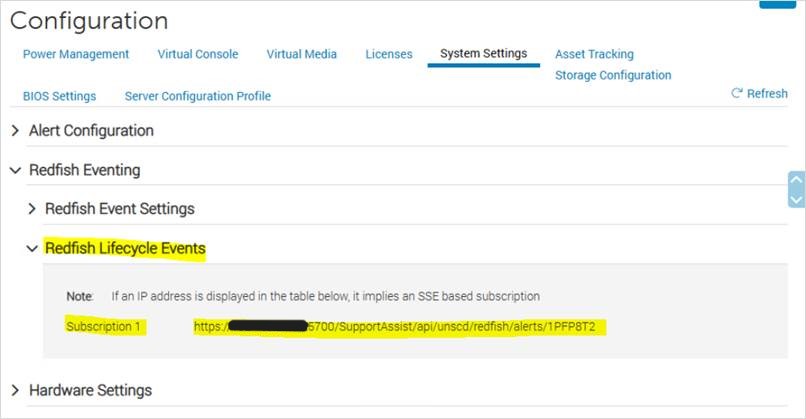
Figura 1: Configuração antes de remover assinaturas do Redfish
Exemplo:

Figura 3: O ID da assinatura é conforme indicado.
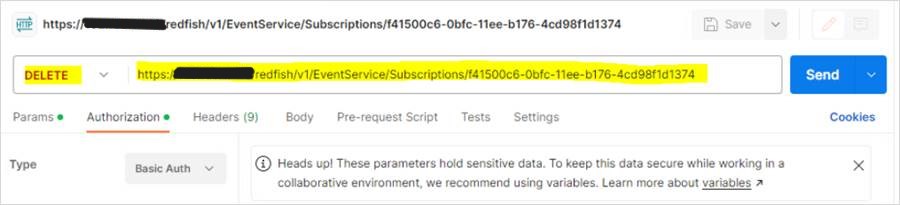
Figura 4: Use a função DELETE.
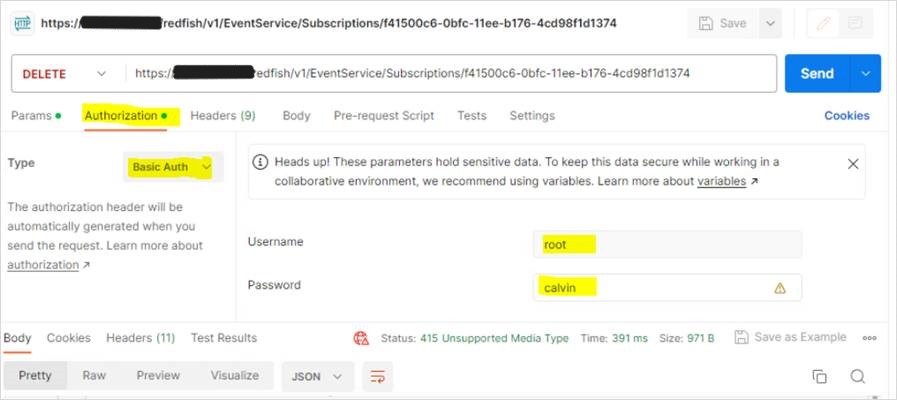
Figura 5: Especifique o nome de usuário e a senha do iDRAC na guia Authorization.
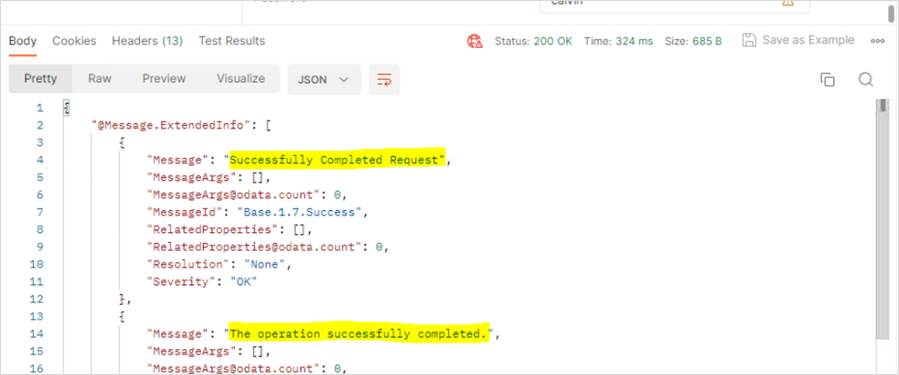
Figura 6: "Solicitação concluída com sucesso" e "A operação foi concluída com sucesso" são exibidas no resultado.
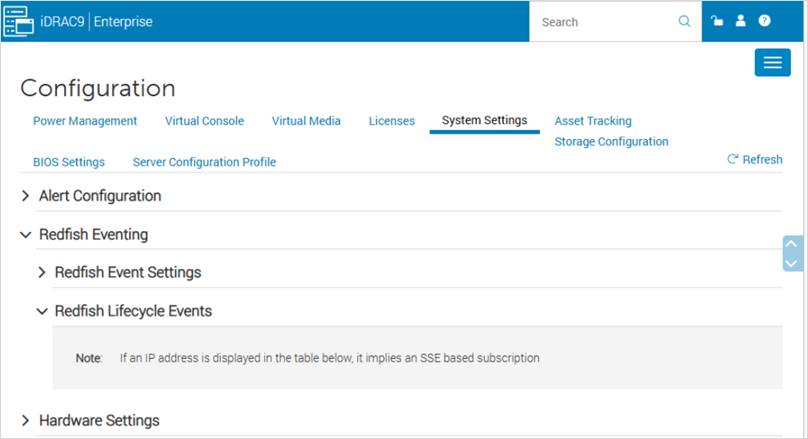
Figura 7: Configuração após a remoção das assinaturas do Redfish
INSTRUÇÕES:
Antes de realizar as alterações:
Figura 1: Configuração antes de remover assinaturas do Redfish
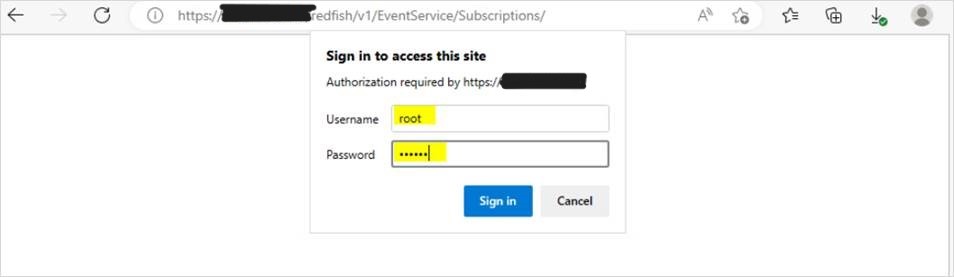
- Obtenha o ID de assinatura digitando o seguinte no navegador:
https://<iDRAC IP>/redfish/v1/EventService/Subscriptions/
Especifique as credenciais do iDRAC quando solicitado.
Figura 2: Adicione as credenciais do iDRAC no prompt.
Exemplo:
O ID da assinatura é conforme indicado:
Figura 3: O ID da assinatura é conforme indicado.
- Abra o software Postman:
-
- Use a função DELETE e digite o seguinte:
https://<iDRAC IP>/redfish/v1/EventService/Subscriptions/<subscription ID>
Figura 4: Use a função DELETE.
-
- Vá para a guia Authorization, selecione Basic Auth como Type e especifique o nome de usuário e a senha do iDRAC.
Figura 5: Especifique o nome de usuário e a senha do iDRAC na guia Authorization.
-
- Clique em Enviare " Solicitação concluída com sucesso" e "A operação foi concluída com sucesso" são vistas no resultado.
Figura 6: "Solicitação concluída com sucesso" e "A operação foi concluída com sucesso" são exibidas no resultado.
- Faça logoff e login novamente no iDRAC. Como alternativa, você também pode atualizar a página do iDRAC.
Figura 7: Configuração após a remoção das assinaturas do Redfish
Affected Products
iDRAC9Products
PowerEdge XR2, Poweredge C4140, PowerEdge C6420, PowerEdge C6520, PowerEdge C6525, PowerEdge C6615, PowerEdge C6620, PowerEdge R250, PowerEdge R260, PowerEdge R350, PowerEdge R360, PowerEdge R440, PowerEdge R450, PowerEdge R540, PowerEdge R550
, PowerEdge R640, PowerEdge R6415, PowerEdge R650, PowerEdge R650xs, PowerEdge R6515, PowerEdge R6525, PowerEdge R660, PowerEdge R660xs, PowerEdge R6615, PowerEdge R6625, PowerEdge R740, PowerEdge R740XD, PowerEdge R740XD2, PowerEdge R7415, PowerEdge R7425, PowerEdge R750, PowerEdge R750XA, PowerEdge R750xs, PowerEdge R7515, PowerEdge R7525, PowerEdge R760, PowerEdge R760XA, PowerEdge R760xd2, PowerEdge R760xs, PowerEdge R7615, PowerEdge R7625, PowerEdge R840, PowerEdge R860, PowerEdge R940, PowerEdge R940xa, PowerEdge R960, PowerEdge T150, PowerEdge T160, PowerEdge T340, PowerEdge T350, PowerEdge T360, PowerEdge T440, PowerEdge T550, PowerEdge T560, PowerEdge T640, PowerEdge XE2420, PowerEdge XE7420, PowerEdge XE7440, PowerEdge XE8545, PowerEdge XE8640, PowerEdge XE9640, PowerEdge XE9680, PowerEdge XR11, PowerEdge XR12, PowerEdge XR4510c, PowerEdge XR4520c, PowerEdge XR5610, PowerEdge XR7620, PowerEdge XR8610t, PowerEdge XR8620t
...
Article Properties
Article Number: 000215102
Article Type: How To
Last Modified: 02 Jan 2025
Version: 3
Find answers to your questions from other Dell users
Support Services
Check if your device is covered by Support Services.