VMware:ESXi MCE PSODのデバッグ
Summary: ESXiマシン チェック例外(MCE)の紫色の診断画面(PSOD)を例を使用してデバッグする方法。
This article applies to
This article does not apply to
This article is not tied to any specific product.
Not all product versions are identified in this article.
Instructions
マシン チェック例外(MCE)エラーにより、ESXi serverがパープル スクリーン(PSOD)で停止することがあります。MCEエラーはハードウェアの問題が原因です。
MCEの紫色の診断画面には、複数の項目が表示されます。これらのうち、 MCi_STATUS registerは、問題のデバッグに役立ちます。
登録の詳細:
- 「
MCi_STATUSレジスターは、マシン・チェック・エラーに関する情報で構成されます。 - レジスタは「
S:" 次の例に示すように、次のようになります。
MC: PCPU18 B:13 S:0xfe20004000011166 M:0x7246040086 A:0x38c989b100 5
ビットとその重要性:
| 63. | 62 | 61 | 60 | 59 | 58 | 57 | 53-56 | 38-52 | 32-37 | 16-31 | 0-15 |
| VALID フラグ - 設定されている場合、情報は有効です。 | OVERFLOWフラグ - 設定されている場合、複数のMCEが互いに近接して発生したことを示している可能性があります。 | UNCフラグ:設定されている場合、CPUはエラーを修正できませんでした。 | ENフラグ | MISCVフラグ - 設定されている場合、MISCレジスタに詳細情報が含まれます。 | ADDRV - 設定されている場合、ADDRレジスタにはエラーが発生した場所が含まれます。 | PCCフラグ - 設定されている場合、プロセッサーが破損している可能性があることを意味します。 | ビット11が設定されている場合はアーキテクチャ、それ以外の場合は「その他の情報」。 | ビット 10 が設定されている場合はアーキテクチャ、それ以外の場合は "その他の情報"です。 | その他の情報 | CPUのモデル固有のエラー コード | マシンチェックエラーコード |
エラーをデバッグするには、 MCi_STATUS 登録は重要です。これらのビットは、単純なエラーまたは複合エラーを示します
オプション1: 自動ツールの使用

オプション2: 手動ステップの使用
- 単純なエラーはすぐにデバッグできます
0000 0000 0000 0000 -- No Error reported to this bank of error-reporting registers.
0000 0000 0000 0001 -- Unclassified - Error has not been classified.
0000 0000 0000 0010 -- Parity error in internal microcode ROM.
0000 0000 0000 0011 -- External error-BINIT# from another processor caused this processor MCE. Happens only if BINIT# observation enabled during power on.
0000 0000 0000 0100 -- Functional redundancy check master/slave error.
0000 0000 0000 0101 -- Internal parity error.
0000 0000 0000 0110 -- SMM handler tried to execute outside the ranges specified by SMRR.
0000 0100 0000 0000 -- Internal timer error.
0000 1110 0000 1011 -- I/O error.
0000 01xx xxxx xxxx -- Internal unclassified error. Atleast one X must be equal to 1.
- 複合エラー
000F 0000 0000 11LL - Generic Cache Hierarchy error.
000F 0000 0001 TTLL - {TT}TLB{LL}_ERR. TLB errors.
000F 0000 1MMM CCCC - {MMM}_Channel{CCCC}_ERR - Memory controller errors.
000F 0001 RRRR TTLL - {TT}CACHE{LL}_{RRRR}_ERR - Cache Hierarchy errors.
000F 1PPT RRRR IILL - BUS{LL}_{PP}_{RRRR}_{II}_T_ERR - Bus and Interconnect errors.
- F - フォーム フラグ
0 – Normal Filtering
1 – Corrected Filtering
フィルタリングとは、この構造のこのエントリに対する後続の修正の一部またはすべてが転記されないことを意味します。
- TT - 上記 2 と 4 に適用されます。
トランザクションのタイプを示します。
00 - Instruction
01 - Data
10 - Generic
- LL - 上記の1、2、4、5に適用されます。
これは、エラーが発生したメモリ階層内のレベルを示します。
00 - Level 0 - L0
01 - Level 1 - L1
10 - Level 2 - L2
11 - Generic – LG (It is shown only when processor cannot determine the hierarchy level)
- RRRR - エラーに関連するアクションのタイプを示します。アクションは次のとおりです。
0000 - Generic Error - ERR
0001 - Generic Read - RD
0010 - Generic Write - WR
0011 - Data Read - DRD
0100 - Data Write - DWR
0101 - Instruction Fetch - IRD
0110 - Prefetch - PREFETCH
0111 - Eviction - EVICT
1000 - Snoop - SNOOP
- PP (Participation) - エラーにおけるローカル プロセッサーの役割について説明します。
00 - SRC - Local processor originated request
01 - RES - Local processor responded to request
10 - OBS - Local processor observed error as third party
11 - Generic
- T (タイムアウト) - 1 = リクエストがタイムアウトしました。
- II (メモリまたは I/O)
00 - M - Memory Access
10 - IO - I/O
01 - Reserved
11 - Other transaction
- メモリー コントローラー エラー - 上記のMMMおよびCCCCサブフィールドで定義
- MMM - メモリー エラー
000 - GEN - Generic undefined request
001 - RD - Memory read error
010 - WR - Memory write error
011 - AC - Address/Command error
100 - MS - Memory Scrubbing error
101-111 - Reserved
- CCCC - エラーのあるチャネル
0000-1110 - CHN - Channel number
1111 - Channel not specified
MCE パープル診断スクリーンショットを分析する方法の例を次に示します。
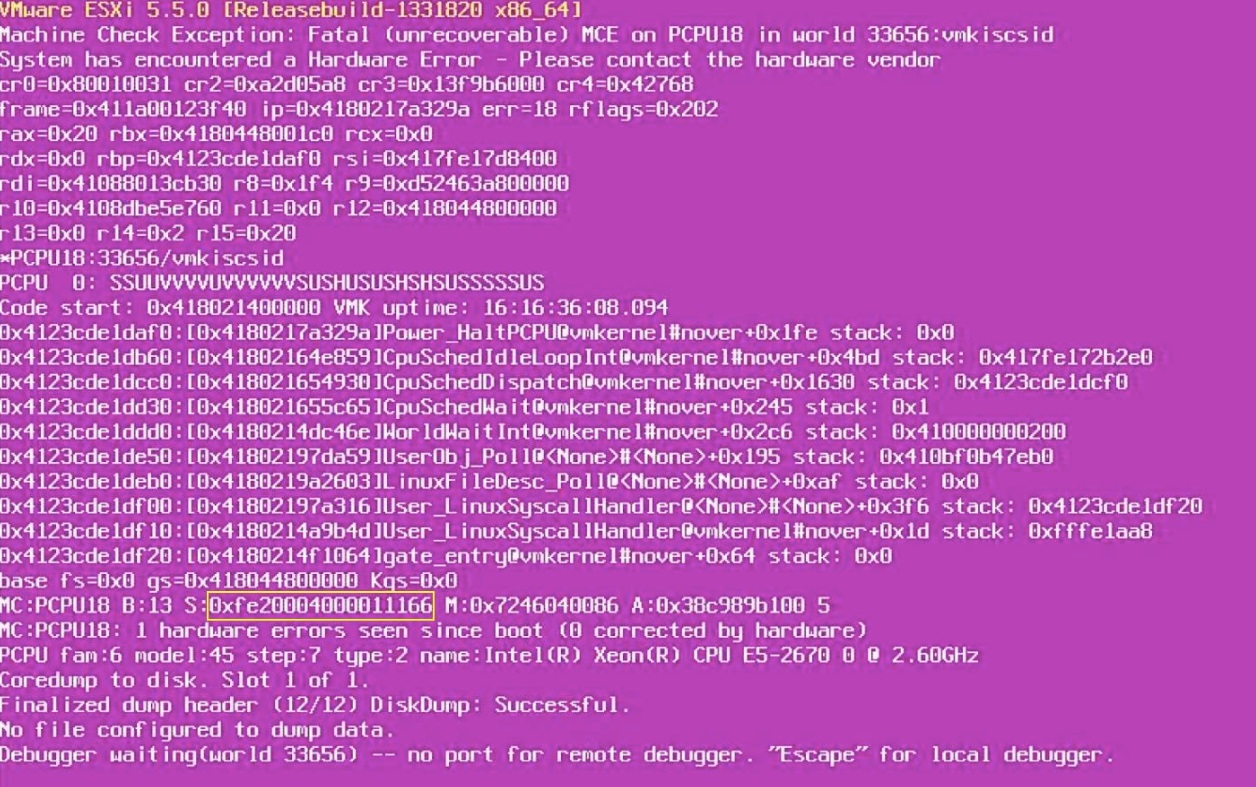
- 次の要素を書き留めます。
MCi_STATUSレジスタ値。はいどうぞ:
0xfe20004000011166.
- バイナリに変換します。
1111 1110 0010 0000 0000 0000 0100 0000 0000 0000 0000 0001 0001 0001 0110 0110
- の下位 16 ビットを取ります。
MCi_STATUS登録:
0001 0001 0110 0110
複合誤差と比較します。この場合、これはキャッシュ階層エラー(タイプ4)のように見えます。
- 値を適用します。
F = 1
RRRR = 0110 – Prefetch
TT = 01 – Transaction type - Data
LL = 10 – Level 2 cache
結論:
- パープル スクリーンは、プロセッサーのL2キャッシュ内のデータに対してプリフェッチ操作が行われているときに発生したようです。
- したがって、これはプロセッサーのL2キャッシュに問題がある可能性があります。
- したがって、最初にCPUを交換してから、問題が解決したかどうかを確認する必要があります。問題が再び発生する場合は、マザーボードを交換できます。
Affected Products
VMware ESXi 6.7.X, VMware ESXi 7.x, VMware ESXi 8.xProducts
PowerFlex rack, ScaleIO, PowerEdge XR2, Poweredge C4140, PowerEdge C6420, PowerEdge C6520, PowerEdge C6525, PowerEdge C6615, PowerEdge C6620, PowerEdge FC640, PowerEdge M640, PowerEdge M640 (for PE VRTX), PowerEdge MX5016s, PowerEdge MX740C
, PowerEdge MX750c, PowerEdge MX760c, PowerEdge MX840C, PowerEdge R240, PowerEdge R250, PowerEdge R260, PowerEdge R340, PowerEdge R350, PowerEdge R360, PowerEdge R440, PowerEdge R450, PowerEdge R540, PowerEdge R550, PowerEdge R640, PowerEdge R6415, PowerEdge R650, PowerEdge R650xs, PowerEdge R6515, PowerEdge R6525, PowerEdge R660, PowerEdge R660xs, PowerEdge R6615, PowerEdge R6625, PowerEdge R740, PowerEdge R740XD, PowerEdge R740XD2, PowerEdge R7415, PowerEdge R7425, PowerEdge R750, PowerEdge R750XA, PowerEdge R750xs, PowerEdge R7515, PowerEdge R7525, PowerEdge R760, PowerEdge R760XA, PowerEdge R760xd2, PowerEdge R760xs, PowerEdge R7615, PowerEdge R7625, PowerEdge R840, PowerEdge R860, PowerEdge R940, PowerEdge R940xa, PowerEdge R960, PowerEdge T140, PowerEdge T150, PowerEdge T160, PowerEdge T340, PowerEdge T350, PowerEdge T360, PowerEdge T440, PowerEdge T550, PowerEdge T560, PowerEdge T640, PowerEdge XR11, PowerEdge XR12, PowerEdge XR4510c, PowerEdge XR4520c, PowerEdge XR8610t, PowerEdge XR8620t
...
Article Properties
Article Number: 000215212
Article Type: How To
Last Modified: 23 Jan 2026
Version: 7
Find answers to your questions from other Dell users
Support Services
Check if your device is covered by Support Services.