Periodisk eller forvrengt lyd ved deling av multimedieinnhold i en telefonkonferanse
Summary: Denne artikkelen inneholder informasjon om multimedielydinnhold som deles under en telefonkonferanse, og som kan bli forvrengt eller periodisk for andre deltakere. Dette skjer når du bruker stasjonære og bærbare PC-er med Intel 12. og 13. generasjons prosessorer. ...
This article applies to
This article does not apply to
This article is not tied to any specific product.
Not all product versions are identified in this article.
Symptoms
Brukere kan oppleve at lyden fra multimedieinnholdet (strømming på nettet eller lagret lokalt) blir forvrengt eller periodisk. Dette skjer når du bruker konferanseapplikasjoner, for eksempel Teams og Zoom.
Bruker du et USB-hodesett? Sjekk lydproblemene med USB-hodesettet når du bruker applikasjoner for videokonferanser i Windows 11.
Berørte modeller:
- Dell DCXXXXX
- Dell 14 DC14250
- Dell 15 DC15250
- Dell Pro Essential
- Dell Pro 14 grunnleggende PV14250
- Dell Pro 15 grunnleggende PV15250
- Inspiron
- Inspiron 13 5320
- Inspiron 13 5330
- Inspiron 14 5420
- Inspiron 14 5430
- 2-i-1-enheten Inspiron 14 7420
- Inspiron 14 7430 2-i-1
- Inspiron 14 Plus 7420
- Inspiron 14 PLUS 7430
- Inspiron 14R 5421
- Inspiron 15 3520
- Inspiron 15 3530
- Inspiron 16 5620
- Inspiron 16 5630
- 2-i-1-enheten Inspiron 16 7620
- Inspiron 16 7630 2-i-1
- Inspiron 16 Plus 7620
- Inspiron 16 Plus 7630
- Inspiron 24 5410 alt-i-ett
- Inspiron 27 7710 alt-i-ett
- Inspiron 27 7720 alt-i-ett
- Latitude
- Latitude 3140
- Latitude 3330
- Latitude 3340
- Latitude 3430
- Latitude 3440
- Latitude 3530
- Latitude 3540
- Latitude 5330
- Latitude 5340
- Latitude 5430
- Latitude 5431
- Latitude 5440
- Latitude 5530
- Latitude 5531
- Latitude 5540
- Latitude 7230 Rugged Extreme-nettbrett
- Latitude 7330
- Latitude 7340
- Latitude 7430
- Latitude 7440
- Latitude 7530
- Latitude 7640
- Latitude 9330
- Latitude 9430
- Latitude 9440 2-i-1
- Dell Pro 13 Premium
- OptiPlex
- OptiPlex 3000 Micro
- OptiPlex 5000 Micro
- OptiPlex 5400 alt-i-ett
- OptiPlex 7000 Micro
- OptiPlex 7010 tårn
- OptiPlex 7400 alt-i-ett
- OptiPlex All-in-One 7410
- OptiPlex Micro 7010
- OptiPlex kompakt 7010
- Precision
- Precision 3260 Compact
- Precision 3460 med liten formfaktor
- Precision 3470
- Precision 3570
- Precision 3571
- Precision 3580
- Precision 3581
- Precision 3660 tårn
- Precision 3660 XE Tower
- Precision 5470
- Precision 5480
- Precision 5570
- Precision 5680
- Precision 5770
- Precision 7670
- Precision 7680
- Precision 7770
- Precision 7780
- Vostro
- Vostro 14 3430
- Vostro 15 3530
- Vostro 16 5630
- Vostro 3420
- Vostro 3520
- Vostro 5320
- Vostro 5620
- Vostro 7620
- XPS
- XPS 13 9315
- XPS 13 9315 2-i-1
- XPS 13 Plus 9320
- XPS 15 9520
- XPS 15 9530
- XPS 17 9720
- XPS 17 9730
Cause
Fjern andres bakgrunnsstøy-funksjon i Dell Optimizer eller MyDell og fjern støy-innstillingen i Waves MaxxAudio Pro-applikasjoner forsøker å fjerne ikke-menneskelige stemmer fra deltakere som lytter til konferanser.
Lyden fra multimedieinnholdet kan behandles som ikke-menneskelige stemmer, og disse funksjonene fjerner lyden.
Resolution
Se etter ett av følgende programmer som er installert på datamaskinen; Dell Optimizer, MyDell eller Waves MaxxAudio Pro. Hvis Dell Optimizer- eller MyDell-applikasjonen er installert, kontrollerer du om innstillingen Fjern andres bakgrunnsstøy er aktivert. Hvis Waves MaxxAudio Pro-applikasjonen er installert, må du kontrollere om innstillingen Fjern støy er aktivert.
For å løse problemet ved hjelp av Dell Optimizer-applikasjonen , deaktiver Fjern andres bakgrunnsstøyfunksjon .
- Åpne Dell Optimizer-applikasjonen .
- Velg Lyd i delen Oppgrader Dell-opplevelsen (figur 1.)

Figur 1. Velge lyd i delen Forbedre Dell-opplevelsen
- Sett funksjonen Fjern andres bakgrunnsstøy til AV (figur 2).

Figur 2. Sette funksjonen Fjern andres bakgrunnsstøy til AV.
For å løse problemet ved hjelp av MyDell-applikasjonen må du deaktivere Fjern andres bakgrunnsstøyfunksjon .
- Åpne MyDell-applikasjonen . Velg Lyd på velkomstsiden (figur 3).

Figur 3. Velge lyd
- Velg kategorien Stemmekvalitet (figur 4).

Figur 4. Kategorien Stemmekvalitet
- Sett funksjonen Fjern andres bakgrunnsstøy til AV (figur 5).

Figur 5. Fjern andres bakgrunnsstøyfunksjon.
For å løse problemet med Waves MaxxAudio Pro-applikasjonen , deaktiver Fjern støy-funksjonen .
- Åpne Waves MaxxAudio Pro-applikasjonen .
- Velg Stemme-fanen .
- Under Høyttalerinnstilling setter du funksjonen Fjern støy til AV (figur 6).
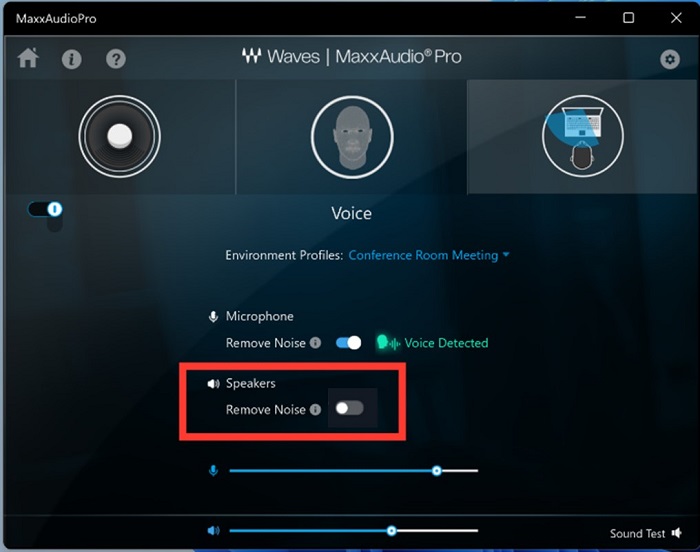
Figur 6. Sette funksjonen Fjern støy til AV.
Merk: Hvis innstillingene for Waves Maxx-lyd ikke er tilgjengelige, går du til Windows Kontrollpanel>System lyd og slår på Forbedre lyd for mikrofon eller høyttaler som brukes.
Additional Information
Anbefalte artikler
Her er noen anbefalte artikler relatert til dette emnet som kan være av interesse for deg.
Affected Products
Dell 14 DC14250, Dell 15 DC15250, Dell Optimizer, Dell Pro 13 Premium PA13250, Dell Pro 14 Essential PV14250, Dell Pro 15 Essential PV15250, Inspiron 13 5320, Inspiron 13 5330, Inspiron 14 5420, Inspiron 14 5430, Inspiron 14 7420 2-in-1
, Inspiron 14 Plus 7420, Inspiron 14 7430 2-in-1, Inspiron 14 Plus 7430, Inspiron 14R 5421, Inspiron 15 3520, Inspiron 15 3530, Inspiron 16 5620, Inspiron 16 5630, Inspiron 16 7620 2-in-1, Inspiron 16 Plus 7620, Inspiron 16 7630 2-in-1, Inspiron 16 Plus 7630, Inspiron 24 5410 All-in-One, Inspiron 27 7710 All-in-One, Inspiron 27 7720 All-in-One, Latitude 3140, Latitude 7230 Rugged Extreme Tablet, Latitude 3330, Latitude 3340, Latitude 5330, Latitude 5340, Latitude 7330, Latitude 7340, Latitude 9330, Latitude 3430, Latitude 3440, Latitude 5431, Latitude 5440, Latitude 7430, Latitude 7440, Latitude 9430, Latitude 9440 2-in-1, Latitude 3530, Latitude 3540, Latitude 5530, Latitude 5531, Latitude 5540, Latitude 7530, Latitude 7640, Latitude 5430, MyDell, OptiPlex 3000 Micro, OptiPlex 5000 Micro, OptiPlex 5400 All-In-One, OptiPlex 7000 Micro, OptiPlex Tower 7010, OptiPlex Micro 7010, OptiPlex Small Form Factor 7010, OptiPlex 7400 All-In-One, OptiPlex All-In-One 7410, Precision 3660 XE Tower, Precision 3470, Precision 5470, Precision 5480, Precision 3570, Precision 3571, Precision 3580, Precision 3581, Precision 5570, Precision 5680, Precision 7670, Precision 7680, Precision 5770, Precision 7770, Precision 7780, Precision 3260 Compact, Precision 3460 Small Form Factor, Precision 3660 Tower, Vostro 5320, Vostro 3420, Vostro 14 3430, Vostro 3520, Vostro 15 3530, Vostro 5620, Vostro 16 5630, Vostro 7620, XPS 13 9315 2-in-1, XPS 13 9315, XPS 13 Plus 9320, XPS 15 9520, XPS 15 9530, XPS 17 9720, XPS 17 9730
...
Products
Inspiron 15 3520, Inspiron 15 3530, Inspiron 16 5620, Inspiron 16 5630, Inspiron 16 7620 2-in-1, Inspiron 16 Plus 7620, Inspiron 16 7630 2-in-1, Inspiron 16 Plus 7630, Inspiron 24 5410 All-in-One, Inspiron 27 7710 All-in-One
, Inspiron 27 7720 All-in-One, Latitude 3140, Latitude 7230 Rugged Extreme Tablet, Latitude 3330, Latitude 3340, Latitude 5330, Latitude 5340, Latitude 7330, Latitude 7340, Latitude 9330, Latitude 3430, Latitude 3440, Latitude 5431, Latitude 5440, Latitude 7430, Latitude 7440, Latitude 9430, Latitude 9440 2-in-1, Latitude 3530, Latitude 3540, Latitude 5530, Latitude 5531, Latitude 5540, Latitude 7530, Latitude 7640, Latitude 5430, OptiPlex 3000 Micro, OptiPlex 5000 Micro, OptiPlex 5400 All-In-One, OptiPlex 7000 Micro, OptiPlex Tower 7010, OptiPlex Micro 7010, OptiPlex Small Form Factor 7010, OptiPlex 7400 All-In-One, OptiPlex All-In-One 7410, Precision 3660 XE Tower, Precision 3470, Precision 5470, Precision 5480, Precision 3570, Precision 3571, Precision 3580, Precision 3581, Precision 5570, Precision 5680, Precision 7670, Precision 7680, Precision 5770, Precision 7770, Precision 7780, Precision 3260 Compact, Precision 3460 Small Form Factor, Precision 3660 Tower, Vostro 5320, Vostro 3420, Vostro 14 3430, Vostro 3520, Vostro 15 3530, Vostro 5620, Vostro 16 5630, Vostro 7620, XPS 13 9315 2-in-1, XPS 13 9315, XPS 13 Plus 9320, XPS 15 9520, XPS 15 9530, XPS 17 9720, XPS 17 9730
...
Article Properties
Article Number: 000215376
Article Type: Solution
Last Modified: 17 Oct 2025
Version: 17
Find answers to your questions from other Dell users
Support Services
Check if your device is covered by Support Services.