PowerProtect Cyber Recovery: Replication monitoring thread has no replication context
Summary: Replication monitoring thread has no replication context error visible in the Cyber Recovery UI.
This article applies to
This article does not apply to
This article is not tied to any specific product.
Not all product versions are identified in this article.
Symptoms
On the Cyber Recovery (CR) User Interface (UI), the following error appears:

Figure 1: Cyber Recovery UI Error: Replication monitoring thread has no replication context.
When we edit the Vault Storage and try to validate the Data Domain connection from Cyber Recovery, the following error appears:
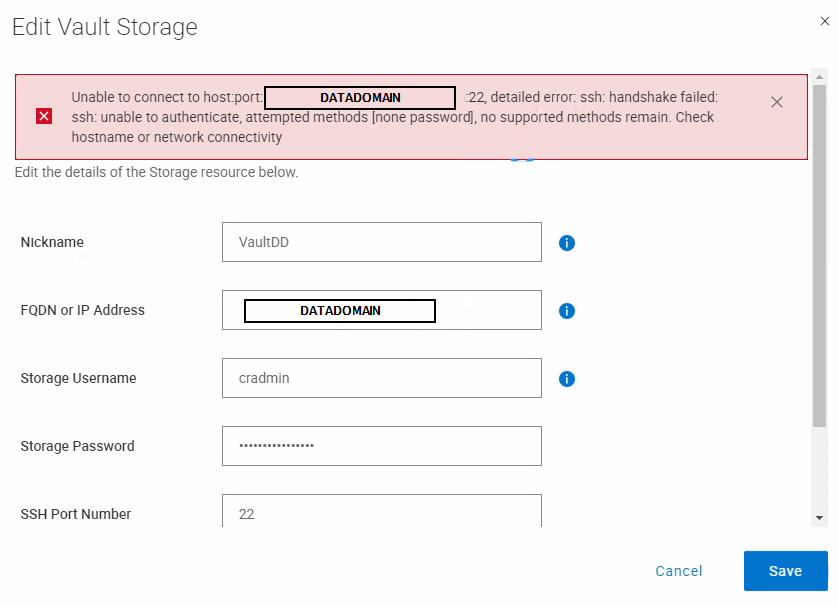
Figure 2: Data Domain connection error with handshake
The following Cyber Recovery alert is also logged:
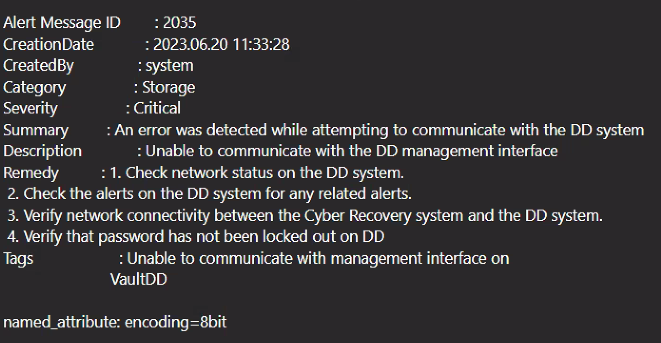
Figure 3: Cyber Recovery alerts
Accessing the vault Data Domain directly using SSH shows the following account-locked message:

Figure 4: SSH access locked out messages
Data Domain "user show list" command confirms that the cradmin account is not locked.
Replication monitoring thread has no replication context.
Figure 1: Cyber Recovery UI Error: Replication monitoring thread has no replication context.
Error message: "Unable to connect to host:port: <Vault_DD_hostname_or_IP>:22, detailed error: ssh: handshake failed: ssh: unable to authenticate, attempted methods [password none], no supported methods remain. Check hostname or network connectivity."
Figure 2: Data Domain connection error with handshake
The following Cyber Recovery alert is also logged:
An error was detected while attempting to communicate with the DD system: Unable to communicate with the DD management interface
Figure 3: Cyber Recovery alerts
Accessing the vault Data Domain directly using SSH shows the following account-locked message:
Account locked due to 2414 failed logins
Figure 4: SSH access locked out messages
Data Domain "user show list" command confirms that the cradmin account is not locked.
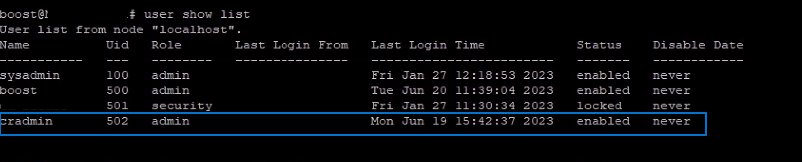
Figure 5: Screenshot of "show user list" command in Data Domain.
Cause
The connection issues with Data Domain in Vault are due to the account with the security role being locked.
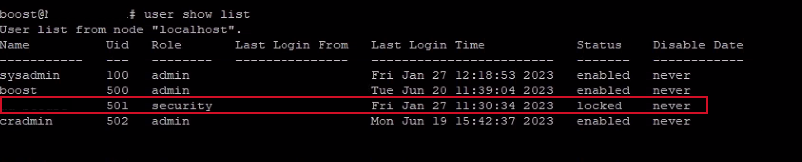
Figure 6: Screenshot showing locked account
Figure 6: Screenshot showing locked account
Resolution
The account must be unlocked. Contact Dell Data Domain Support for assistance.
After the account is unlocked, the cradmin account can communicate with the Data Domain in the Vault successfully, and replication starts at the scheduled time.
After the account is unlocked, the cradmin account can communicate with the Data Domain in the Vault successfully, and replication starts at the scheduled time.
Affected Products
PowerProtect Cyber RecoveryArticle Properties
Article Number: 000215427
Article Type: Solution
Last Modified: 07 Jul 2023
Version: 2
Find answers to your questions from other Dell users
Support Services
Check if your device is covered by Support Services.