NVP vProxy:來自獨立 ESXi 的 VM 備份失敗,並顯示「已收到 HTTP 代碼:400...."
Summary: NetWorker VMware Protection (NVP) vProxy 裝置部署在獨立的 VMware ESXi Hypervisor (7.0U3) 主機上。所有 VM 備份立即失敗,並顯示訊息「無法建立 BackupVmSession 資源。登入 CIS 主機時發生錯誤,無法擷取 guestOSImage 詳細資料」
This article applies to
This article does not apply to
This article is not tied to any specific product.
Not all product versions are identified in this article.
Symptoms
獨立 ESXi 主機已新增至 NetWorker (無 vCenter 伺服器)。
ESXi 主機版本為 7.0U3。
vProxy 版本為 4.3.0-46。
ESXi 主機已使用 root 帳戶新增,並「部署在雲端」選項 (必填):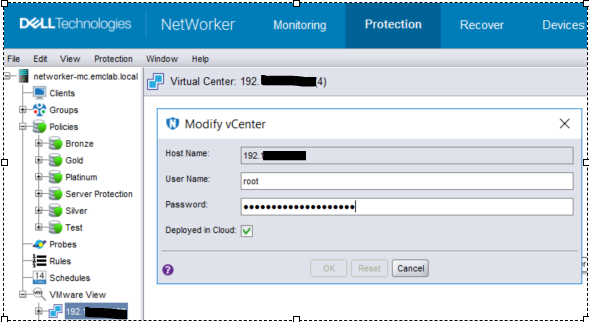
圖 1:修改 vCenter 頁面的螢幕擷取畫面
VM 備份操作立即失敗,並在操作日誌中顯示以下錯誤訊息: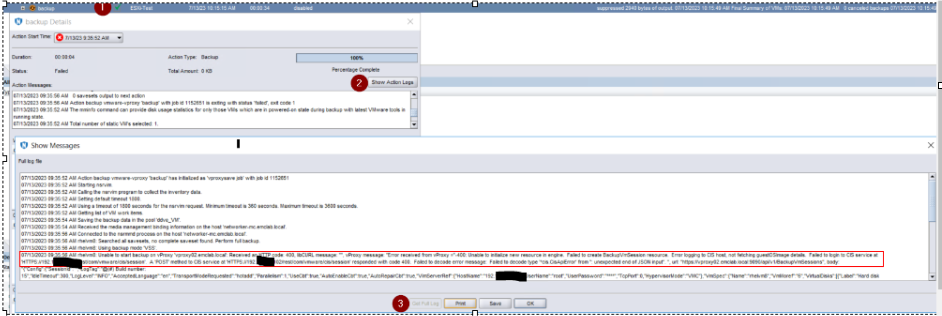
圖 2:動作記錄中的備份動作失敗訊息
Error message:
07/13/2023 09:35:56 AM rhelvm8: Unable to start backup on vProxy 'vproxy02.emclab.local': Received an HTTP code: 400, libCURL message: "", vProxy message: "Error received from vProxy ="-400: Unable to initialize new resource in engine. Failed to create BackupVmSession resource. Error logging to CIS host, not fetching guestOSImage details. Failed to login to CIS service at 'HTTPS://192.xxx.xx.xxx/rest/com/vmware/cis/session'. A 'POST' method to CIS service at 'HTTPS://192.xxx.xx.xxx/rest/com/vmware/cis/session' responded with code 400. Failed to decode error message: Failed to decode type '*cis.CisApiError' from '': unexpected end of JSON input". ", url: "https://vproxy02.emclab.local:9090/api/v1/BackupVmSessions",
Cause
vProxy 在訊息處理
時發生錯誤 訊息「記錄到 CIS 主機時發生錯誤,未擷取 guestOSImage 詳細資料」應視為警告,並允許備份繼續進行;但是,這會被視為失敗,並停止執行備份。
Resolution
暫時的因應措施是降級至 vProxy 4.3.0-41。
此問題預期在即將推出的 vProxy 版本中解決。檢查 https://www.dell.com/support/home/product-support/product/networker-family/drivers 的可用性。
Affected Products
NetWorkerProducts
NetWorker Family, NetWorker SeriesArticle Properties
Article Number: 000215790
Article Type: Solution
Last Modified: 10 Apr 2024
Version: 7
Find answers to your questions from other Dell users
Support Services
Check if your device is covered by Support Services.